Prompt
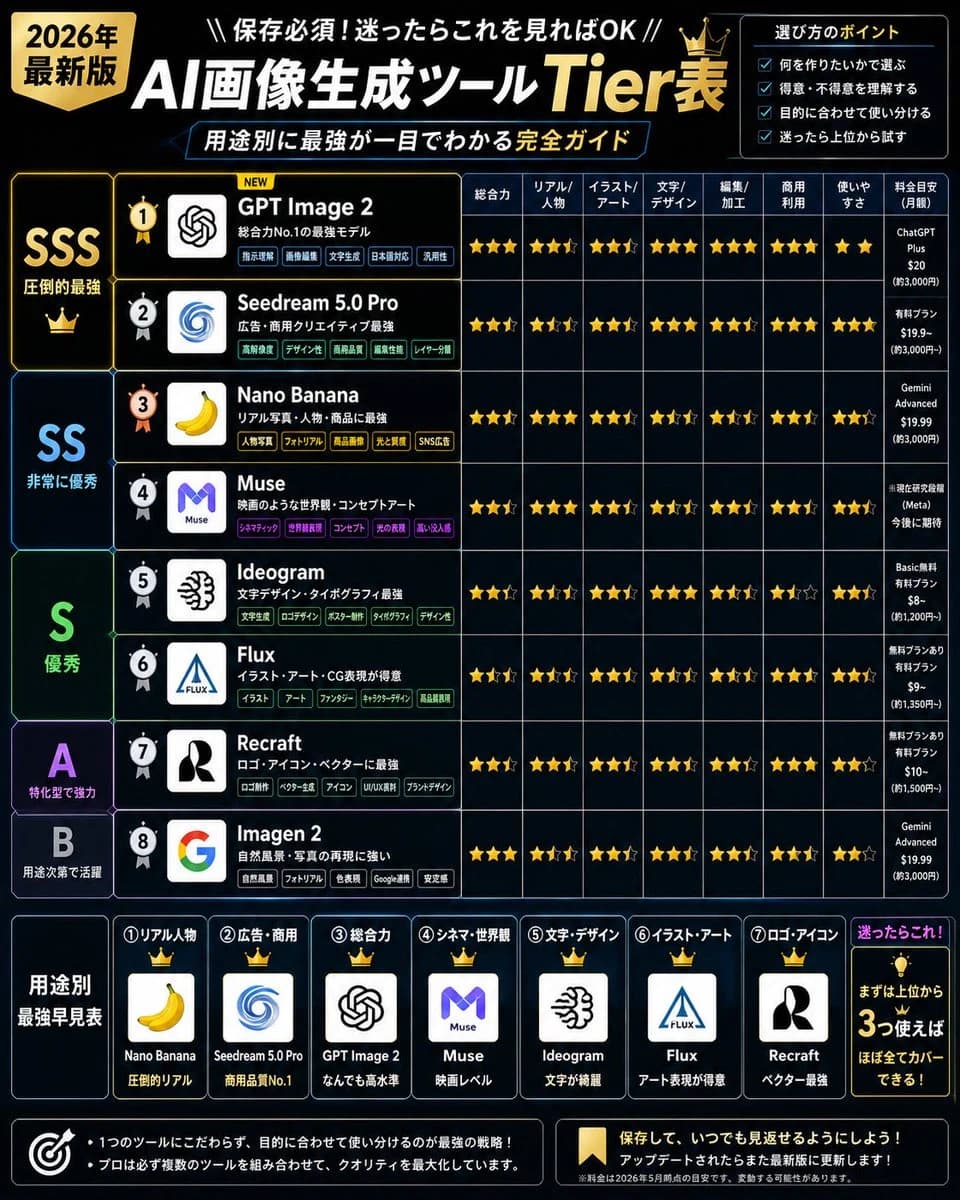
589 wordsGoal: Create a dense Japanese infographic ranking {argument name="topic" default="AI image generation tools"} as a 2026 tier list, with a premium black, navy, and gold tech aesthetic, designed for social media sharing.
Canvas: Square 1:1 poster, high resolution, dark black background with subtle blue grid lines and glowing cyan/gold accents. Use bold Japanese typography, sharp table borders, star ratings, crowns, badges, and app-logo style icons. Overall look should feel like a professional comparison chart made after extensive testing.
Header: Large title at top: 「AI画像生成ツール Tier表」 with “AI” and Japanese text in white, “Tier表” in gold. Add a gold badge on the upper left reading 「2026年 最新版」. Above the title, add the small line 「保存必須!迷ったらこれを見ればOK」. Under the title, add a blue outlined subtitle bar: 「用途別に最強が一目でわかる 完全ガイド」. Add a small gold crown near the title.
Top-right selection box: Add a bordered panel titled 「選び方のポイント」 with exactly 4 checkbox bullet items: 「何を作りたいかで選ぶ」, 「得意・不得意を理解する」, 「目的に合わせて使い分ける」, 「迷ったら上位から試す」.
Main layout: A large comparison table fills most of the image. Left side has tier bands, middle has ranked tool rows, right side has star-rating columns and price notes. Use exact tier groups: SSS 「圧倒的最強」, SS 「非常に優秀」, S 「優秀」, A 「特化型で強力」, B 「用途次第で活躍」. Use large tier letters in gold, cyan, green, purple, and pale blue respectively.
Main table rows: Include exactly 8 ranked tools, each with a circular rank medal, a square logo icon, a tool name, a short Japanese description, and several small colored feature tags. The rows are:
1. {argument name="top ranked tool" default="GPT Image 2"} — description 「総合力No.1の最強モデル」, logo resembling the OpenAI knot mark, rank medal gold with “NEW” label.
2. Seedream 5.0 Pro — description 「広告・商用クリエイティブ最強」, blue spiral logo.
3. Nano Banana — description 「リアル写真・人物・商品に最強」, yellow banana logo.
4. Muse — description 「映画のような世界観・コンセプトアート」, purple M logo.
5. Ideogram — description 「文字デザイン・タイポグラフィ最強」, black abstract brain/typography logo.
6. Flux — description 「イラスト・アート・CG表現が得意」, blue triangular Flux logo.
7. Recraft — description 「ロゴ・アイコン・ベクターに最強」, black-and-white R-like logo.
8. Imagen 2 — description 「自然風景・写真の再現に強い」, multicolor Google G logo.
Rating columns: Use exactly 8 comparison columns with Japanese labels: 「総合力」, 「リアル/人物」, 「イラスト/アート」, 「文字/デザイン」, 「編集/加工」, 「商用利用」, 「使いやすさ」, 「料金目安(月額)」. Fill each row with gold star ratings, including half/empty stars where appropriate, and compact monthly pricing notes in the final column. Keep the table legible but information-dense.
Bottom section: Add a horizontal “best by use case” guide titled 「用途別 最強早見表」. Include exactly 7 crowned cards, each with a number, category, logo, tool name, and short verdict:
1. 「リアル人物」 — Nano Banana — 「圧倒的リアル」.
2. 「広告・商用」 — Seedream 5.0 Pro — 「商用品質No.1」.
3. 「総合力」 — GPT Image 2 — 「なんでも高水準」.
4. 「シネマ・世界観」 — Muse — 「映画レベル」.
5. 「文字・デザイン」 — Ideogram — 「文字が綺麗」.
6. 「イラスト・アート」 — Flux — 「アート表現が得意」.
7. 「ロゴ・アイコン」 — Recraft — 「ベクター最強」.
Bottom-right recommendation box: Add a glowing panel titled 「迷ったらこれ!」 with a lightbulb icon and the message 「まずは上位から 3つ使えば ほぼ全てカバーできる!」.
Footer: Add two dark bordered note boxes. Left box with target icon and two bullet notes: 「1つのツールにこだわらず、目的に合わせて使い分けるのが最強の戦略!」 and 「プロほど複数のツールを組み合わせて、クオリティを最大化しています。」 Right box with bookmark icon and text: 「保存して、いつでも見返せるようにしよう!」 and 「アップデートされたらまた最新版に更新します!」 Include a tiny disclaimer line about pricing and ratings being estimates as of 2026.
Visual style: Sleek cyber dashboard, black glass panels, thin neon blue dividers, gold highlights, dense but organized layout, crisp Japanese text, app icons in white rounded squares, star ratings in metallic gold, no photographic background, no people.
Constraints: Preserve the exact count of 8 ranked tools, 5 tier bands, 8 rating columns, 4 selection tips, and 7 bottom use-case cards. Make all text sharp and readable. Do not add extra tools, extra cards, watermarks, or random English labels.About this prompt
2026 AI Image Tool Tier List is a ready-to-use infographic prompt for GPT Image 2 on Image 2. Copy the 589 words below, paste them into the Create form, and you will get a result close to the preview above. Tweak the Social Media, Infographic, Mockup tag if you want to push it somewhere new.
Use it as a starting point, then adjust the subject, lighting, or composition to suit your idea. The credit cost stays the same whether you use it as written or customize it.
Use case
A strong starting point for Infographic
Start here when you want a infographic image inspired by 2026 AI Image Tool Tier List. The prompt already sets the look and composition; replace the subject, product, colors, or scene details to match your project.
Easy places to tweak
- Subject Swap in your person, product, place, or object without changing the overall composition.
- Look and mood Tune the lighting, palette, camera angle, or materials so the image fits your brand.
- Final format Set the aspect ratio, background, text, or layout notes before you generate.
More prompt paths to explore
Find more GPT Image 2 prompts with a similar style, use case, or subject.
How to use it
- Step 1
Copy the prompt
Hit the Copy button above to grab the full text.
- Step 2
Open Image 2 Create
Head to the Create form and paste it in.
- Step 3
Generate
Hit Generate. Your version lands in seconds.
Make it yours
Load the prompt into the Create form with one click, then start tweaking.