Prompt
354 words{
"resolution": "8K",
"aspect_ratio": "3:4",
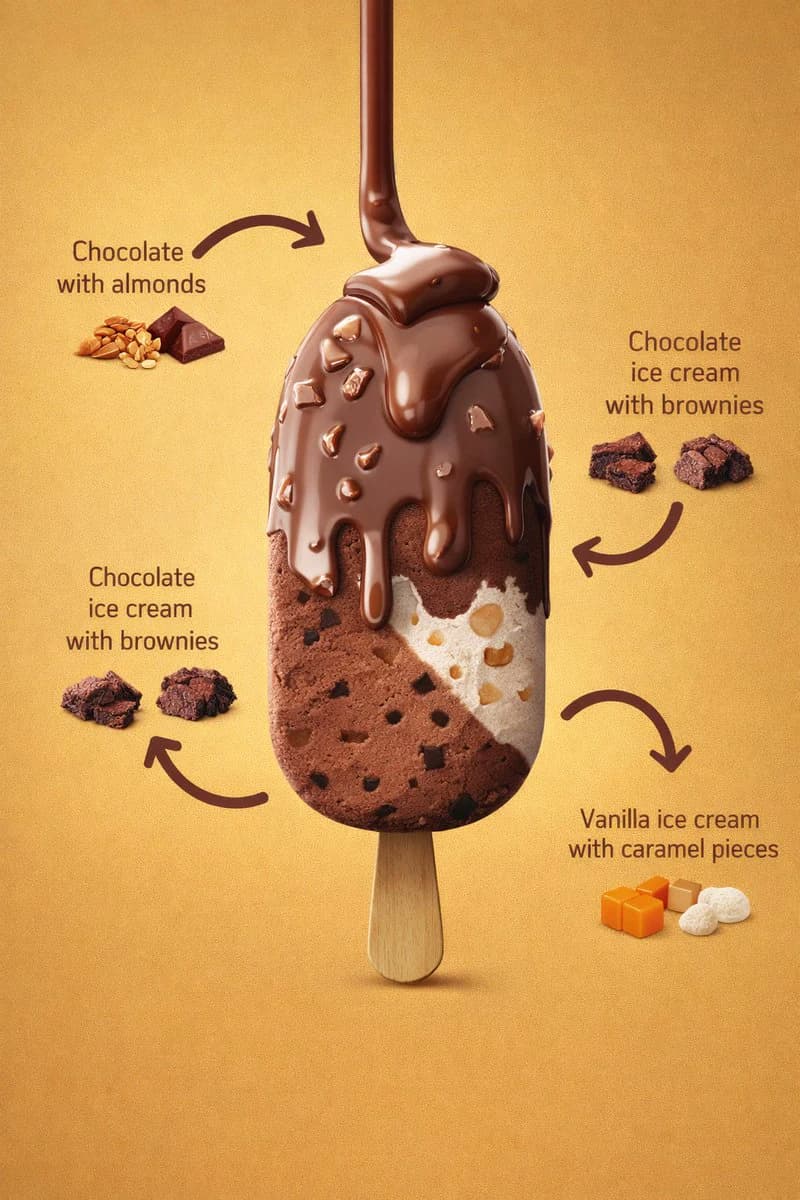
"image_type": "photorealistic commercial product render",
"scene_description": {
"main_subject": "A vertically centered ice cream bar mounted on a wooden stick",
"orientation": "upright, front-facing, slightly elevated perspective",
"composition": "single product centered with surrounding ingredient labels and curved arrows"
},
"background": {
"color": "warm golden-yellow gradient",
"texture": "smooth, matte, evenly illuminated",
"lighting_falloff": "subtle vignette, darker towards edges"
},
"lighting": {
"type": "studio lighting",
"key_light": "soft frontal light emphasizing chocolate gloss",
"fill_light": "balanced fill preserving texture detail",
"specular_highlights": "visible on melted chocolate coating",
"shadows": "soft shadow beneath the stick"
},
"ice_cream_bar": {
"shape": "rounded rectangular bar",
"surface": "smooth with visible embedded inclusions",
"layers": [
{
"layer_position": "top coating",
"material": "milk chocolate",
"state": "melted and dripping",
"texture": "glossy, thick, fluid",
"details": [
"multiple chocolate drips flowing downward",
"irregular almond pieces embedded in coating",
"rounded drip edges pulled by gravity"
]
},
{
"layer_position": "left interior",
"material": "chocolate ice cream",
"texture": "dense, creamy",
"details": [
"small dark brownie chunks evenly dispersed",
"matte finish contrasting outer chocolate"
]
},
{
"layer_position": "right interior",
"material": "vanilla ice cream",
"texture": "smooth and creamy",
"details": [
"visible caramel pieces",
"light beige caramel chunks with rounded edges"
]
}
]
},
"stick": {
"material": "light natural wood",
"texture": "smooth with subtle grain",
"shape": "rounded edges, flat profile",
"visibility": "fully visible below ice cream bar"
},
"ingredient_callouts": {
"style": {
"arrows": "curved, thick, dark brown",
"text_color": "dark brown",
"font_style": "clean sans-serif",
"layout": "balanced around product"
},
"labels": [
{
"text": "Chocolate with almonds",
"position": "top-left",
"visual_aid": ["whole almonds", "small chocolate squares"]
},
{
"text": "Chocolate ice cream with brownies",
"position": "left-middle",
"visual_aid": ["brownie chunks"]
},
{
"text": "Chocolate ice cream with brownies",
"position": "right-middle",
"visual_aid": ["brownie chunks"]
},
{
"text": "Vanilla ice cream with caramel pieces",
"position": "bottom-right",
"visual_aid": ["caramel cubes", "white vanilla pieces"]
}
]
},
"color_palette": {
"primary_colors": ["milk chocolate brown", "golden yellow", "cream white"],
"secondary_colors": ["dark brownie brown", "light caramel orange", "almond beige"]
},
"render_quality": {
"sharpness": "extreme micro-detail visibility",
"texture_fidelity": "high realism",
"noise": "none",
"depth_of_field": "moderate, product fully in focus"
},
"style_tags": [
"luxury dessert advertising",
"hyper-realistic food photography",
"commercial product render",
"clean studio composition"
]
}About this prompt
Ingredient Callout Ice Cream Ad is a ready-to-use e-commerce prompt for GPT Image 2 on Image 2. Copy the 354 words below, paste them into the Create form, and you will get a result close to the preview above. Tweak the Product Ad, E-commerce, Infographic tag if you want to push it somewhere new.
Use it as a starting point, then adjust the subject, lighting, or composition to suit your idea. The credit cost stays the same whether you use it as written or customize it.
Use case
A strong starting point for E-commerce
Start here when you want a e-commerce image inspired by Ingredient Callout Ice Cream Ad. The prompt already sets the look and composition; replace the subject, product, colors, or scene details to match your project.
Easy places to tweak
- Subject Swap in your person, product, place, or object without changing the overall composition.
- Look and mood Tune the lighting, palette, camera angle, or materials so the image fits your brand.
- Final format Set the aspect ratio, background, text, or layout notes before you generate.
More prompt paths to explore
Find more GPT Image 2 prompts with a similar style, use case, or subject.
How to use it
- Step 1
Copy the prompt
Hit the Copy button above to grab the full text.
- Step 2
Open Image 2 Create
Head to the Create form and paste it in.
- Step 3
Generate
Hit Generate. Your version lands in seconds.
Make it yours
Load the prompt into the Create form with one click, then start tweaking.