Prompt
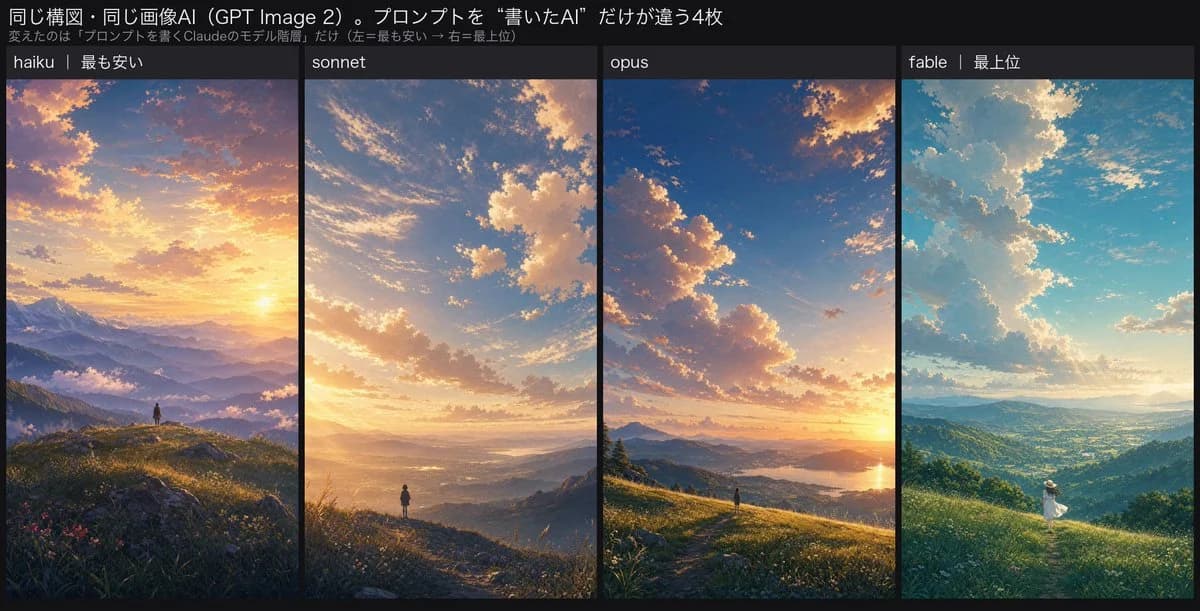
436 wordsGoal: Create a wide social-media comparison graphic showing four AI-generated anime landscape wallpapers side by side, comparing prompt-writing model levels while keeping the same composition and image model.
Canvas: Wide horizontal 2:1 image, approximately 1200×620 px, dark charcoal background. Add a black header band across the top and four tall vertical image panels beneath it, separated by narrow black gutters.
Header text: Large Japanese title at the top left: 「同じ構図・同じ画像AI(GPT Image 2)。プロンプトを“書いたAI”だけが違う4枚」. Smaller gray subtitle underneath: 「変えたのは『プロンプトを書くClaudeのモデル階層』だけ(左=最も安い → 右=最上位)」.
Layout: Use exactly 4 vertical panels, equal width, arranged left to right. Each panel has a dark label strip at the top with white text. The four labels are exactly: 1) 「haiku|最も安い」, 2) 「sonnet」, 3) 「opus」, 4) 「fable|最上位」.
Panel imagery: All four panels depict the same basic anime cinematic composition: a tiny solitary human figure on a grassy mountain ridge, overlooking a vast valley, distant layered mountains, dramatic clouds, and golden sunlight. Make each panel beautiful but subtly different in art direction.
Panel 1, haiku: Warm sunset fantasy landscape, orange and pink sky, sun near the horizon, purple-blue mountain layers, mist in the valleys, wildflowers and grass in the foreground, one tiny dark standing figure centered near the lower third, highly polished but conventional.
Panel 2, sonnet: More restrained natural lighting and atmospheric perspective, huge textured cloud mass in a blue-and-gold sky, soft glowing valley haze, one tiny standing figure at the end of a ridge path, realistic depth and gentle warm light.
Panel 3, opus: Stronger cinematic composition with a sweeping cloud formation, low sun at the right horizon, glowing lake or river in the valley, one tiny figure on a grassy ridge near the bottom center, refined color balance, crisp foreground grasses, natural aerial depth.
Panel 4, fable: Brighter anime film still feeling, turquoise-blue sky, towering cumulus clouds, sunbeams breaking through, lush green valley and hills, one small but clearly animated person in a white dress and sunhat moving or turning on the grassy slope, clothing and pose readable despite small scale.
Visual style: High-end anime background art, painterly but detailed, Makoto Shinkai-inspired light, cinematic atmosphere, soft bloom, elegant color grading. Keep the comparison graphic clean and readable, with thin gutters and consistent panel sizing.
Customizable details: Use {argument name="image model name" default="GPT Image 2"} in the title, compare {argument name="first model label" default="haiku|最も安い"}, {argument name="second model label" default="sonnet"}, {argument name="third model label" default="opus"}, and {argument name="fourth model label" default="fable|最上位"}.
Constraints: Include exactly 4 panels and exactly 4 tiny human figures total, one per panel. Do not add logos, watermarks, extra charts, extra icons, or additional captions beyond the header, subtitle, and four panel labels.About this prompt
Four-Panel AI Landscape Comparison is a ready-to-use comparison prompt for GPT Image 2 on Image 2. Copy the 436 words below, paste them into the Create form, and you will get a result close to the preview above. Tweak the Comparison, Storyboard, Product tag if you want to push it somewhere new.
Use it as a starting point, then adjust the subject, lighting, or composition to suit your idea. The credit cost stays the same whether you use it as written or customize it.
Use case
A strong starting point for Comparison
Start here when you want a comparison image inspired by Four-Panel AI Landscape Comparison. The prompt already sets the look and composition; replace the subject, product, colors, or scene details to match your project.
Easy places to tweak
- Subject Swap in your person, product, place, or object without changing the overall composition.
- Look and mood Tune the lighting, palette, camera angle, or materials so the image fits your brand.
- Final format Set the aspect ratio, background, text, or layout notes before you generate.
More prompt paths to explore
Find more GPT Image 2 prompts with a similar style, use case, or subject.
How to use it
- Step 1
Copy the prompt
Hit the Copy button above to grab the full text.
- Step 2
Open Image 2 Create
Head to the Create form and paste it in.
- Step 3
Generate
Hit Generate. Your version lands in seconds.
Make it yours
Load the prompt into the Create form with one click, then start tweaking.