Prompt
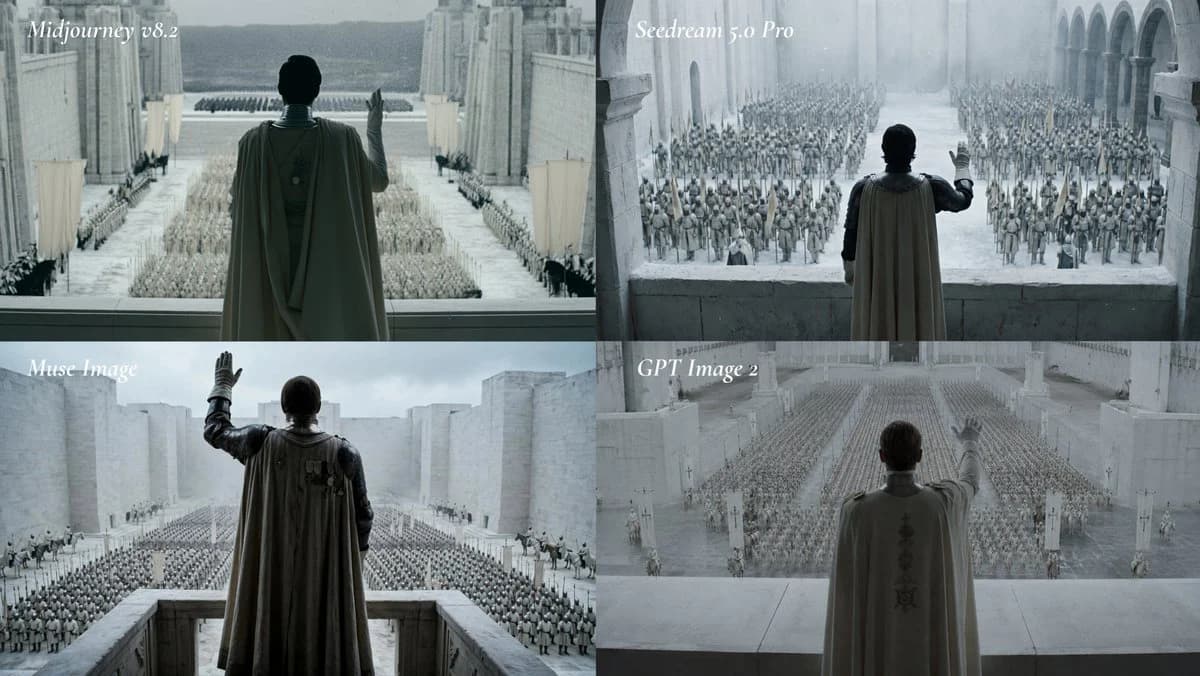
486 wordsGoal: Create a cinematic 2x2 comparison grid showing the same epic fantasy scene rendered by four image models, with each quadrant labeled in elegant white italic serif text.
Canvas: Wide 16:9 image, approximately 1200x675, divided into exactly 4 equal panels in a clean 2x2 layout with no borders beyond the natural panel seams.
Layout: The four panels are arranged as follows: top-left labeled “Midjourney v8.2”, top-right labeled “Seedream 5.0 Pro”, bottom-left labeled “Muse Image”, bottom-right labeled “GPT Image 2”. Place each label near the upper-left corner of its panel in small white italic serif typography.
Subject and scene: In every panel, show the same composition concept: a lone ruler or commander seen from behind, standing on a high stone balcony or terrace, raising one hand in salute over a vast assembled army in a monumental pale stone fortress city. The figure wears a long dark-gray or muted olive cloak/cape over armor, with the back of the head visible, facing away from the viewer toward the army. The architecture is massive, cold, and ancient: white-gray stone walls, tall towers, arches, colonnades, courtyards, and ceremonial banners. The army consists of thousands of small soldiers arranged in orderly ranks across the courtyard, with some mounted riders or standard bearers visible near the sides. The mood is solemn, imperial, and cinematic, like a fantasy war film.
Panel-specific details: Count exactly 4 panels. Panel 1, “Midjourney v8.2”: central cloaked ruler on a balcony, very symmetrical grand courtyard, distant mountains beyond the fortress, rows of soldiers and banners, cool desaturated blue-gray lighting. Panel 2, “Seedream 5.0 Pro”: closer balcony view with arched colonnade on the right, dense crowd of soldiers filling the courtyard, misty pale stone atmosphere, commander raises the right hand. Panel 3, “Muse Image”: lower-left view with commander slightly larger and darker, raised gloved hand, high rectangular stone parapet, enormous army in grid formation below, fortress walls stretching into the distance under cloudy sky. Panel 4, “GPT Image 2”: hazier and softer view, commander centered with embroidered cape back, raised hand partly translucent or motion-blurred, army in long converging ranks, white stone pillars and banners in the foreground.
Visual style: Photorealistic cinematic still, high fantasy epic scale, desaturated cold color grading, foggy atmospheric perspective, soft overcast light, pale stone textures, subtle film grain, serious dramatic tone, no modern objects.
Customizable core prompt for the scene: depict {argument name="main character" default="a cloaked ruler in armor"} overlooking {argument name="army description" default="a vast army of thousands arranged in ceremonial ranks"} inside {argument name="location" default="a monumental white-stone fantasy fortress city"}, with {argument name="lighting" default="cold desaturated overcast cinematic lighting"} and labels comparing {argument name="model labels" default="Midjourney v8.2, Seedream 5.0 Pro, Muse Image, GPT Image 2"}.
Constraints: Keep the same scene type in all four panels, preserve the exact 2x2 comparison layout and the exact 4 labels, avoid extra captions, avoid logos, avoid watermarks, avoid bright saturated colors, and keep the image cinematic rather than illustrative.About this prompt
Cinematic AI Model Comparison Grid is a ready-to-use comparison prompt for GPT Image 2 on Image 2. Copy the 486 words below, paste them into the Create form, and you will get a result close to the preview above. Tweak the Infographic, Comparison, Storyboard tag if you want to push it somewhere new.
Use it as a starting point, then adjust the subject, lighting, or composition to suit your idea. The credit cost stays the same whether you use it as written or customize it.
Use case
A strong starting point for Comparison
Start here when you want a comparison image inspired by Cinematic AI Model Comparison Grid. The prompt already sets the look and composition; replace the subject, product, colors, or scene details to match your project.
Easy places to tweak
- Subject Swap in your person, product, place, or object without changing the overall composition.
- Look and mood Tune the lighting, palette, camera angle, or materials so the image fits your brand.
- Final format Set the aspect ratio, background, text, or layout notes before you generate.
More prompt paths to explore
Find more GPT Image 2 prompts with a similar style, use case, or subject.
How to use it
- Step 1
Copy the prompt
Hit the Copy button above to grab the full text.
- Step 2
Open Image 2 Create
Head to the Create form and paste it in.
- Step 3
Generate
Hit Generate. Your version lands in seconds.
Make it yours
Load the prompt into the Create form with one click, then start tweaking.