Prompt
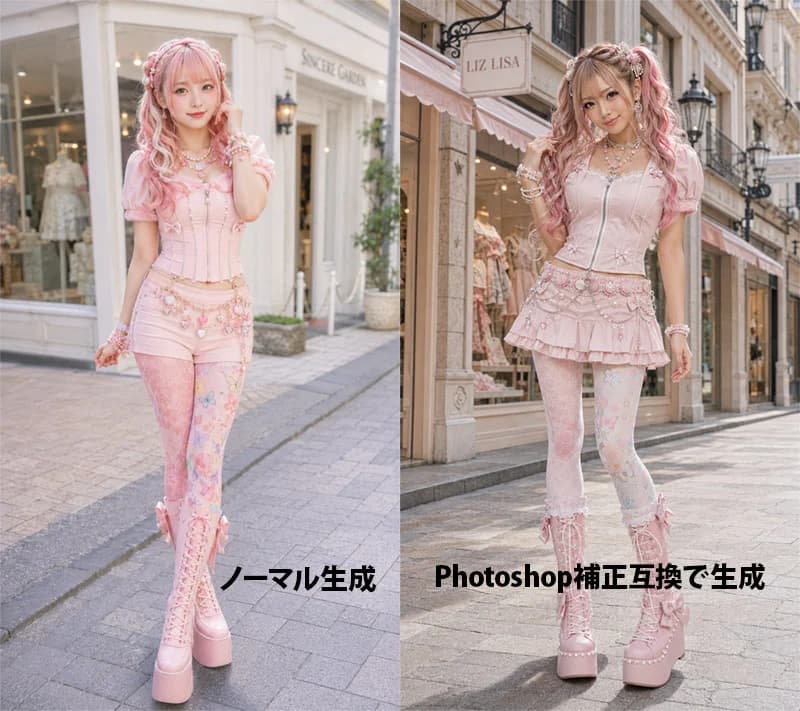
379 wordsGoal: Create a side-by-side comparison image showing an AI-generated fashion portrait before and after Photoshop-style color correction, featuring the same young woman in pastel pink sweet lolita/gyaru street fashion on a European boutique shopping street.
Canvas: Landscape 4:3 image, split exactly into two equal vertical panels with a hard center divide. Photorealistic fashion editorial style, full-body subject in both panels, street-level perspective, shallow depth of field, soft daylight.
Left panel: Show the uncorrected version labeled in bold black Japanese text near the bottom: 「ノーマル生成」. The model stands in front of a bright cream-white boutique facade with large display windows and a pale sign. Overall color is slightly flat, pale, low-contrast, airy, and softly washed out. The model faces forward with a gentle smile, one hand near her hair, wearing a pastel pink corset top with puff sleeves, pink short bottoms, decorative waist chains, patterned pastel tights, and tall pink lace-up platform boots.
Right panel: Show the corrected version labeled in bold black mixed text near the bottom: 「Photoshop補正互換で生成」. The same model stands on a similar elegant shopping street in front of a boutique with a visible hanging sign reading {argument name="shop sign text" default="LIZ LISA"}. The lighting and color correction should look more polished: warmer highlights, richer contrast, clearer skin tones, slightly deeper shadows, brighter pinks, crisp details, and a more professional retouched fashion-photo finish. The model poses with one hand in her hair and one leg slightly bent, smiling at the camera.
Subject details: A cute young Japanese fashion model with fair skin, long wavy twin-tail hair in {argument name="hair color" default="pink blonde"}, soft bangs, ribbons and pearl hair accessories, glossy idol-like makeup, large bright eyes, and a friendly expression. Outfit color theme is {argument name="outfit color theme" default="pastel pink"}. Include many kawaii accessories: layered pearl necklaces, bracelets, bows, lace, floral charms, decorative belt chains, and platform boots.
Visible text: Exactly 2 large bottom labels: left label 「ノーマル生成」 and right label 「Photoshop補正互換で生成」. Keep the labels bold, black, horizontal, and placed over the pavement area without outlines.
Constraints: Make both panels look like variations of the same fashion shoot, not a collage of unrelated characters. Use realistic anatomy, full-body framing, no extra logos except the boutique sign, no watermark, no additional captions, no borders other than the central split.About this prompt
Pink Lolita Color Correction Comparison is a ready-to-use comparison prompt for GPT Image 2 on Image 2. Copy the 379 words below, paste them into the Create form, and you will get a result close to the preview above. Tweak the Infographic, Comparison, Storyboard tag if you want to push it somewhere new.
Use it as a starting point, then adjust the subject, lighting, or composition to suit your idea. The credit cost stays the same whether you use it as written or customize it.
Use case
A strong starting point for Comparison
Start here when you want a comparison image inspired by Pink Lolita Color Correction Comparison. The prompt already sets the look and composition; replace the subject, product, colors, or scene details to match your project.
Easy places to tweak
- Subject Swap in your person, product, place, or object without changing the overall composition.
- Look and mood Tune the lighting, palette, camera angle, or materials so the image fits your brand.
- Final format Set the aspect ratio, background, text, or layout notes before you generate.
More prompt paths to explore
Find more GPT Image 2 prompts with a similar style, use case, or subject.
How to use it
- Step 1
Copy the prompt
Hit the Copy button above to grab the full text.
- Step 2
Open Image 2 Create
Head to the Create form and paste it in.
- Step 3
Generate
Hit Generate. Your version lands in seconds.
Make it yours
Load the prompt into the Create form with one click, then start tweaking.