Prompt
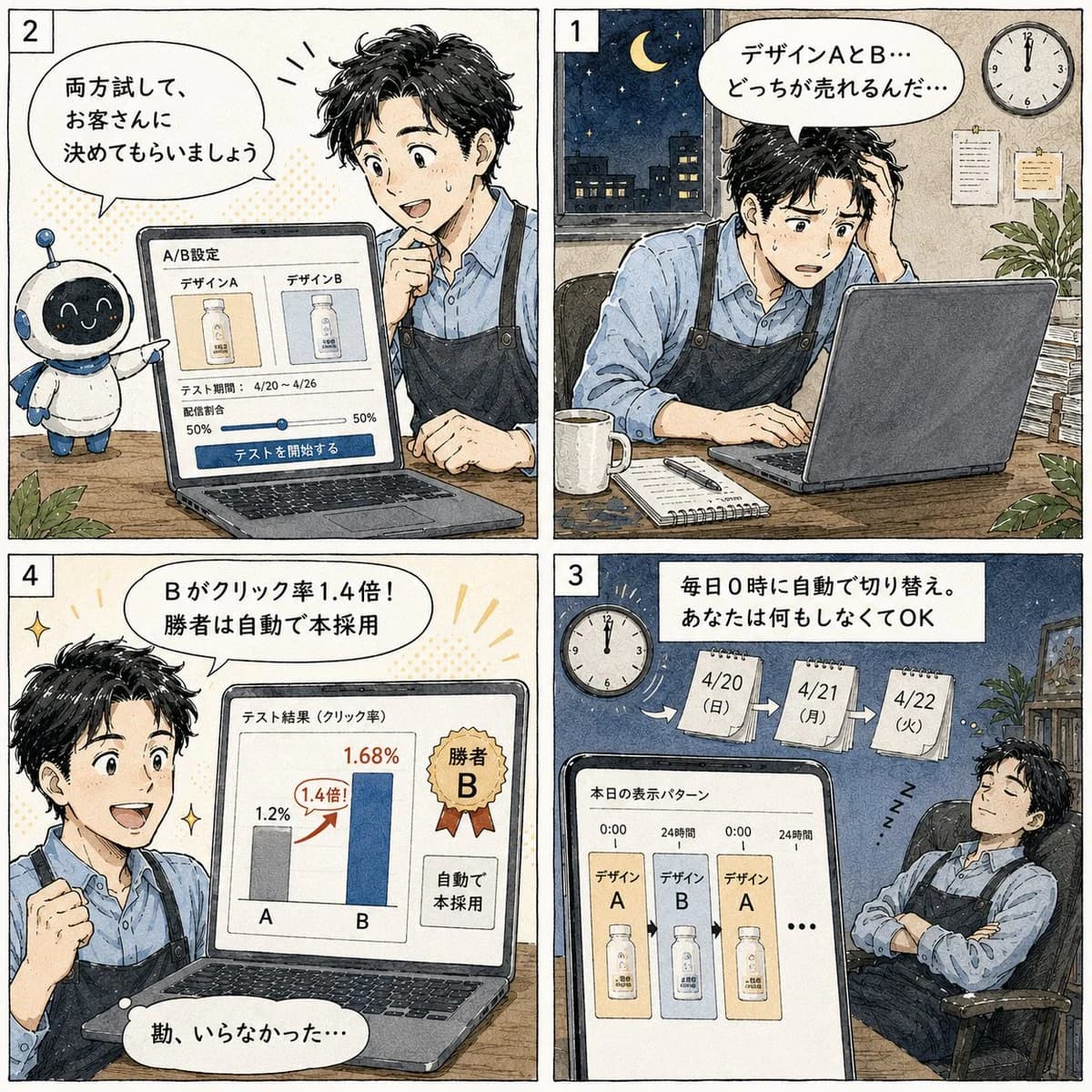
512 wordsGoal: Create a square 2x2 Japanese manga-style promotional comic explaining an automated A/B testing feature for a landing page. Use {argument name="feature topic" default="A/B testing automation"} as the product theme, with an approachable small-business SaaS feeling.
Canvas: Square image, four equal comic panels separated by thick black gutters, arranged in reading order with small white panel-number boxes: 1 at top right, 2 at top left, 3 at bottom right, 4 at bottom left. Hand-drawn ink outlines, warm watercolor shading, off-white paper texture, subtle screen-tone dots, clean readable Japanese lettering in speech bubbles and UI cards.
Main character: A young Japanese male designer, about late 20s to early 30s, short messy black hair, expressive face, wearing a light blue button-up shirt and a dark navy apron. Keep him consistent in all panels. Include a cute small robot assistant in panel 2: round black screen face with glowing eyes, white body, blue ear-like side parts, small antenna, friendly mascot pose.
Panel 1, top right: Nighttime office scene. The designer sits at a desk using a laptop, looking worried and tired, one hand in his hair. Outside the window is a dark city skyline with a crescent moon and stars. Wall clock shows midnight. Desk includes a white mug, notebook, pen, and papers. Speech bubble text: 「デザインAとB… どっちが売れるんだ…」.
Panel 2, top left: Bright decision/setup scene. The robot stands beside the desk and gestures toward the laptop. The designer leans in, smiling with interest and touching his chin. Laptop screen shows an A/B settings interface with exactly two design cards labeled 「デザインA」 and 「デザインB」, a test period line 「4/20~4/26」, a traffic split slider showing 50% and 50%, and a large blue button labeled 「テストを開始する」. Speech bubble text: 「両方試して、お客さんに決めてもらいましょう」.
Panel 3, bottom right: Automation scene at night. The designer sleeps peacefully in an office chair with arms folded, “Z” marks near him, while the laptop/tablet screen in the foreground shows the daily display pattern. Include a clock at midnight and three hanging calendar pages labeled exactly: 「4/20(日)」, 「4/21(月)」, 「4/22(火)」 with arrows between them. Screen title: 「本日の表示パターン」. The screen shows exactly three product-display cards in sequence labeled デザインA, デザインB, デザインA, then an ellipsis. Top caption box text: 「毎日0時に自動で切り替え。あなたは何もしなくてOK」.
Panel 4, bottom left: Results/winner scene. The designer is excited, smiling, and raising a fist. Laptop screen displays a results chart titled 「テスト結果(クリック率)」 with exactly two vertical bars labeled A and B. A is gray at 1.2%, B is blue at 1.68%, with a red upward arrow and badge reading 「1.4倍!」. Include a gold ribbon badge reading 「勝者B」 and a side note on the screen reading 「自動で本採用」. Speech bubble text: 「Bがクリック率1.4倍! 勝者は自動で本採用」. Small bottom reaction bubble: 「勘、いらなかった…」.
Visual style: Japanese web manga / educational SaaS comic, friendly and polished, clear panel composition, expressive faces, soft watercolor colors, cream paper background, detailed but uncluttered office props, legible UI mockups on laptop screens.
Constraints: Use exactly 4 panels and exactly the numbered panel order described. Preserve all Japanese text exactly as specified. Do not add extra panels, extra characters besides the designer and the one robot mascot, watermarks, logos, or unrelated captions.About this prompt
Japanese Manga A/B Testing Comic is a ready-to-use comparison prompt for GPT Image 2 on Image 2. Copy the 512 words below, paste them into the Create form, and you will get a result close to the preview above. Tweak the Infographic, Mockup, Comparison tag if you want to push it somewhere new.
Use it as a starting point, then adjust the subject, lighting, or composition to suit your idea. The credit cost stays the same whether you use it as written or customize it.
Use case
A strong starting point for Comparison
Start here when you want a comparison image inspired by Japanese Manga A/B Testing Comic. The prompt already sets the look and composition; replace the subject, product, colors, or scene details to match your project.
Easy places to tweak
- Subject Swap in your person, product, place, or object without changing the overall composition.
- Look and mood Tune the lighting, palette, camera angle, or materials so the image fits your brand.
- Final format Set the aspect ratio, background, text, or layout notes before you generate.
More prompt paths to explore
Find more GPT Image 2 prompts with a similar style, use case, or subject.
How to use it
- Step 1
Copy the prompt
Hit the Copy button above to grab the full text.
- Step 2
Open Image 2 Create
Head to the Create form and paste it in.
- Step 3
Generate
Hit Generate. Your version lands in seconds.
Make it yours
Load the prompt into the Create form with one click, then start tweaking.