Prompt
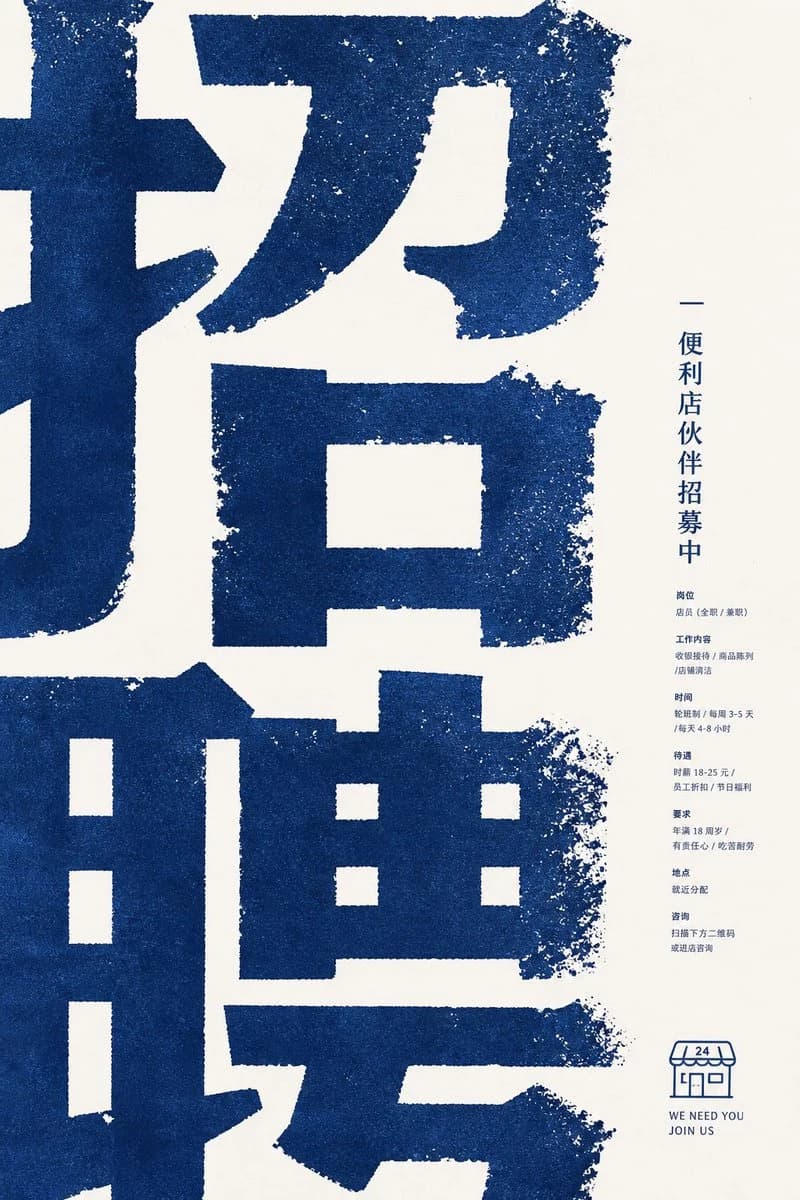
341 wordsGoal: Create a minimalist corporate recruitment poster for a convenience store partner hiring campaign, using a bold East Asian typographic aesthetic.
Canvas: Vertical poster, 2:3 aspect ratio, warm off-white paper background with lots of negative space on the right.
Layout: Fill the left 75% of the poster with enormous cropped dark-blue Chinese characters, reading like a giant recruitment headline {argument name="main headline" default="招聘"}; the characters are so large that their strokes extend beyond the poster edges. Place a narrow right-side information column centered vertically, aligned near the right margin. Add a small convenience-store line icon and English slogan at the lower right.
Visual style: Rough risograph / screen-print texture, dark navy blue ink on cream paper, gritty distressed edges, speckled ink loss, slightly uneven stamped typography. Use a calm corporate poster composition, modern but tactile, no photos, no gradients, no extra colors.
Text content: The poster contains exactly 1 giant cropped headline area, 1 vertical title line, 7 small information sections, and 1 bottom logo/slogan block. The vertical title line should read {argument name="vertical title" default="便利店伙伴招募中"}. The 7 small sections in the right column are: 1) position: store staff, full-time or part-time; 2) work content: cashier operation, product display, store cleaning; 3) schedule: shift system, 3–5 days per week, 4–8 hours per day; 4) benefits: hourly wage 18–25 yuan, employee discount, holiday benefits; 5) requirements: age 18 or above, responsible, hardworking; 6) location: assigned nearby; 7) contact: scan the QR code below or visit the store to ask. Keep this body text very small, compact, and navy blue.
Bottom block: Draw exactly 1 simple outlined convenience-store icon with an awning marked “24”, and below it place two short English lines: {argument name="english slogan line one" default="WE NEED YOU"} and {argument name="english slogan line two" default="JOIN US"}.
Constraints: Preserve the extreme scale contrast between the huge cropped blue headline and the tiny right-column details. Keep all typography and illustration in the same navy ink. Avoid realistic people, photos, decorative icons beyond the single store icon, QR code detail, shadows, or glossy effects.About this prompt
Distressed Convenience Store Recruitment Poster is a ready-to-use infographic prompt for GPT Image 2 on Image 2. Copy the 341 words below, paste them into the Create form, and you will get a result close to the preview above. Tweak the Product Ad, Infographic, Product tag if you want to push it somewhere new.
Use it as a starting point, then adjust the subject, lighting, or composition to suit your idea. The credit cost stays the same whether you use it as written or customize it.
Use case
A strong starting point for Infographic
Start here when you want a infographic image inspired by Distressed Convenience Store Recruitment Poster. The prompt already sets the look and composition; replace the subject, product, colors, or scene details to match your project.
Easy places to tweak
- Subject Swap in your person, product, place, or object without changing the overall composition.
- Look and mood Tune the lighting, palette, camera angle, or materials so the image fits your brand.
- Final format Set the aspect ratio, background, text, or layout notes before you generate.
More prompt paths to explore
Find more GPT Image 2 prompts with a similar style, use case, or subject.
How to use it
- Step 1
Copy the prompt
Hit the Copy button above to grab the full text.
- Step 2
Open Image 2 Create
Head to the Create form and paste it in.
- Step 3
Generate
Hit Generate. Your version lands in seconds.
Make it yours
Load the prompt into the Create form with one click, then start tweaking.