Prompt
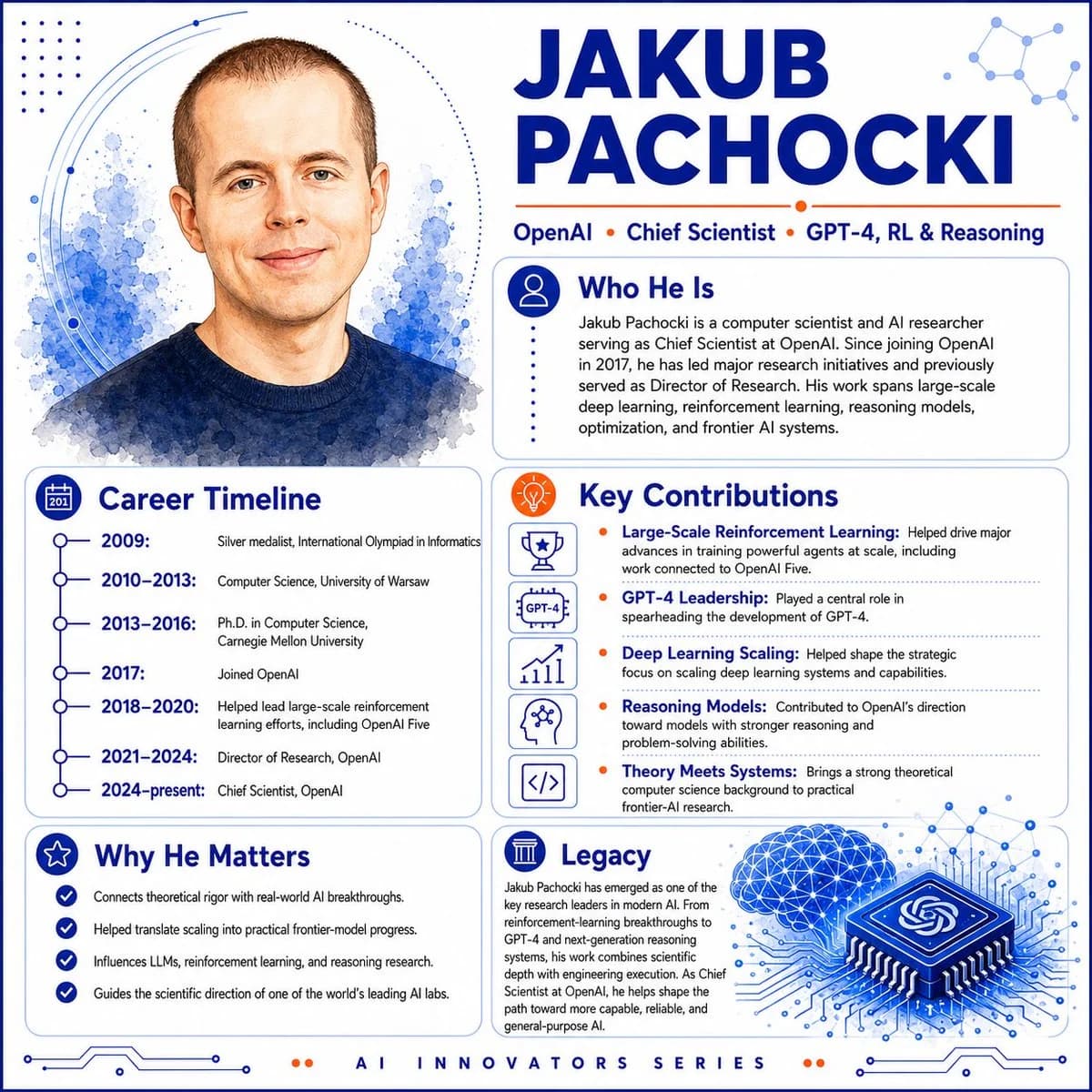
604 wordsGoal: Create a polished square educational profile infographic for an AI innovator, featuring a watercolor portrait and biography panels about {argument name="character name" default="Jakub Pachocki"}.
Canvas: 1:1 square layout, white background with cobalt-blue and orange accent colors, clean tech editorial style, high-resolution vector-infographic finish with subtle watercolor textures.
Layout: Split composition with a large portrait on the upper left and the main name headline on the upper right. Use rounded rectangular content cards with thin blue borders, dotted dividers, simple line icons, and circuit/network decorations. Add a small footer label centered at the bottom.
Top left portrait: Semi-realistic watercolor head-and-shoulders portrait of a light-skinned man with very short brown hair, blue eyes, slight smile, wearing a dark navy crewneck sweater. Place him in front of blue watercolor splashes, dotted halftone accents, and curved circular orbit lines.
Header: Huge bold uppercase dark-blue name text reading {argument name="headline name" default="JAKUB PACHOCKI"}. Beneath it, a slim orange line and a credential row reading: OpenAI • Chief Scientist • GPT-4, RL & Reasoning. Add a small abstract molecule/network icon in the top-right corner.
Content cards: Use exactly 5 information panels:
1. “Who He Is” card at upper right with a blue circular person icon. Body text: “Jakub Pachocki is a computer scientist and AI researcher serving as Chief Scientist at OpenAI. Since joining OpenAI in 2017, he has led major research initiatives and previously served as Director of Research. His work spans large-scale deep learning, reinforcement learning, reasoning models, optimization, and frontier AI systems.”
2. “Career Timeline” card at lower left with a blue calendar icon and a vertical timeline. Include exactly 6 timeline entries: 2009: Silver medalist, International Olympiad in Informatics; 2010–2013: Computer Science, University of Warsaw; 2013–2016: Ph.D. in Computer Science, Carnegie Mellon University; 2017: Joined OpenAI; 2018–2020: Helped lead large-scale reinforcement learning efforts, including OpenAI Five; 2021–2024: Director of Research, OpenAI; 2024–present: Chief Scientist, OpenAI.
3. “Key Contributions” card at center right with an orange lightbulb icon. Include exactly 5 contribution rows, each with a small blue outline icon: trophy for “Large-Scale Reinforcement Learning,” GPT-4 badge for “GPT-4 Leadership,” rising chart for “Deep Learning Scaling,” head/brain network for “Reasoning Models,” and code brackets for “Theory Meets Systems.” Use short explanatory text after each bold blue contribution label, separated by dotted horizontal rules and orange bullet dots.
4. “Why He Matters” card at bottom left with a blue star icon. Include exactly 4 checkmark bullets: Connects theoretical rigor with real-world AI breakthroughs; Helped translate scaling into practical frontier-model progress; Influences LLMs, reinforcement learning, and reasoning research; Guides the scientific direction of one of the world’s leading AI labs.
5. “Legacy” card at bottom right with a blue classical-column icon. Add paragraph text explaining that he emerged as a key research leader in modern AI, from reinforcement-learning breakthroughs to GPT-4 and next-generation reasoning systems, combining scientific depth with engineering execution as Chief Scientist at OpenAI.
Bottom right illustration: Add a large blue isometric microchip with the OpenAI knot logo on top, connected to circuit traces, next to a glowing blue wireframe brain made of nodes and triangular mesh lines.
Footer: Centered small spaced uppercase text reading {argument name="footer text" default="AI INNOVATORS SERIES"}, flanked by tiny orange dots and thin blue circuit-line ornaments.
Visual style: Crisp modern infographic, deep cobalt blue typography, orange highlights, thin rounded cards, dotted halftone patterns, network-node motifs, clean sans-serif fonts, balanced white space, professional magazine-poster design.
Constraints: Keep all text legible and aligned; use exactly 5 content cards, exactly 6 timeline entries, exactly 5 contribution rows, and exactly 4 checkmark bullets; no extra logos except the OpenAI-style knot on the chip; no watermark.About this prompt
Jakub Pachocki AI Innovator Infographic is a ready-to-use infographic prompt for GPT Image 2 on Image 2. Copy the 604 words below, paste them into the Create form, and you will get a result close to the preview above. Tweak the Infographic, Mockup, Storyboard tag if you want to push it somewhere new.
Use it as a starting point, then adjust the subject, lighting, or composition to suit your idea. The credit cost stays the same whether you use it as written or customize it.
Use case
A strong starting point for Infographic
Start here when you want a infographic image inspired by Jakub Pachocki AI Innovator Infographic. The prompt already sets the look and composition; replace the subject, product, colors, or scene details to match your project.
Easy places to tweak
- Subject Swap in your person, product, place, or object without changing the overall composition.
- Look and mood Tune the lighting, palette, camera angle, or materials so the image fits your brand.
- Final format Set the aspect ratio, background, text, or layout notes before you generate.
More prompt paths to explore
Find more GPT Image 2 prompts with a similar style, use case, or subject.
How to use it
- Step 1
Copy the prompt
Hit the Copy button above to grab the full text.
- Step 2
Open Image 2 Create
Head to the Create form and paste it in.
- Step 3
Generate
Hit Generate. Your version lands in seconds.
Make it yours
Load the prompt into the Create form with one click, then start tweaking.