Prompt
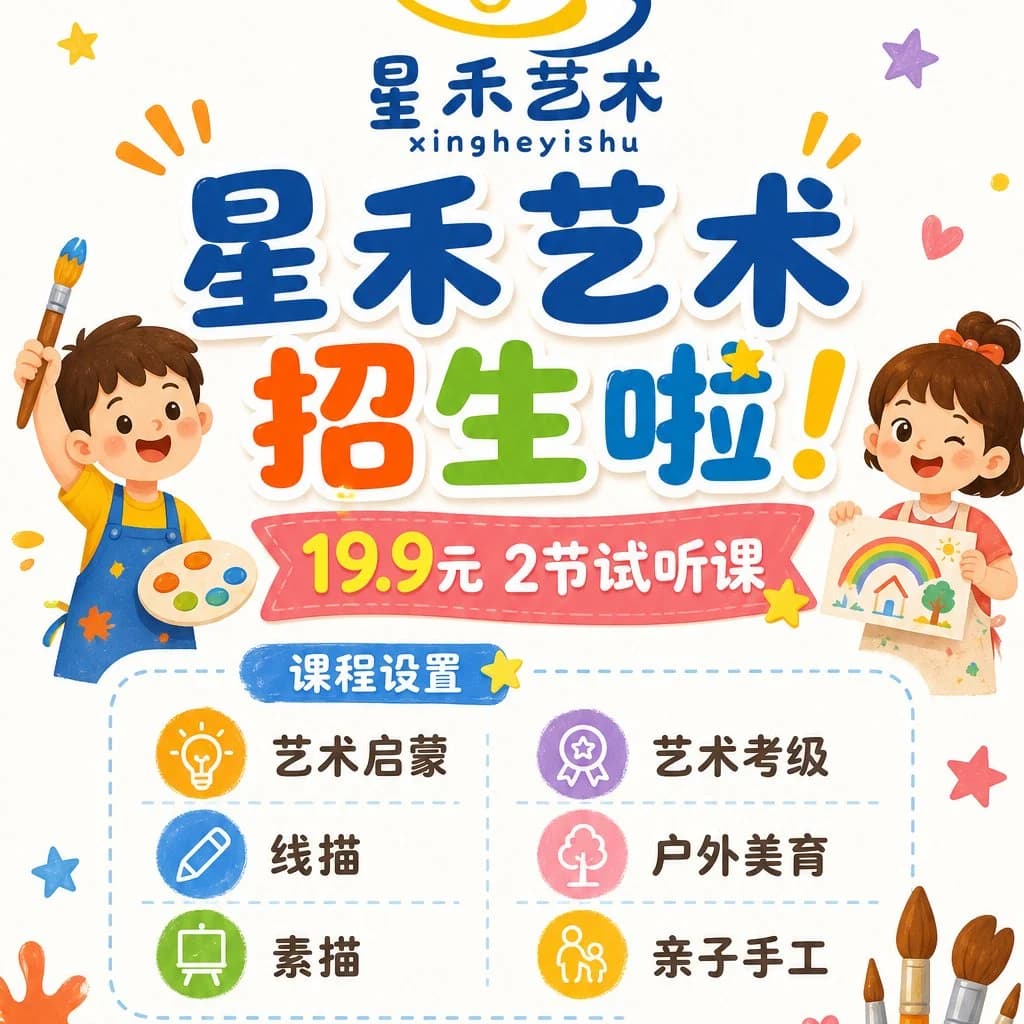
410 wordsGoal: Create a cheerful square Chinese children's art class enrollment poster for {argument name="art school name" default="星禾艺术"}, bright and playful, aimed at parents of young children.
Canvas: 1:1 square poster on a warm off-white background with lots of white space, rounded cartoon shapes, soft shadows, and colorful doodle decorations. Use a cute hand-drawn vector illustration style with thick rounded Chinese lettering, glossy sticker-like text, and saturated primary colors.
Layout: Top center has a small logo area with a yellow-and-blue abstract swirl above the school name, the Chinese text “星禾艺术” and small pinyin “xingheyishu”. The main headline dominates the upper middle in large chunky blue characters “星禾艺术”, followed by an oversized multicolor call-to-action “招生啦!” with red/orange “招”, green “生”, blue “啦”, and a yellow exclamation mark. Below it place a pink stitched ribbon banner containing the offer “19.9元 2节试听课”, with “19.9” in bright yellow and the rest in white. Under the ribbon, add a dashed rounded rectangle course panel with a blue pill label “课程设置”. The panel contains exactly 6 course items in a 2-column by 3-row grid, separated by pale dashed lines: 1) yellow lightbulb icon, “艺术启蒙”; 2) purple medal icon, “艺术考级”; 3) blue pencil icon, “线描”; 4) pink tree icon, “户外美育”; 5) green easel icon, “素描”; 6) orange parent-and-child craft icon, “亲子手工”.
Characters and decorative elements: On the left side, draw a smiling little boy in blue overalls over a yellow shirt, holding a paintbrush up in one hand and a painter’s palette with six paint blobs in the other. On the right side, draw a smiling little girl with brown hair and an orange bow, winking while holding a childlike rainbow drawing. Around the poster add exactly 12 small decorative doodles: yellow star near top left, purple star top right, orange emphasis marks near both top sides, a red heart at upper right, small yellow dot at far right, yellow star near the headline, yellow star near the banner, blue star at lower left, red star at lower right, orange paint splash at lower left, and a cluster of paintbrushes rising from the lower right corner.
Text content: Use the exact visible Chinese text: {argument name="headline text" default="星禾艺术 招生啦!"}; {argument name="trial offer" default="19.9元 2节试听课"}; {argument name="course label" default="课程设置"}. Keep all course names in Chinese exactly as listed.
Constraints: Make the poster family-friendly, clean, high-resolution, and print-ready. Keep the typography large and legible, avoid photorealism, avoid extra course items or extra paragraphs of text, no watermark, no QR code.About this prompt
Children's Art Class Enrollment Poster is a ready-to-use infographic prompt for GPT Image 2 on Image 2. Copy the 410 words below, paste them into the Create form, and you will get a result close to the preview above. Tweak the Infographic, Poster, Product tag if you want to push it somewhere new.
Use it as a starting point, then adjust the subject, lighting, or composition to suit your idea. The credit cost stays the same whether you use it as written or customize it.
Use case
A strong starting point for Infographic
Start here when you want a infographic image inspired by Children's Art Class Enrollment Poster. The prompt already sets the look and composition; replace the subject, product, colors, or scene details to match your project.
Easy places to tweak
- Subject Swap in your person, product, place, or object without changing the overall composition.
- Look and mood Tune the lighting, palette, camera angle, or materials so the image fits your brand.
- Final format Set the aspect ratio, background, text, or layout notes before you generate.
More prompt paths to explore
Find more GPT Image 2 prompts with a similar style, use case, or subject.
How to use it
- Step 1
Copy the prompt
Hit the Copy button above to grab the full text.
- Step 2
Open Image 2 Create
Head to the Create form and paste it in.
- Step 3
Generate
Hit Generate. Your version lands in seconds.
Make it yours
Load the prompt into the Create form with one click, then start tweaking.