Prompt
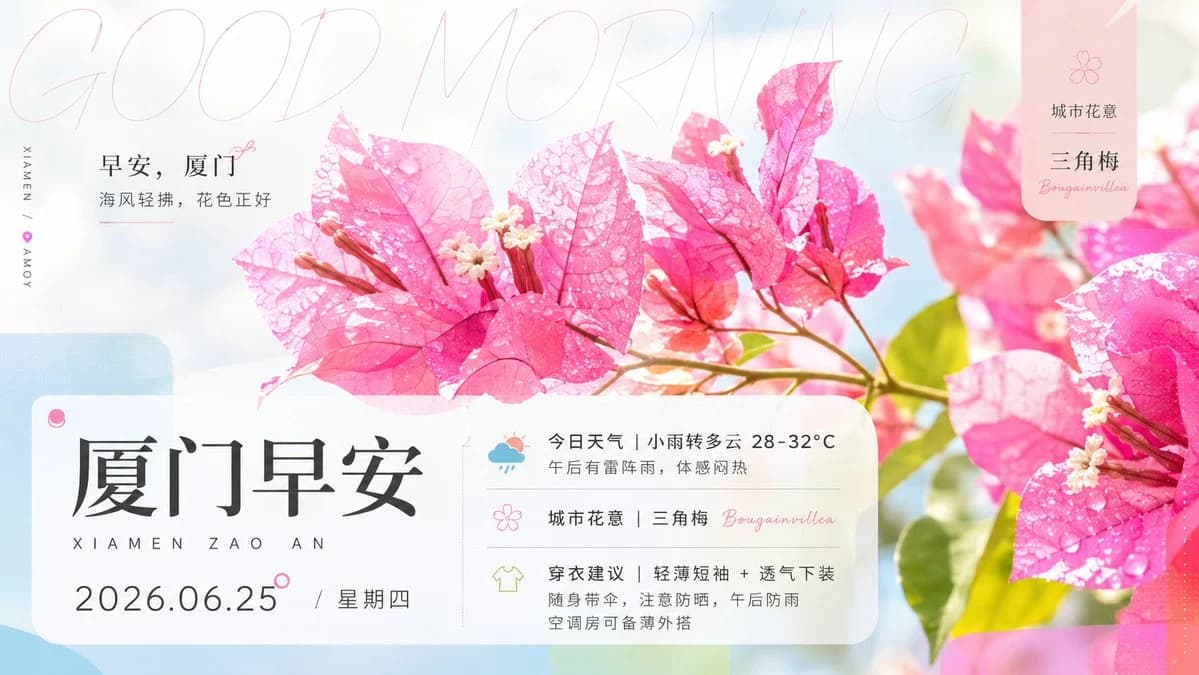
456 wordsGoal: Create a refined morning greeting poster for Xiamen featuring bright pink bougainvillea flowers, soft city-flower aesthetics, and elegant Chinese typography.
Canvas: Horizontal 16:9 poster, 1200×675 style composition, airy high-key lighting, pastel white-blue-pink background, soft bokeh, clean editorial design.
Main image: Use a close-up macro photograph style of vivid pink bougainvillea branches across the center and right side, with translucent veined petals, tiny cream-white blossoms, dew drops on petals, green leaves, sunlit fresh morning atmosphere, shallow depth of field, and a gentle sky-blue background blur. Include exactly 3 prominent bougainvillea flower clusters: one large cluster centered, one large cropped cluster on the right edge, and one softer blurred cluster in the rear right.
Typography and layout: Add a very large, thin, pale pink handwritten English phrase “GOOD MORNING” stretched across the top as a subtle background overlay. On the upper left place a small greeting block with Chinese text: “早安,厦门” and below it “海风轻拂,花色正好”, with a small pink flower doodle and thin underline. Along the far left edge add vertical micro text “XIAMEN | AMOY” with a tiny pink map-pin or heart dot between the words.
Bottom information card: Place one large frosted-glass rounded rectangle card across the lower left and middle, with a pale blue rounded decorative block behind it. The card contains the main title “厦门早安” in large black Chinese serif calligraphy style, with spaced romanization below: “XIAMEN ZAO AN”. Under that show the date line “{argument name="date" default="2026.06.25"} / 星期四”. Add a small pink circular accent near the title/date.
Right side of bottom card: Include a vertical divider and exactly 3 information rows with simple pastel icons. Row 1 has a small rainy weather icon and text: “今日天气 | 小雨转多云 28-32°C” plus smaller text “午后有雷阵雨,体感闷热”. Row 2 has a pink flower outline icon and text: “城市花意 | 三角梅 Bougainvillea”. Row 3 has a light green T-shirt icon and text: “穿衣建议 | 轻薄短袖 + 透气下装” plus smaller text “随身带伞,注意防晒,午后防雨 空调房可备薄外搭”.
Top-right badge: Add one vertical rounded pink translucent label card with a small flower icon at top, Chinese text “城市花意”, larger “三角梅”, and cursive English “Bougainvillea”.
Style: Modern Chinese lifestyle poster, soft feminine botanical aesthetic, premium magazine layout, translucent glassmorphism cards, delicate line icons, pastel gradients, crisp readable text, elegant spacing, no clutter. Use {argument name="city name" default="厦门"} as the city theme, {argument name="main flower" default="三角梅"} as the city flower, {argument name="weather summary" default="小雨转多云 28-32°C"} for the forecast, and {argument name="morning message" default="海风轻拂,花色正好"} for the greeting subtitle.
Constraints: Keep exactly 2 rounded translucent information cards total: the large bottom card and the small top-right badge. Keep exactly 3 information rows in the bottom card. Preserve the bright pink bougainvillea as the dominant visual subject, maintain legible Chinese text, avoid people, avoid logos, avoid watermarks.About this prompt
Xiamen Bougainvillea Morning Poster is a ready-to-use social media prompt for GPT Image 2 on Image 2. Copy the 456 words below, paste them into the Create form, and you will get a result close to the preview above. Tweak the Product Ad, Social Media, Portrait tag if you want to push it somewhere new.
Use it as a starting point, then adjust the subject, lighting, or composition to suit your idea. The credit cost stays the same whether you use it as written or customize it.
Use case
A strong starting point for Social Media
Start here when you want a social media image inspired by Xiamen Bougainvillea Morning Poster. The prompt already sets the look and composition; replace the subject, product, colors, or scene details to match your project.
Easy places to tweak
- Subject Swap in your person, product, place, or object without changing the overall composition.
- Look and mood Tune the lighting, palette, camera angle, or materials so the image fits your brand.
- Final format Set the aspect ratio, background, text, or layout notes before you generate.
More prompt paths to explore
Find more GPT Image 2 prompts with a similar style, use case, or subject.
How to use it
- Step 1
Copy the prompt
Hit the Copy button above to grab the full text.
- Step 2
Open Image 2 Create
Head to the Create form and paste it in.
- Step 3
Generate
Hit Generate. Your version lands in seconds.
Make it yours
Load the prompt into the Create form with one click, then start tweaking.