Prompt
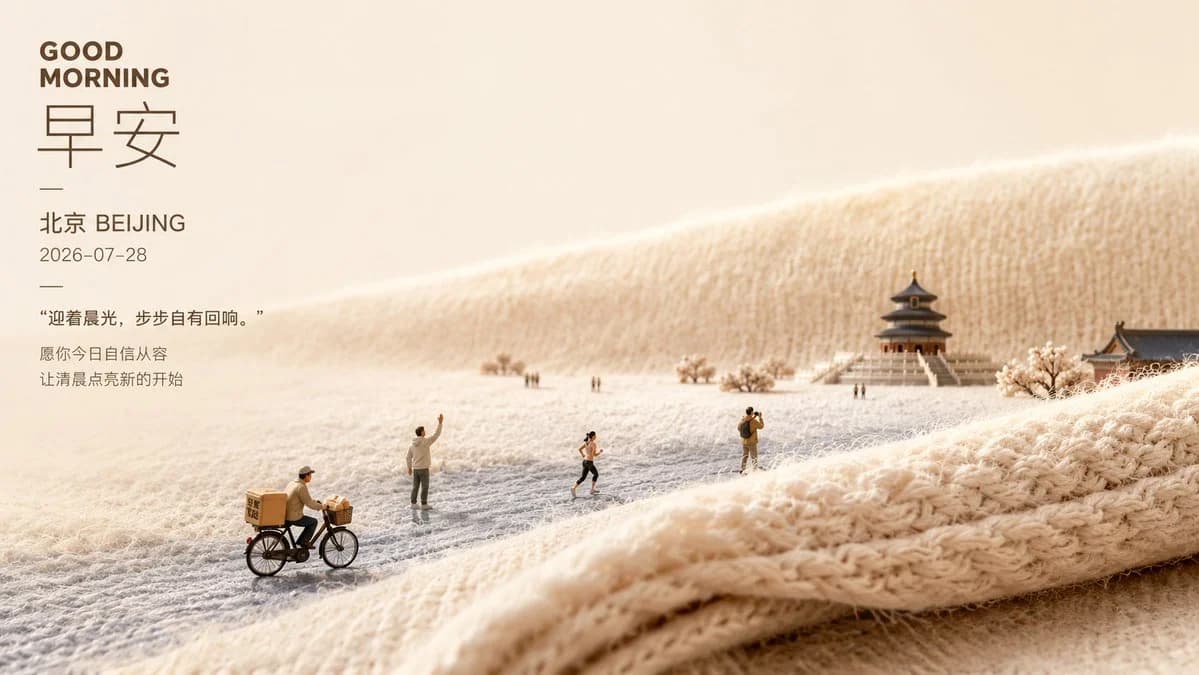
367 wordsGoal: Create a soft healing morning poster combining typography and a miniature Beijing landscape scene on warm knitted fabric.
Canvas: Wide horizontal poster, 16:9 aspect ratio, warm cream and beige palette, generous negative space on the left, cinematic shallow depth of field.
Layout: Place all typography in a vertical block on the upper-left third. The right and lower areas show a tiny diorama-like winter morning landscape made from fuzzy cream yarn and knitted textile folds. Use the knitted fabric as rolling hills, ground, and foreground ridge, with visible wool fibers and soft loops.
Text content: Include exactly 7 text elements on the left: 1) bold uppercase English headline “GOOD MORNING”; 2) very large thin Chinese characters “早安”; 3) a short horizontal divider line; 4) location line “北京 BEIJING”; 5) date line “2026-07-28”; 6) quoted sentence “迎着晨光,步步自有回响。”; 7) two-line blessing text “愿你今日自信从容 / 让清晨点亮新的开始”. Use dark warm brown typography, clean modern sans-serif for English and dates, elegant thin Chinese type for the large characters.
Subject details: The miniature scene contains exactly 7 visible human figures: 1) a delivery cyclist in the lower-left foreground riding a black bicycle with tan delivery boxes; 2) a standing person near center-left waving one arm; 3) a tiny distant figure pair near the middle background; 4) a runner in dark shorts near center; 5) a photographer or traveler standing center-right with a backpack; 6) a tiny distant walker near the temple stairs. Add one central traditional Beijing-style pavilion/temple with stairs in the right background, one partial traditional roof building at the far right edge, and a few pale flowering or frosted trees. Make all people look like tiny scale-model figures.
Visual style: Macro photography of a handcrafted miniature scene, cozy wool texture, soft sunrise light from the upper left, gentle misty atmosphere, creamy highlights, realistic fabric fibers, warm shadows, premium lifestyle poster aesthetic, calm and comforting mood.
Parameters: Use {argument name="headline text" default="GOOD MORNING"}, {argument name="large greeting text" default="早安"}, {argument name="city label" default="北京 BEIJING"}, {argument name="date" default="2026-07-28"}, and {argument name="quote" default="迎着晨光,步步自有回响。"}.
Constraints: Keep the image uncluttered, preserve the left-side text hierarchy, avoid watermarks or logos, do not add extra people beyond the 7 specified figures, and maintain a soft beige morning color grade.About this prompt
Soft Miniature Beijing Morning Poster is a ready-to-use infographic prompt for GPT Image 2 on Image 2. Copy the 367 words below, paste them into the Create form, and you will get a result close to the preview above. Tweak the Infographic, Product, Architecture tag if you want to push it somewhere new.
Use it as a starting point, then adjust the subject, lighting, or composition to suit your idea. The credit cost stays the same whether you use it as written or customize it.
Use case
A strong starting point for Infographic
Start here when you want a infographic image inspired by Soft Miniature Beijing Morning Poster. The prompt already sets the look and composition; replace the subject, product, colors, or scene details to match your project.
Easy places to tweak
- Subject Swap in your person, product, place, or object without changing the overall composition.
- Look and mood Tune the lighting, palette, camera angle, or materials so the image fits your brand.
- Final format Set the aspect ratio, background, text, or layout notes before you generate.
More prompt paths to explore
Find more GPT Image 2 prompts with a similar style, use case, or subject.
How to use it
- Step 1
Copy the prompt
Hit the Copy button above to grab the full text.
- Step 2
Open Image 2 Create
Head to the Create form and paste it in.
- Step 3
Generate
Hit Generate. Your version lands in seconds.
Make it yours
Load the prompt into the Create form with one click, then start tweaking.