Prompt
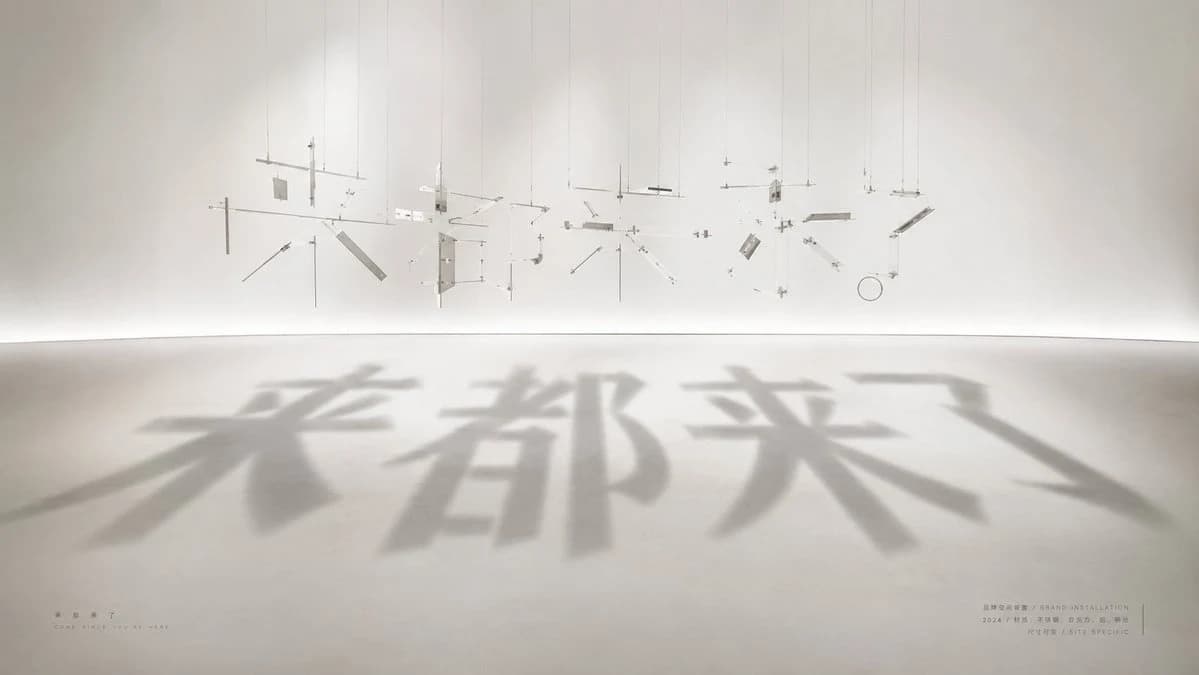
256 wordsCreate a wide cinematic photograph of a minimalist contemporary installation artwork in a white gallery room. The scene shows dozens of tiny suspended metal, acrylic, wire, and glass fragments hanging from the ceiling by thin vertical strings, carefully arranged in midair like an exploded deconstructed sculpture. Count the visible suspended components as about 45 discrete pieces: thin rods, small rectangular plates, angled strips, circular ring, crossbars, and tiny connector blocks, all in pale silver, clear, and off-white materials. A strong soft spotlight from above and behind projects their combined shadows onto the smooth concrete floor, forming four huge blurred Chinese characters reading {argument name="shadow text" default="来都来了"}. The shadow typography should dominate the foreground, oversized and soft-edged, stretching toward the viewer with realistic perspective. The physical hanging fragments should appear abstract and unreadable by themselves, but their shadows clearly align into the text. Use a serene museum aesthetic, warm white walls, curved seamless floor-to-wall transition, subtle haze, high-key lighting, long soft shadows, lots of negative space, and a calm beige-gray palette. Add very small exhibition-style captions near the bottom corners: on the lower left place the Chinese title {argument name="small title text" default="来都来了"} with a tiny English subtitle beneath it reading "COME SINCE YOU ARE HERE"; on the lower right add tiny bilingual-looking museum metadata lines including {argument name="artist label" default="BRAND INSTALLATION"}, "2024", and "SITE SPECIFIC". Keep the typography on the floor as shadow only, not printed ink. Photorealistic architectural installation art, 16:9 aspect ratio, viewed from a low frontal angle, no people, no clutter, no watermark.About this prompt
Shadow Text Installation Art is a ready-to-use infographic prompt for GPT Image 2 on Image 2. Copy the 256 words below, paste them into the Create form, and you will get a result close to the preview above. Tweak the Infographic, Product, Architecture tag if you want to push it somewhere new.
Use it as a starting point, then adjust the subject, lighting, or composition to suit your idea. The credit cost stays the same whether you use it as written or customize it.
Use case
A strong starting point for Infographic
Start here when you want a infographic image inspired by Shadow Text Installation Art. The prompt already sets the look and composition; replace the subject, product, colors, or scene details to match your project.
Easy places to tweak
- Subject Swap in your person, product, place, or object without changing the overall composition.
- Look and mood Tune the lighting, palette, camera angle, or materials so the image fits your brand.
- Final format Set the aspect ratio, background, text, or layout notes before you generate.
More prompt paths to explore
Find more GPT Image 2 prompts with a similar style, use case, or subject.
How to use it
- Step 1
Copy the prompt
Hit the Copy button above to grab the full text.
- Step 2
Open Image 2 Create
Head to the Create form and paste it in.
- Step 3
Generate
Hit Generate. Your version lands in seconds.
Make it yours
Load the prompt into the Create form with one click, then start tweaking.