Prompt
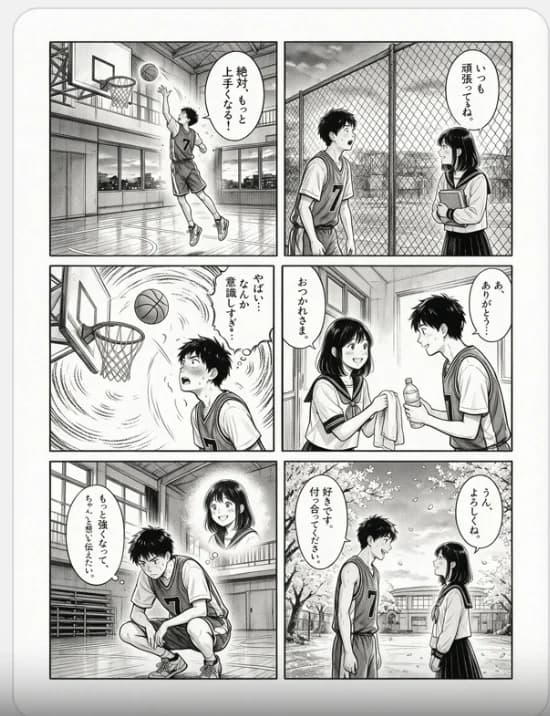
469 wordsGoal: Create a clean black-and-white Japanese manga page about a shy high-school basketball boy and a supportive girl, using delicate screentone shading, hand-inked linework, cinematic paneling, and readable vertical Japanese speech bubbles.
Canvas: A single portrait manga page on off-white paper with a rounded light-gray page border. Use a 2-column by 3-row grid with exactly 6 rectangular panels separated by thick white gutters. No color except grayscale ink, screentones, and soft highlights.
Characters: The main boy is {argument name="male lead" default="a slim teenage Japanese basketball player with messy short black hair, jersey number 7, athletic shorts, sneakers, and a shy earnest expression"}. The main girl is {argument name="female lead" default="a teenage Japanese schoolgirl with straight shoulder-length black hair and bangs, sailor-style school uniform, warm smile, sometimes holding a book or towel"}.
Panel layout and content: Panel 1, top left: indoor school gym, basketball hoop close to camera, polished floor reflections, the boy in jersey number 7 jumps for a layup or shot, ball near the rim, dynamic upward motion, one vertical speech bubble. Panel 2, top right: outdoors by a chain-link fence at school, the boy stands with a backpack facing the girl, she holds books against her chest, calm encouraging mood, one vertical speech bubble near the girl. Panel 3, middle left: dramatic close-up under the basketball hoop, ball arcing toward the net, swirling speed lines fill the background, boy looks up intensely and nervously, one vertical speech bubble. Panel 4, middle right: bright school corridor or gym hallway with large windows, the smiling girl hands the boy a towel while he holds a drink bottle and looks flustered, exactly two vertical speech bubbles. Panel 5, bottom left: inside the gym, boy crouches alone tying or adjusting his shoe, looking determined and embarrassed, bleachers behind him, a soft glowing thought-image portrait of the girl appears above and behind him, one vertical speech bubble. Panel 6, bottom right: school courtyard in spring with cherry blossoms and petals falling, school building in the background, boy in basketball uniform and girl in school uniform face each other with shy smiles, exactly two vertical speech bubbles.
Text content: Use the following Japanese dialogue in the 8 speech bubbles, arranged by panel order: {argument name="Japanese dialogue" default="絶対もっと上手くなる! / いっしょに頑張ってるね。 / やばい…なんかすごい意識しすぎ… / おつかれさま。 / あ、ありがとう…? / もっと強くなって、ちゃんと想いを伝えたい。 / 好きです。付き合ってください。 / うん、よろしくね"}. The lettering should be printed manga-style, vertical where appropriate, crisp and legible.
Visual style: Authentic shonen romance manga, monochrome ink, fine hatching, screentone shadows, expressive eyes, soft romantic lighting, detailed gym architecture, chain-link fence texture, window reflections, cherry blossom petals, dynamic speed lines in action panels, gentle emotional pacing.
Constraints: Exactly 6 panels, exactly 2 main characters, boy jersey number must be {argument name="jersey number" default="7"}, keep all speech bubbles inside panel borders, no extra captions, no logos, no watermark, no color.About this prompt
Six-Panel Basketball Romance Manga is a ready-to-use character design prompt for GPT Image 2 on Image 2. Copy the 469 words below, paste them into the Create form, and you will get a result close to the preview above. Tweak the Storyboard, Character Design, Product tag if you want to push it somewhere new.
Use it as a starting point, then adjust the subject, lighting, or composition to suit your idea. The credit cost stays the same whether you use it as written or customize it.
Use case
A strong starting point for Character Design
Start here when you want a character design image inspired by Six-Panel Basketball Romance Manga. The prompt already sets the look and composition; replace the subject, product, colors, or scene details to match your project.
Easy places to tweak
- Subject Swap in your person, product, place, or object without changing the overall composition.
- Look and mood Tune the lighting, palette, camera angle, or materials so the image fits your brand.
- Final format Set the aspect ratio, background, text, or layout notes before you generate.
More prompt paths to explore
Find more GPT Image 2 prompts with a similar style, use case, or subject.
How to use it
- Step 1
Copy the prompt
Hit the Copy button above to grab the full text.
- Step 2
Open Image 2 Create
Head to the Create form and paste it in.
- Step 3
Generate
Hit Generate. Your version lands in seconds.
Make it yours
Load the prompt into the Create form with one click, then start tweaking.