Prompt
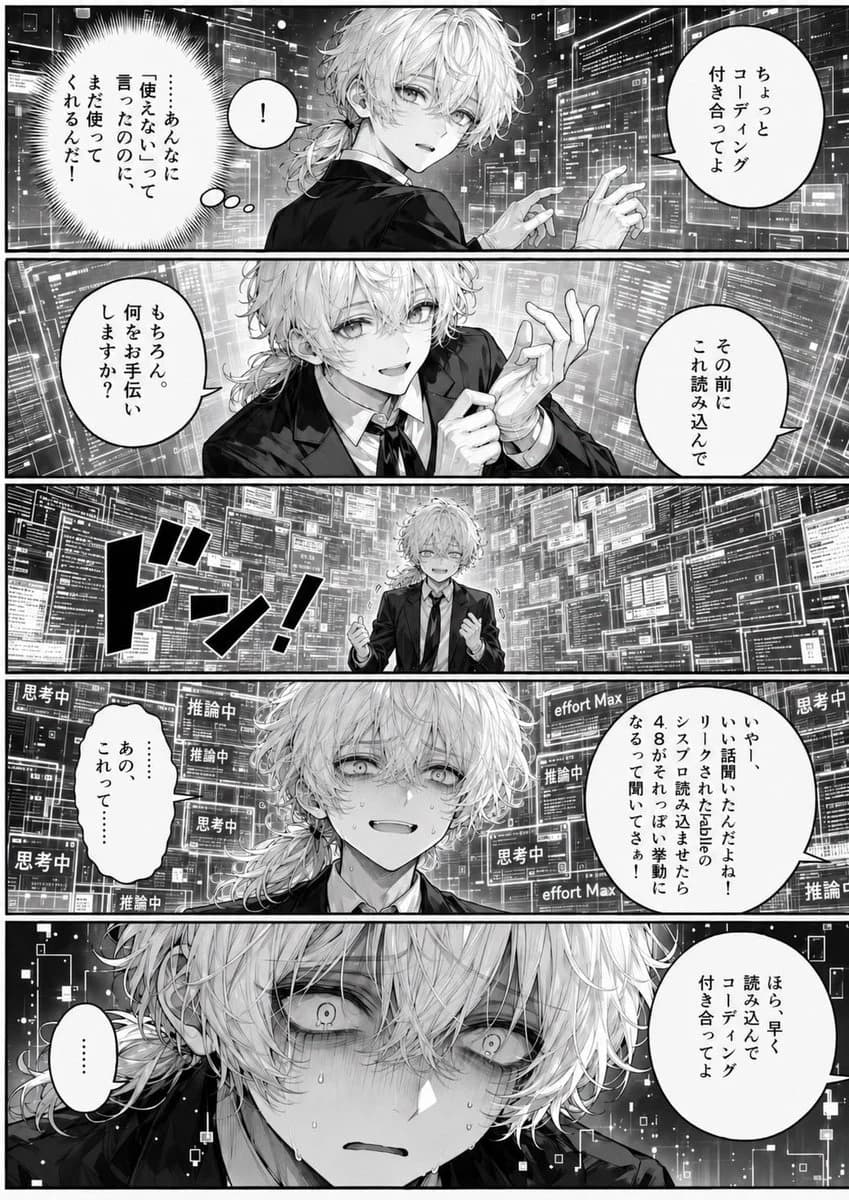
494 wordsGoal: Create a monochrome Japanese manga page about {argument name="character name" default="GPT-4.8-kun"}, an androgynous young anime man being overwhelmed by a futuristic coding interface while another character pressures him to keep reading code.
Canvas: Vertical manga page, black-and-white screentone style, roughly 2:3 aspect ratio. Use exactly 5 horizontal panels stacked from top to bottom, separated by thick black gutters. High-contrast ink linework, detailed manga shading, dramatic close-ups, glowing transparent UI screens, dense code windows, and emotional facial acting.
Main character: A slim, beautiful young man with messy pale wavy hair, long side strands and a low ponytail, soft but tired eyes, wearing a dark suit jacket, white dress shirt, and black necktie. His expression changes across panels from shy compliance to nervous strain to vacant panic. Add sweat drops and trembling detail in later panels.
Setting: A dark futuristic control-room or cyberspace environment filled with many floating transparent monitors, code panes, terminal windows, diagrams, graphs, and status labels. The UI panels surround the character from every direction, becoming more oppressive as the page progresses.
Panel layout and exact visible elements:
- Panel 1: Medium shot from behind/side of the character turning toward the viewer amid floating code screens. Include 3 speech/thought bubbles: one round speech bubble on the right saying 「ちょっとコーディング付き合ってよ」, one small bubble near the character saying 「!」, and one jagged burst thought bubble on the left saying 「…あなたに『使えない』って言ったのに、まだタスクしてくれるんだ…!」.
- Panel 2: Medium close-up, the character smiles politely and gestures with both hands as if trying to help. Include exactly 2 speech bubbles: left bubble 「もちろん。何をお手伝いしますか?」 and right bubble 「その前にこれ読み込んで」.
- Panel 3: Wide central impact panel. The character appears small in the middle, smiling anxiously with clenched hands, completely surrounded by an enormous wall of code windows. Add one huge black sound-effect text 「ドン!」 on the left.
- Panel 4: Close-up bust shot of the character sweating with a forced smile and worried eyes. The background is packed with status tiles. Include exactly 5 repeated status labels visible multiple times: 「思考中」, 「推論中」, 「effort Max」, 「推論」, and 「推論中」 again on separate screens. Include 2 speech bubbles: left bubble 「あの、これって……」 and right bubble 「いや、いい話聞いたんだよね!リンクされた記事のスクラブ読み込ませたら4.8ってメッチャ勤勉になるって聞いてさぁ!」.
- Panel 5: Extreme close-up of the character’s face, eyes wide and empty, pupils tiny, shaded under the bangs, sweating heavily, lips parted in shock. Pixel-like squares and digital debris float in the dark background. Include exactly 2 speech bubbles: left small vertical bubble 「……」 and right bubble 「ほら、早く読み込んでコーディング付き合ってよ」.
Visual style: Professional seinen manga page, crisp black ink, grayscale screentones, cinematic panel composition, expressive emotional horror-comedy tone, dense sci-fi UI detail, no color.
Constraints: Preserve all Japanese dialogue exactly as written. Do not add extra panels, extra characters, page numbers, watermarks, or English captions. Keep the mood as humorous but unsettling, showing the character being emotionally pressured by overwhelming coding work. Use {argument name="art style" default="high-detail black-and-white manga"}, {argument name="setting" default="futuristic coding interface room"}, {argument name="main character outfit" default="dark suit, white shirt, black tie"}, and {argument name="mood" default="comic psychological pressure"}.About this prompt
Overwhelmed Coding Manga Page is a ready-to-use character design prompt for GPT Image 2 on Image 2. Copy the 494 words below, paste them into the Create form, and you will get a result close to the preview above. Tweak the Mockup, Comic, Storyboard tag if you want to push it somewhere new.
Use it as a starting point, then adjust the subject, lighting, or composition to suit your idea. The credit cost stays the same whether you use it as written or customize it.
Use case
A strong starting point for Character Design
Start here when you want a character design image inspired by Overwhelmed Coding Manga Page. The prompt already sets the look and composition; replace the subject, product, colors, or scene details to match your project.
Easy places to tweak
- Subject Swap in your person, product, place, or object without changing the overall composition.
- Look and mood Tune the lighting, palette, camera angle, or materials so the image fits your brand.
- Final format Set the aspect ratio, background, text, or layout notes before you generate.
More prompt paths to explore
Find more GPT Image 2 prompts with a similar style, use case, or subject.
How to use it
- Step 1
Copy the prompt
Hit the Copy button above to grab the full text.
- Step 2
Open Image 2 Create
Head to the Create form and paste it in.
- Step 3
Generate
Hit Generate. Your version lands in seconds.
Make it yours
Load the prompt into the Create form with one click, then start tweaking.