Prompt
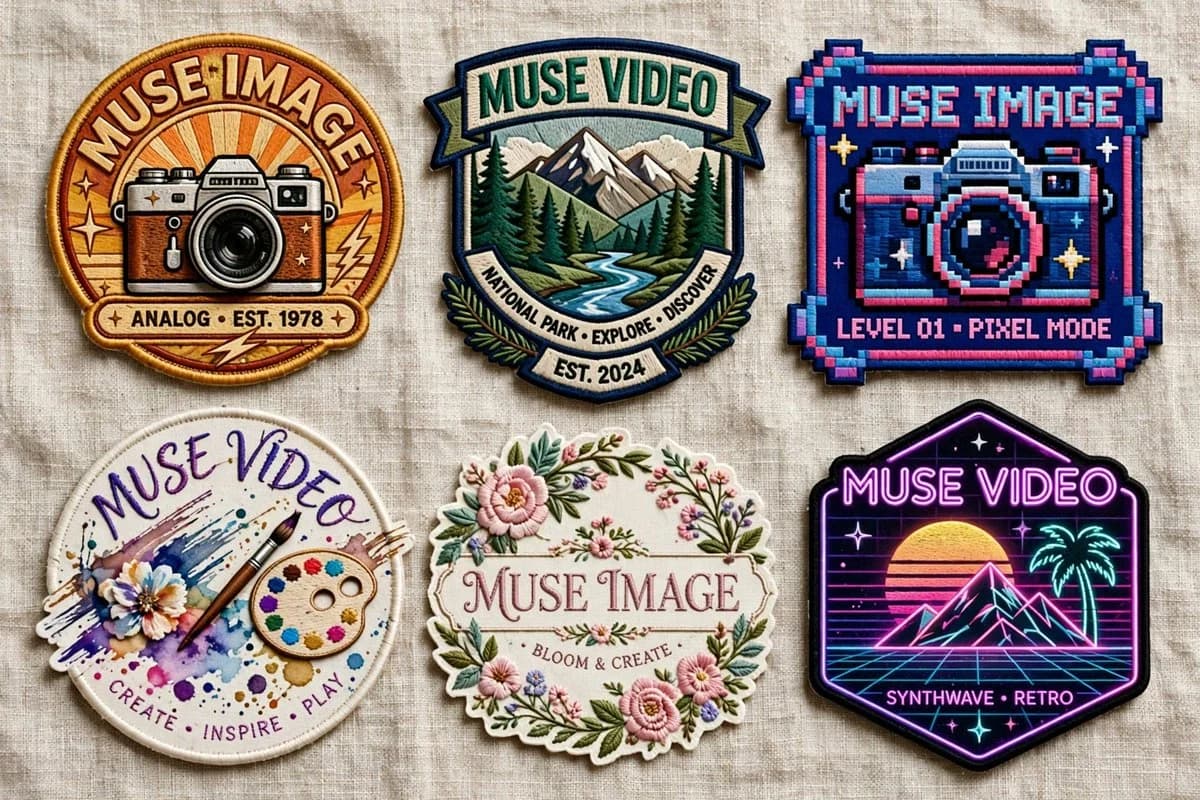
399 wordsGoal: Create a realistic product-style flat lay of exactly 6 embroidered patches on a neutral wrinkled linen fabric background, showcasing different badge designs for {argument name="brand name" default="Muse Image"} and {argument name="alternate brand name" default="Muse Video"}. The patches should look tactile and sewn, with raised thread, stitched borders, slight shadows, and varied shapes, arranged in a clean 3-column by 2-row grid.
Canvas: Wide horizontal image, approximately 16:9, photographed from directly above. Use soft natural lighting, beige woven fabric texture, crisp embroidery detail, and no hands or packaging.
Layout: Include exactly 6 discrete patches:
1. Top left: round vintage camera patch with warm orange sunburst background, thick golden embroidered border, retro camera illustration, large curved text “MUSE IMAGE” at the top, small text ribbon “ANALOG • EST. 1978” at the bottom, small star and lightning accents.
2. Top center: shield-shaped outdoor national park patch with mountains, pine forest, and winding river, teal and cream border, top banner text “MUSE VIDEO,” lower curved ribbon text “NATIONAL PARK • EXPLORE • DISCOVER,” and small bottom banner “EST. 2024.”
3. Top right: square pixel-art arcade patch with chunky pixel border in navy, cyan, pink, and purple, a pixelated camera in the center, top text “MUSE IMAGE,” and bottom text “LEVEL 01 • PIXEL MODE.”
4. Bottom left: circular watercolor art patch with white stitched edge, paint splashes, flower, brush, and painter palette, handwritten curved top text “MUSE VIDEO,” and bottom text “CREATE • INSPIRE • PLAY.”
5. Bottom center: ornate floral oval patch with scalloped cream border, pink flowers, green leaves, delicate garden embroidery, central serif text “MUSE IMAGE,” and small text “BLOOM & CREATE.”
6. Bottom right: black hexagonal neon synthwave patch with glowing purple border, retro sunset, wireframe grid, palm tree, mountain peaks, stars, top neon text “MUSE VIDEO,” and bottom text “SYNTHWAVE • RETRO.”
Visual style: Hyper-realistic embroidered patch mockup, high-resolution thread texture, visible stitching, slightly raised edges, subtle fabric shadows, saturated but tasteful colors. Each patch should have a distinct theme: vintage analog photography, national park exploration, pixel arcade camera, creative watercolor art, floral craft, and neon retro synthwave.
Text constraints: Render all visible text as clean embroidered lettering. Keep exactly 6 patches and no additional badges, labels, watermarks, or extra objects. Customize the main brand words using {argument name="primary patch text" default="MUSE IMAGE"}, {argument name="secondary patch text" default="MUSE VIDEO"}, and the vintage date using {argument name="vintage year" default="1978"}.About this prompt
Six Embroidered Muse Patches is a ready-to-use ad creative prompt for GPT Image 2 on Image 2. Copy the 399 words below, paste them into the Create form, and you will get a result close to the preview above. Tweak the Product Ad, Ad Creative, Mockup tag if you want to push it somewhere new.
Use it as a starting point, then adjust the subject, lighting, or composition to suit your idea. The credit cost stays the same whether you use it as written or customize it.
Use case
A strong starting point for Ad Creative
Start here when you want a ad creative image inspired by Six Embroidered Muse Patches. The prompt already sets the look and composition; replace the subject, product, colors, or scene details to match your project.
Easy places to tweak
- Subject Swap in your person, product, place, or object without changing the overall composition.
- Look and mood Tune the lighting, palette, camera angle, or materials so the image fits your brand.
- Final format Set the aspect ratio, background, text, or layout notes before you generate.
More prompt paths to explore
Find more GPT Image 2 prompts with a similar style, use case, or subject.
How to use it
- Step 1
Copy the prompt
Hit the Copy button above to grab the full text.
- Step 2
Open Image 2 Create
Head to the Create form and paste it in.
- Step 3
Generate
Hit Generate. Your version lands in seconds.
Make it yours
Load the prompt into the Create form with one click, then start tweaking.