Prompt
279 words{
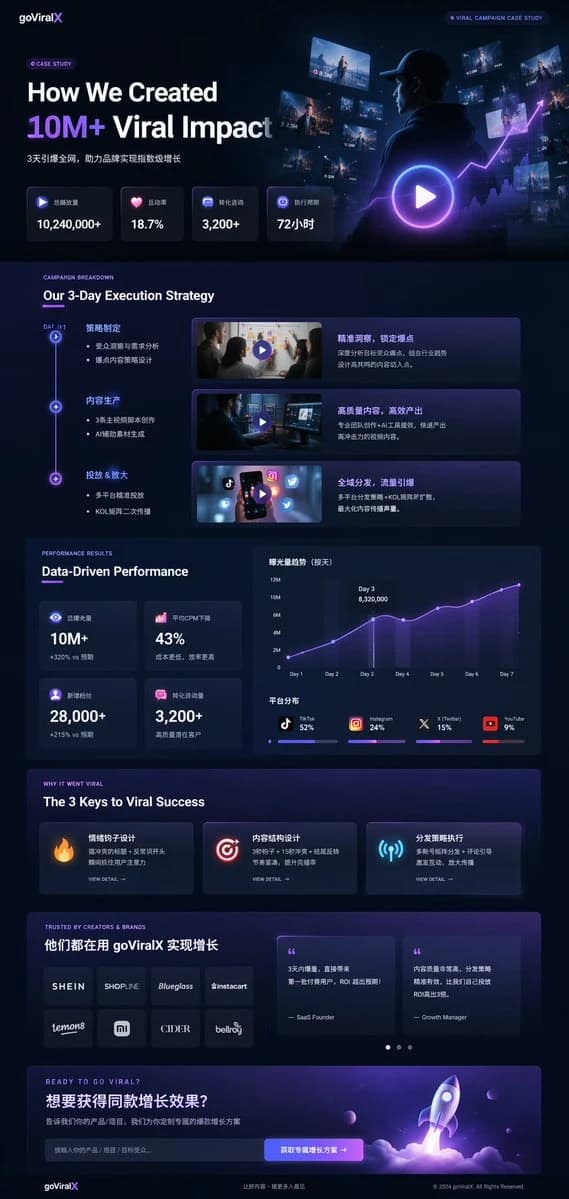
"type": "UI/UX landing page mockup",
"theme": "dark mode, sleek modern aesthetic, glassmorphism, {argument name=\"primary accent color\" default=\"neon purple and blue\"} glowing accents",
"header": {
"logo": "{argument name=\"brand name\" default=\"goViralX\"}",
"top_right_tag": "VIRAL CAMPAIGN CASE STUDY"
},
"layout": {
"sections": [
{
"name": "Hero",
"headline": "{argument name=\"hero headline\" default=\"How We Created 10M+ Viral Impact\"}",
"subheadline": "3天引爆全网, 助力品牌实现指数级增长",
"stats_row": {
"count": 4,
"labels": ["总播放量", "互动率", "转化咨询", "执行周期"],
"values": ["{argument name=\"main statistic\" default=\"10,240,000+\"}", "18.7%", "3,200+", "72小时"]
},
"visual": "cinematic shot of a person in a hoodie looking at glowing digital screens and graphs, large play button overlay"
},
{
"name": "Strategy",
"title": "Our 3-Day Execution Strategy",
"layout_type": "vertical timeline",
"steps_count": 3,
"elements_per_step": ["timeline node", "title", "bullet points", "video thumbnail with play button", "description box"]
},
{
"name": "Performance",
"title": "Data-Driven Performance",
"left_column": {
"stat_cards_count": 4,
"values": ["10M+", "43%", "28,000+", "3,200+"]
},
"right_column": {
"charts_count": 2,
"chart_1": "line graph showing 7-day growth peaking at Day 3",
"chart_2": "horizontal segmented bar chart showing platform distribution (TikTok 52%, Instagram 24%, X 15%, YouTube 9%)"
}
},
{
"name": "Keys to Success",
"title": "The 3 Keys to Viral Success",
"cards_count": 3,
"card_elements": ["glowing icon (fire, target, antenna)", "title", "description", "VIEW DETAIL link"]
},
{
"name": "Social Proof",
"title": "TRUSTED BY CREATORS & BRANDS",
"left_column": {
"logos_count": 8,
"grid": "2x4",
"brands": ["SHEIN", "SHOPLINE", "Blueglass", "instacart", "lemon8", "mi", "CIDER", "bellroy"]
},
"right_column": {
"testimonial_cards_count": 2,
"elements": ["quote", "author title (SaaS Founder, Growth Manager)"]
}
},
{
"name": "Call to Action",
"title": "READY TO GO VIRAL?",
"interactive_elements": ["text input field", "glowing button with text '{argument name=\"call to action text\" default=\"获取专属增长方案 ->\"}'"],
"visual": "3D render of a rocket ship taking off with purple and blue flames"
}
]
}
}About this prompt
Dark Mode Marketing Case Study UI is a ready-to-use ad creative prompt for GPT Image 2 on Image 2. Copy the 279 words below, paste them into the Create form, and you will get a result close to the preview above. Tweak the Product Ad, Ad Creative, Social Media tag if you want to push it somewhere new.
Use it as a starting point, then adjust the subject, lighting, or composition to suit your idea. The credit cost stays the same whether you use it as written or customize it.
Use case
A strong starting point for Ad Creative
Start here when you want a ad creative image inspired by Dark Mode Marketing Case Study UI. The prompt already sets the look and composition; replace the subject, product, colors, or scene details to match your project.
Easy places to tweak
- Subject Swap in your person, product, place, or object without changing the overall composition.
- Look and mood Tune the lighting, palette, camera angle, or materials so the image fits your brand.
- Final format Set the aspect ratio, background, text, or layout notes before you generate.
More prompt paths to explore
Find more GPT Image 2 prompts with a similar style, use case, or subject.
How to use it
- Step 1
Copy the prompt
Hit the Copy button above to grab the full text.
- Step 2
Open Image 2 Create
Head to the Create form and paste it in.
- Step 3
Generate
Hit Generate. Your version lands in seconds.
Make it yours
Load the prompt into the Create form with one click, then start tweaking.