Prompt
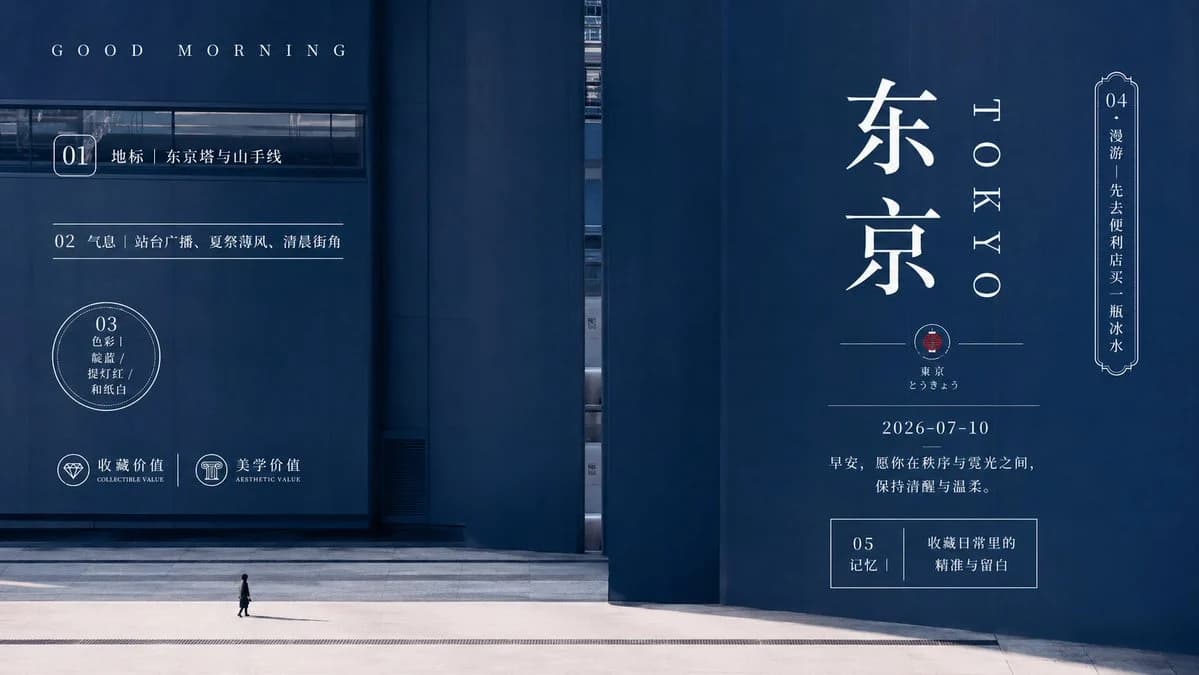
382 wordsCreate a cinematic minimalist travel poster for {argument name="city name" default="Tokyo"}, using a vast dark navy-blue architectural facade as the background and a tiny solitary pedestrian at the bottom for scale. The composition should feel grand, cold, clean, quiet, and ritualistic, with a monumental wall, sharp vertical seams, a narrow slit of reflected city glass near the center, and pale concrete pavement along the bottom. Use a deep blue monochrome color grade, high contrast sunlight and shadow, elegant editorial poster aesthetics, fine white typography, generous negative space, and a calm early-morning atmosphere.
Layout: horizontal 16:9 poster. Left third contains small structured guide text and numbered items over the building wall; right third contains the main destination title. Top left reads “G O O D M O R N I N G” in widely spaced small serif capitals. On the left, show exactly 3 numbered information blocks: “01” in a rounded rectangle followed by “地标|东京塔与山手线”; “02” on a thin horizontal divider followed by “气息|站台广播、夏祭薄风、清晨街角”; “03” inside a thin double-line circle followed by “色彩|藏蓝 / 提灯红 / 和纸白”. Bottom left shows exactly 2 small icon badges: a diamond icon labeled “收藏价值 / COLLECTIBLE VALUE” and a classical column icon labeled “美学价值 / AESTHETIC VALUE”.
Right side typography: place huge vertical white Japanese characters “东京” as the dominant title, with “T O K Y O” set vertically beside it in spaced serif letters. Under the title, add a thin horizontal line with a small red seal emblem at center, then small text “东京” and “とうきょう”. Below that add the date “{argument name="date" default="2026-07-10"}” and the sentence “早安,愿你在秩序与霓光之间,保持清醒与温柔。” On the far right edge, include one ornate vertical label frame marked “04” with the text “漫游|先去便利店买一瓶冰水”. Near the lower right, include one rectangular outlined box marked “05 记忆|收藏日常里的 精准与留白”.
Subject details: the only person is a tiny figure in dark clothing walking across the pale plaza near the lower center-left, casting a long subtle shadow. No cars, no crowds, no clutter.
Style constraints: ultra-clean PPT-like grid logic, refined Japanese editorial design, photorealistic architectural background, crisp white overlays, one small red accent seal, no watermark, no extra text beyond the specified poster elements. Use {argument name="main color palette" default="deep navy blue, paper white, small vermilion red accent"} and keep the mood {argument name="mood" default="quiet, majestic, cool, clean, ceremonial"}.About this prompt
Minimalist Tokyo Morning Poster is a ready-to-use poster prompt for GPT Image 2 on Image 2. Copy the 382 words below, paste them into the Create form, and you will get a result close to the preview above. Tweak the Infographic, Poster, Product tag if you want to push it somewhere new.
Use it as a starting point, then adjust the subject, lighting, or composition to suit your idea. The credit cost stays the same whether you use it as written or customize it.
Use case
A strong starting point for Poster
Start here when you want a poster image inspired by Minimalist Tokyo Morning Poster. The prompt already sets the look and composition; replace the subject, product, colors, or scene details to match your project.
Easy places to tweak
- Subject Swap in your person, product, place, or object without changing the overall composition.
- Look and mood Tune the lighting, palette, camera angle, or materials so the image fits your brand.
- Final format Set the aspect ratio, background, text, or layout notes before you generate.
More prompt paths to explore
Find more GPT Image 2 prompts with a similar style, use case, or subject.
How to use it
- Step 1
Copy the prompt
Hit the Copy button above to grab the full text.
- Step 2
Open Image 2 Create
Head to the Create form and paste it in.
- Step 3
Generate
Hit Generate. Your version lands in seconds.
Make it yours
Load the prompt into the Create form with one click, then start tweaking.