Prompt
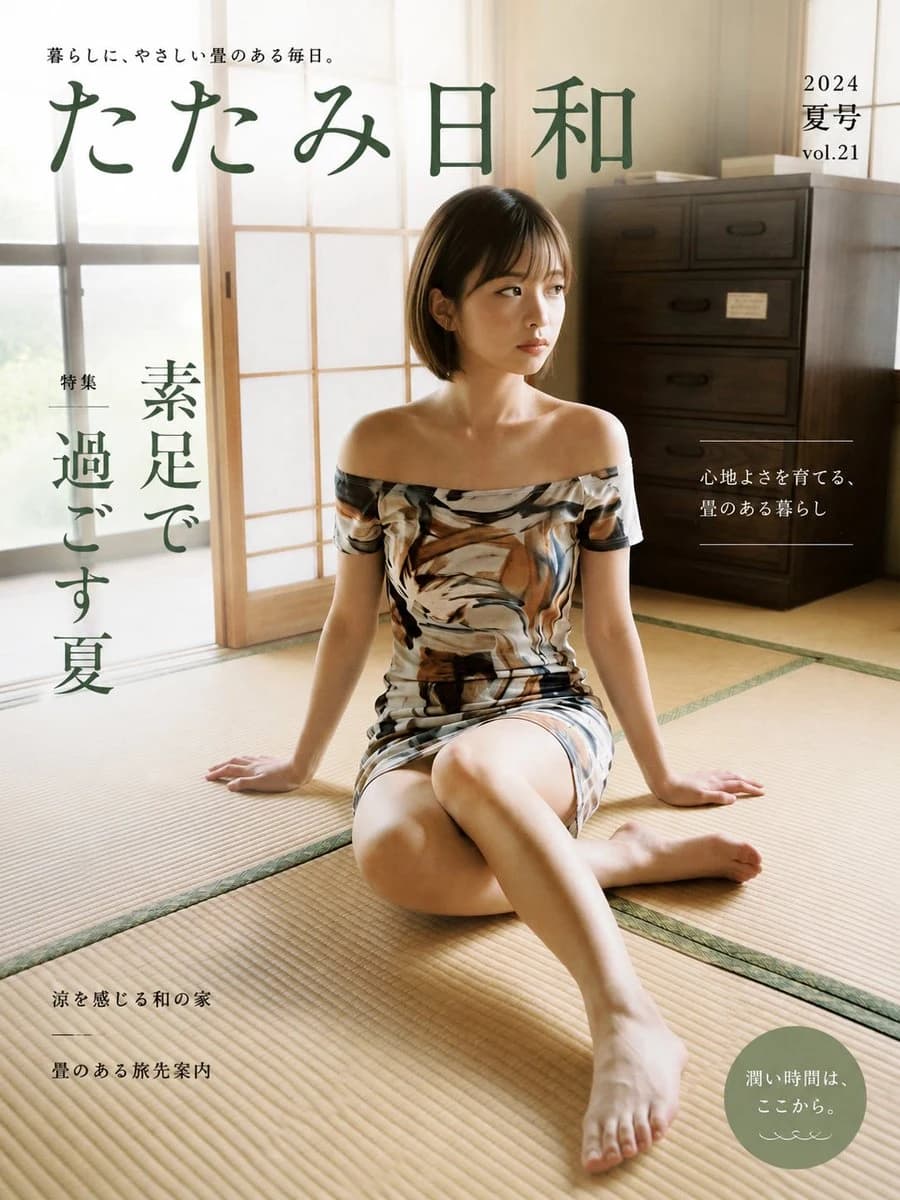
353 wordsGoal: Create a realistic Japanese lifestyle magazine cover for {argument name="magazine title" default="たたみ日和"}, with a calm summer tatami-room aesthetic and elegant editorial typography.
Canvas: Portrait magazine cover, 3:4 aspect ratio, full-bleed photo background, warm natural daylight, soft beige and deep green color palette.
Main image: A young Japanese woman with a short dark bob haircut sits barefoot on a tatami mat floor in a traditional Japanese room. She is seated near the center-right, legs folded casually with one leg extended toward the camera, hands resting on the floor behind her for support, gazing thoughtfully to the right. She wears an off-shoulder fitted summer dress with an abstract brown, cream, black, and gray painterly pattern. Lighting is soft and sunlit from shoji-style windows on the left, creating a serene domestic atmosphere. Background includes sliding shoji panels, tatami seams, and a dark wooden chest of drawers on the right.
Layout: Large magazine masthead across the upper left and center in dark muted green Japanese calligraphy-style type. Small tagline above the masthead. Issue information in the upper right. Vertical feature headline on the left side. Small editorial blurb on the right with thin horizontal divider lines. Small article teasers in the lower left. A muted sage-green circular badge in the lower right.
Text content: Include exactly these visible text groups, preserving Japanese text:
1. Top tagline: {argument name="tagline" default="暮らしに、やさしい畳のある毎日。"}
2. Main masthead: {argument name="magazine title" default="たたみ日和"}
3. Upper-right issue text: "2024", "夏号", "vol.21"
4. Left vertical feature label and headline: "特集", {argument name="feature headline" default="素足で過ごす夏"}
5. Right-side blurb: "心地よさを育てる、", "畳のある暮らし"
6. Lower-left teasers: "涼を感じる和の家", a thin divider line, "畳のある旅先案内"
7. Lower-right circular badge: {argument name="badge text" default="潤い時間は、ここから。"} plus a small decorative wave mark underneath.
Visual style: Polished commercial magazine design, photorealistic editorial photography, clean Japanese lifestyle-magazine layout, generous negative space, refined but slightly familiar mainstream cover design. Use muted forest green typography, thin white divider lines where shown, and restrained minimal ornamentation.
Constraints: Keep the cover realistic and uncluttered. Do not add extra people, extra cover lines, barcodes, logos, watermarks, or English translations. Ensure all Japanese text is legible and placed like a real magazine cover.About this prompt
Japanese Tatami Lifestyle Magazine Cover is a ready-to-use ad creative prompt for GPT Image 2 on Image 2. Copy the 353 words below, paste them into the Create form, and you will get a result close to the preview above. Tweak the Product Ad, Ad Creative, Storyboard tag if you want to push it somewhere new.
Use it as a starting point, then adjust the subject, lighting, or composition to suit your idea. The credit cost stays the same whether you use it as written or customize it.
Use case
A strong starting point for Ad Creative
Start here when you want a ad creative image inspired by Japanese Tatami Lifestyle Magazine Cover. The prompt already sets the look and composition; replace the subject, product, colors, or scene details to match your project.
Easy places to tweak
- Subject Swap in your person, product, place, or object without changing the overall composition.
- Look and mood Tune the lighting, palette, camera angle, or materials so the image fits your brand.
- Final format Set the aspect ratio, background, text, or layout notes before you generate.
More prompt paths to explore
Find more GPT Image 2 prompts with a similar style, use case, or subject.
How to use it
- Step 1
Copy the prompt
Hit the Copy button above to grab the full text.
- Step 2
Open Image 2 Create
Head to the Create form and paste it in.
- Step 3
Generate
Hit Generate. Your version lands in seconds.
Make it yours
Load the prompt into the Create form with one click, then start tweaking.