Prompt
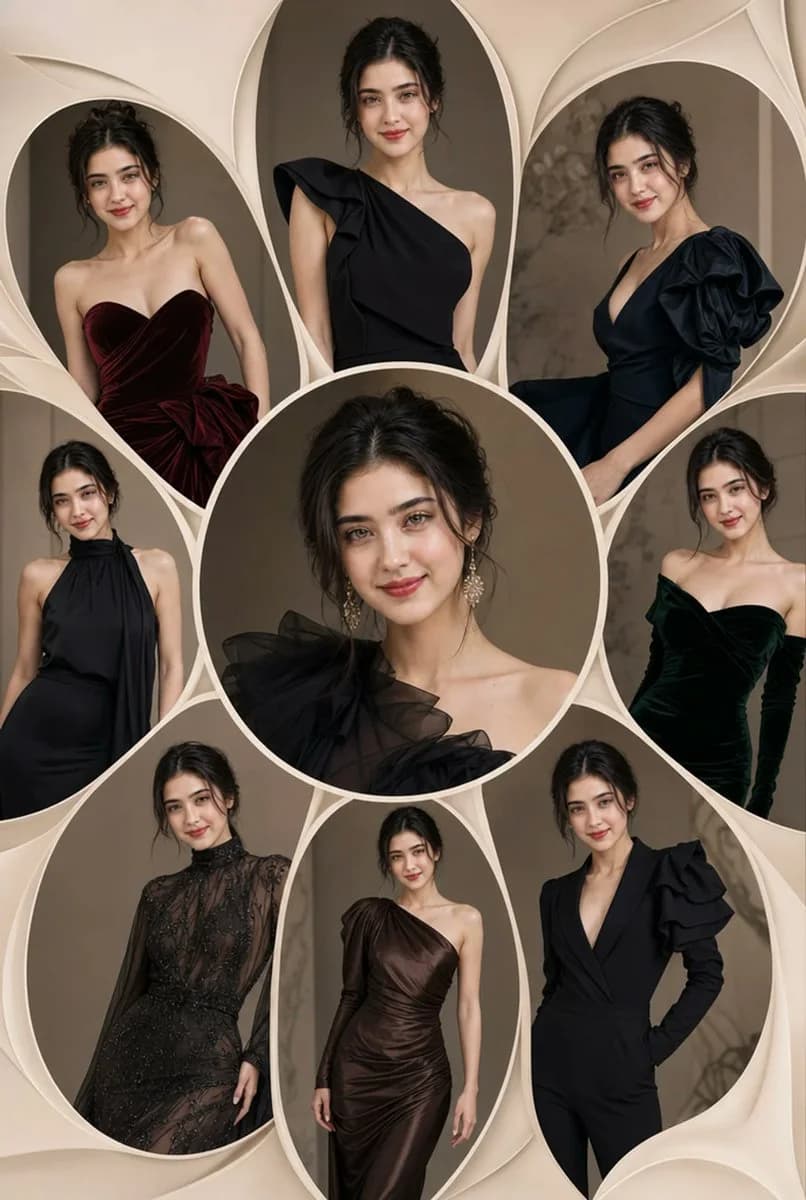
299 wordsUltra-photorealistic IMAX-quality luxury fashion editorial collage portrait, square 1:1 composition, structured as an elegant multi-frame floral-petal layout with soft petal-shaped and oval cutout panels radiating outward from a central circular beauty portrait — one {argument name="subject" default="beautiful young woman"} depicted across all frames in varied couture looks, consistent graceful facial features throughout: expressive almond eyes, sculpted brows, soft full lips, sleek pulled-back updo, luminous refined complexion, calm and confident editorial presence
Central frame: intimate glamour close-up, delicate fine jewelry earrings, flawless soft-glam makeup, direct gaze, cinematic studio lighting with gentle facial highlights
Surrounding frames each featuring a distinct couture silhouette and pose — all designed in a {argument name="color palette" default="rich dark palette: obsidian black, deep charcoal, midnight navy, dark espresso brown, deep burgundy, dark emerald"} — rendered in sculptural strapless gowns, dramatic one-shoulder silhouettes, sheer heavily-embellished eveningwear, fluid draped column dresses, tailored structured-sleeve jumpsuits, ruffled couture ballgowns — each outfit showing different texture details: silk charmeuse, duchess satin, organza overlays, hand-beaded mesh, velvet, metallic jacquard
Posing across frames: seated editorial lean, standing three-quarter turn, over-the-shoulder glance, flowing movement pose, close cropped fashion detail — cohesive styling language across all panels, unified by sleek hair and consistent beauty look
Background: {argument name="background style" default="soft warm beige-cream luxury art paper texture"}, layered dimensional petal and leaf shapes, subtle drop shadows between frames, clean white negative space, refined editorial grid structure
Lighting: soft wraparound cinematic studio glow, gentle specular highlights on skin and fabric surfaces, feathered rim light, deep shadow contrast on dark garments, HDR balanced exposure
Color grade: creamy neutral background tones sharply contrasted against deep saturated couture colors, luminous warm skin highlights, premium magazine color temperature, cinematic shadow depth
Render quality: 8K photorealistic production, ultra-fine fabric texture detail, masterpiece editorial composition, global illumination, premium fashion portrait optics, HDR renderingAbout this prompt
Luxury Fashion Editorial Collage is a ready-to-use ad creative prompt for GPT Image 2 on Image 2. Copy the 299 words below, paste them into the Create form, and you will get a result close to the preview above. Tweak the Product Ad, Ad Creative, Storyboard tag if you want to push it somewhere new.
Use it as a starting point, then adjust the subject, lighting, or composition to suit your idea. The credit cost stays the same whether you use it as written or customize it.
Use case
A strong starting point for Ad Creative
Start here when you want a ad creative image inspired by Luxury Fashion Editorial Collage. The prompt already sets the look and composition; replace the subject, product, colors, or scene details to match your project.
Easy places to tweak
- Subject Swap in your person, product, place, or object without changing the overall composition.
- Look and mood Tune the lighting, palette, camera angle, or materials so the image fits your brand.
- Final format Set the aspect ratio, background, text, or layout notes before you generate.
More prompt paths to explore
Find more GPT Image 2 prompts with a similar style, use case, or subject.
How to use it
- Step 1
Copy the prompt
Hit the Copy button above to grab the full text.
- Step 2
Open Image 2 Create
Head to the Create form and paste it in.
- Step 3
Generate
Hit Generate. Your version lands in seconds.
Make it yours
Load the prompt into the Create form with one click, then start tweaking.