Prompt
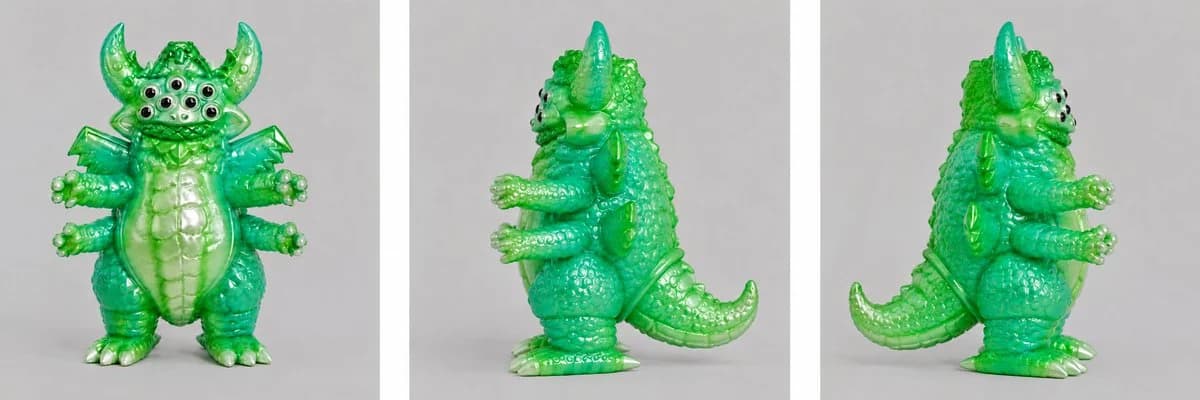
174 wordsUsing REFERENCE_0 as the creature design base, turn the rough sketch into a polished collectible toy/garage-kit render. Preserve the monster’s core silhouette and features from the sketch, but convert it into a glossy translucent green vinyl figure with soft sculpted details, rounded toy-like proportions, pearly off-white claws/teeth/belly highlights, and black-and-white glossy eyes.
Create a clean product turnaround sheet with exactly 3 vertical panels separated by white gutters: 1) front view, 2) left side profile, 3) right side / rear three-quarter profile. Keep the figure standing upright in the same general pose, with the horns, many eyes, small wings, multiple arms, segmented belly, chunky legs, tail, claws, bumps, scales, and kaiju-toy texture translated into a finished 3D sculpt.
Style: {argument name="toy material" default="translucent emerald green glossy vinyl"}, studio product photography, soft even lighting, subtle shadows, neutral light gray background, high detail, playful Japanese sofubi monster aesthetic. Do not include text, logos, hands, tools, or sketch lines. The final image should look like rendered photos of a physical prototype ready for 3D modeling or sculpting reference.About this prompt
Green Vinyl Monster Turnaround is a ready-to-use e-commerce prompt for GPT Image 2 on Image 2. Copy the 174 words below, paste them into the Create form, and you will get a result close to the preview above. Tweak the Product Ad, E-commerce, Storyboard tag if you want to push it somewhere new.
Use it as a starting point, then adjust the subject, lighting, or composition to suit your idea. The credit cost stays the same whether you use it as written or customize it.
Use case
A strong starting point for E-commerce
Start here when you want a e-commerce image inspired by Green Vinyl Monster Turnaround. The prompt already sets the look and composition; replace the subject, product, colors, or scene details to match your project.
Easy places to tweak
- Subject Swap in your person, product, place, or object without changing the overall composition.
- Look and mood Tune the lighting, palette, camera angle, or materials so the image fits your brand.
- Final format Set the aspect ratio, background, text, or layout notes before you generate.
More prompt paths to explore
Find more GPT Image 2 prompts with a similar style, use case, or subject.
How to use it
- Step 1
Copy the prompt
Hit the Copy button above to grab the full text.
- Step 2
Open Image 2 Create
Head to the Create form and paste it in.
- Step 3
Generate
Hit Generate. Your version lands in seconds.
Make it yours
Load the prompt into the Create form with one click, then start tweaking.