Prompt
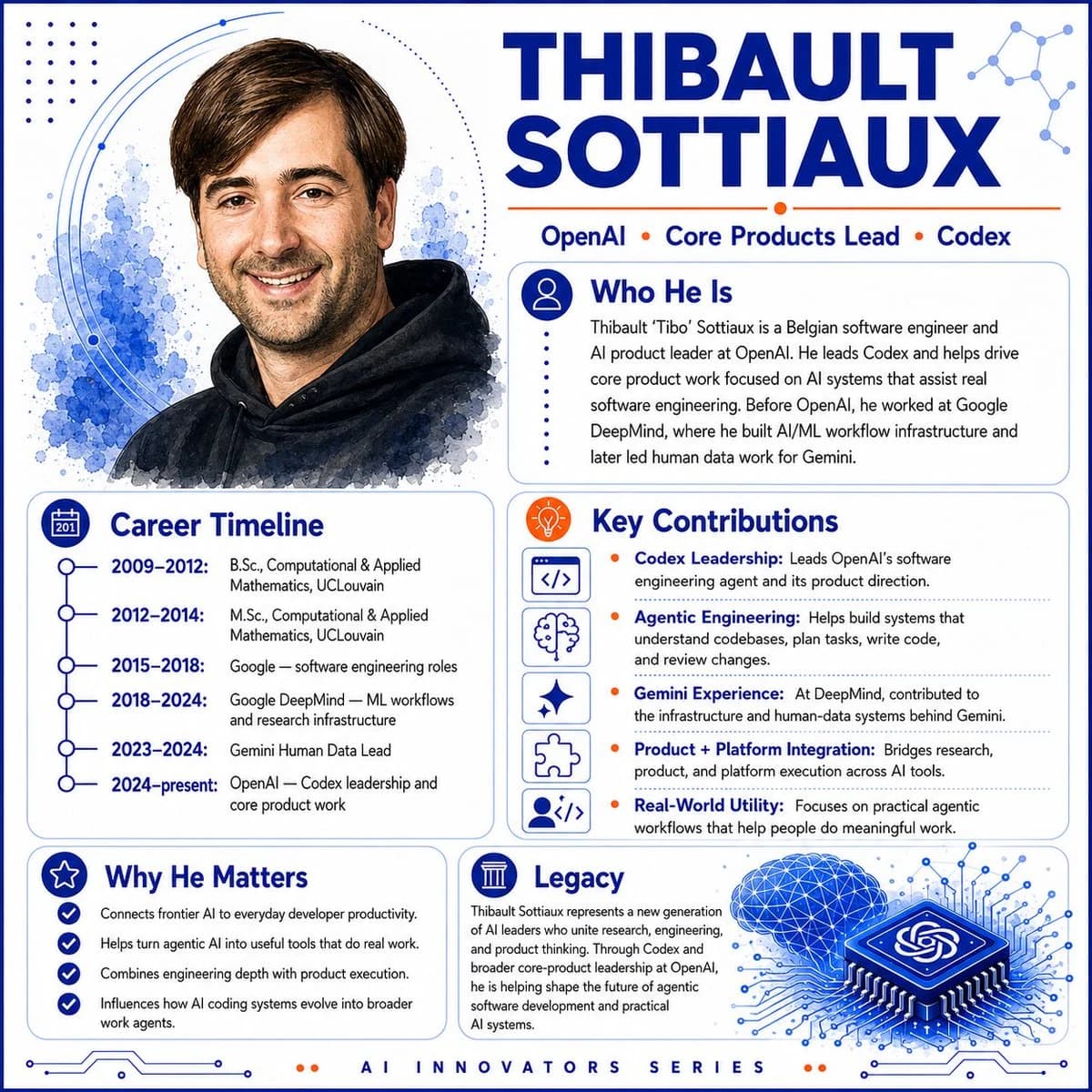
682 wordsGoal: Create a polished square AI innovator profile infographic about {argument name="character name" default="Thibault Sottiaux"}, styled like a modern tech magazine hero card.
Canvas: Square 1:1 layout, white background, deep cobalt blue and bright orange accent color palette, thin rounded blue border, subtle circuit traces along the bottom edge, dotted decoration and abstract network nodes in the corners. Use crisp vector layout combined with a soft watercolor portrait.
Layout: Two-column composition. The left side contains a large watercolor-style head-and-shoulders portrait at the top and a career timeline card below it. The right side contains the oversized name headline at the top, followed by a short affiliation line, then three rounded information cards stacked in a balanced grid. Add a footer label centered at the bottom.
Hero portrait: On the upper left, show a friendly smiling adult man with short brown side-parted hair, light skin, light stubble, and a black hoodie, rendered as a semi-realistic watercolor illustration with blue ink splashes behind him and thin orbital arc lines around the portrait.
Headline and top text: Large bold uppercase title in dark blue reading {argument name="headline text" default="THIBAULT SOTTIAUX"}. Under it, place a thin orange rule and the affiliation line: “OpenAI • Core Products Lead • Codex”, with orange dot separators.
Cards and content: Use exactly 5 rounded content cards, each with a blue outline, clear icon badge, and dark-blue section heading.
1. “Who He Is” card: icon of a user silhouette in a blue circle. Body text: “Thibault ‘Tibo’ Sottiaux is a Belgian software engineer and AI product leader at OpenAI. He leads Codex and helps drive core product work focused on AI systems that assist real software engineering. Before OpenAI, he worked at Google DeepMind, where he built AI/ML workflow infrastructure and later led human data work for Gemini.”
2. “Career Timeline” card: calendar icon. Include exactly 6 timeline entries with connected blue circles: “2009–2012: B.Sc., Computational & Applied Mathematics, UCLouvain”; “2012–2014: M.Sc., Computational & Applied Mathematics, UCLouvain”; “2015–2018: Google — software engineering roles”; “2018–2024: Google DeepMind — ML workflows and research infrastructure”; “2023–2024: Gemini Human Data Lead”; “2024–present: OpenAI — Codex leadership and core product work”.
3. “Key Contributions” card: orange lightbulb icon. Include exactly 5 contribution rows, each with a small square line icon on the left and an orange bullet before bold blue label text: “Codex Leadership: Leads OpenAI’s software engineering agent and its product direction.”; “Agentic Engineering: Helps build systems that understand codebases, plan tasks, write code, and review changes.”; “Gemini Experience: At DeepMind, contributed to the infrastructure and human-data systems behind Gemini.”; “Product + Platform Integration: Bridges research, product, and platform execution across AI tools.”; “Real-World Utility: Focuses on practical agentic workflows that help people do meaningful work.” The 5 left-side icons are, in order: code brackets, brain, sparkle, puzzle piece, and user-with-code.
4. “Why He Matters” card: star icon. Include exactly 4 checkmark bullets: “Connects frontier AI to everyday developer productivity.”; “Helps turn agentic AI into useful tools that do real work.”; “Combines engineering depth with product execution.”; “Influences how AI coding systems evolve into broader work agents.”
5. “Legacy” card: classical column icon. Include a short paragraph: “Thibault Sottiaux represents a new generation of AI leaders who unite research, engineering, and product thinking. Through Codex and broader core-product leadership at OpenAI, he is helping shape the future of agentic software development and practical AI systems.” Add a decorative blue 3D microchip illustration to the lower right of this card, with the OpenAI knot symbol on the chip, glowing circuit lines radiating outward, and a blue wireframe brain/cloud above it.
Footer: Centered letter-spaced footer text reading “AI INNOVATORS SERIES”, with two small orange dots on each side.
Visual style: Clean editorial infographic, premium SaaS/AI branding, strong hierarchy, rounded cards, thin blue dividers, dark navy typography, orange highlights, minimal shadows, high-resolution print-ready finish.
Constraints: Keep all text legible and spelled correctly. Use exactly 5 cards, exactly 6 timeline entries, exactly 5 key contribution rows, and exactly 4 why-it-matters bullets. Do not add extra people, logos besides the OpenAI knot on the chip, watermarks, or social media UI.About this prompt
AI Innovator Profile Infographic is a ready-to-use portrait prompt for GPT Image 2 on Image 2. Copy the 682 words below, paste them into the Create form, and you will get a result close to the preview above. Tweak the Social Media, Infographic, Mockup tag if you want to push it somewhere new.
Use it as a starting point, then adjust the subject, lighting, or composition to suit your idea. The credit cost stays the same whether you use it as written or customize it.
Use case
A strong starting point for Portrait
Start here when you want a portrait image inspired by AI Innovator Profile Infographic. The prompt already sets the look and composition; replace the subject, product, colors, or scene details to match your project.
Easy places to tweak
- Subject Swap in your person, product, place, or object without changing the overall composition.
- Look and mood Tune the lighting, palette, camera angle, or materials so the image fits your brand.
- Final format Set the aspect ratio, background, text, or layout notes before you generate.
More prompt paths to explore
Find more GPT Image 2 prompts with a similar style, use case, or subject.
How to use it
- Step 1
Copy the prompt
Hit the Copy button above to grab the full text.
- Step 2
Open Image 2 Create
Head to the Create form and paste it in.
- Step 3
Generate
Hit Generate. Your version lands in seconds.
Make it yours
Load the prompt into the Create form with one click, then start tweaking.