Prompt
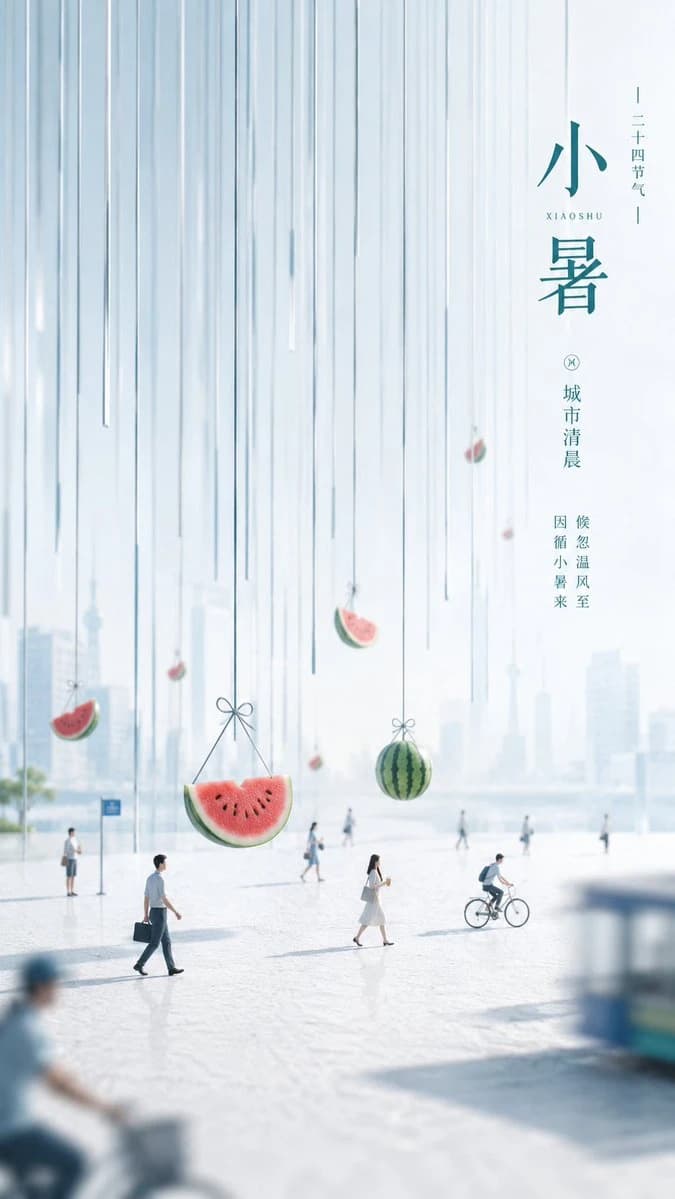
505 wordsGoal: Create a serene vertical Chinese solar-term poster for {argument name="season title" default="小暑"}, with transparent, quiet, miniature-narrative aesthetics: first impression is rhythmic vertical pressure, second impression is tiny urban life, third impression is a sense of time, heat, and open space.
Canvas: Tall 9:16 poster, soft high-key daylight, pale blue-white palette, lots of clean negative space, airy haze, shallow depth of field, minimal and elegant.
Layout: The image is divided into three layers. Top layer: a dense curtain of many thin vertical hanging lines descending from the top edge, varied lengths, translucent blue-gray, like wind chimes, rain threads, or suspended strings. Middle/right typography layer: vertical Chinese editorial text placed in the upper-right quadrant with generous spacing. Bottom layer: a miniature city plaza scene occupying the lower third, with tiny people moving through a bright misty urban morning.
Text content: On the right side, set the main vertical title as {argument name="main Chinese title" default="小暑"} in refined teal Chinese serif/calligraphy style, large and elegant. Add small roman letters {argument name="romanized season name" default="XIAOSHU"} beside or between the title characters. Add a small vertical label {argument name="solar term label" default="二十四节气"} near the top. Add poetic vertical copy in teal, including {argument name="poetic copy" default="城市清晨 候忽温风至 因循小暑来"}. Keep all text crisp, vertical, restrained, and aligned like a premium cultural poster.
Subject details: Include exactly 6 visible suspended fruit objects among the vertical strings: 1 large half-watermelon slice hanging by a bow near the lower left center; 1 whole round striped watermelon hanging by a bow near the lower center-right; 1 small watermelon wedge at the far left above the plaza; 1 small watermelon wedge in the mid-background near center; 1 small watermelon wedge high on the right; and 1 tiny red watermelon-like piece hanging lower right of the text area. The fruit should feel delicate and miniature, with soft highlights and realistic rind/seed details.
Miniature narrative: Show exactly 10 human figures in the plaza: 1 sharp man in a white shirt walking left-to-right with a dark briefcase in the foreground-left; 1 sharp woman in a pale dress walking near center holding a drink or phone; 1 sharp cyclist riding rightward near the lower-right center; 1 person standing near a blue sign on the far left; 5 tiny distant pedestrians scattered across the hazy background; and 1 large blurred partial cyclist in the extreme bottom-left foreground. Add one blurred blue vehicle or kiosk shape cropped at the bottom-right foreground. Background architecture should be a faint, washed-out modern city skyline with glass towers and an open waterfront or plaza feeling.
Visual style: Photorealistic mixed with surreal miniature installation, clean Chinese editorial poster design, pale cyan and white, teal typography, watermelon red/green accents, soft morning haze, bright reflective ground, gentle shadows, cinematic depth of field, calm summer atmosphere, no clutter.
Constraints: Maintain strong negative space, keep the vertical string rhythm dominant in the upper two-thirds, keep all people small and story-like, avoid extra fruit beyond the 6 specified suspended fruit objects, avoid extra headline text, no watermark, no logo, no border.About this prompt
Xiaoshu Watermelon City Poster is a ready-to-use social media prompt for GPT Image 2 on Image 2. Copy the 505 words below, paste them into the Create form, and you will get a result close to the preview above. Tweak the Social Media, Product, Food tag if you want to push it somewhere new.
Use it as a starting point, then adjust the subject, lighting, or composition to suit your idea. The credit cost stays the same whether you use it as written or customize it.
Use case
A strong starting point for Social Media
Start here when you want a social media image inspired by Xiaoshu Watermelon City Poster. The prompt already sets the look and composition; replace the subject, product, colors, or scene details to match your project.
Easy places to tweak
- Subject Swap in your person, product, place, or object without changing the overall composition.
- Look and mood Tune the lighting, palette, camera angle, or materials so the image fits your brand.
- Final format Set the aspect ratio, background, text, or layout notes before you generate.
More prompt paths to explore
Find more GPT Image 2 prompts with a similar style, use case, or subject.
How to use it
- Step 1
Copy the prompt
Hit the Copy button above to grab the full text.
- Step 2
Open Image 2 Create
Head to the Create form and paste it in.
- Step 3
Generate
Hit Generate. Your version lands in seconds.
Make it yours
Load the prompt into the Create form with one click, then start tweaking.