Prompt
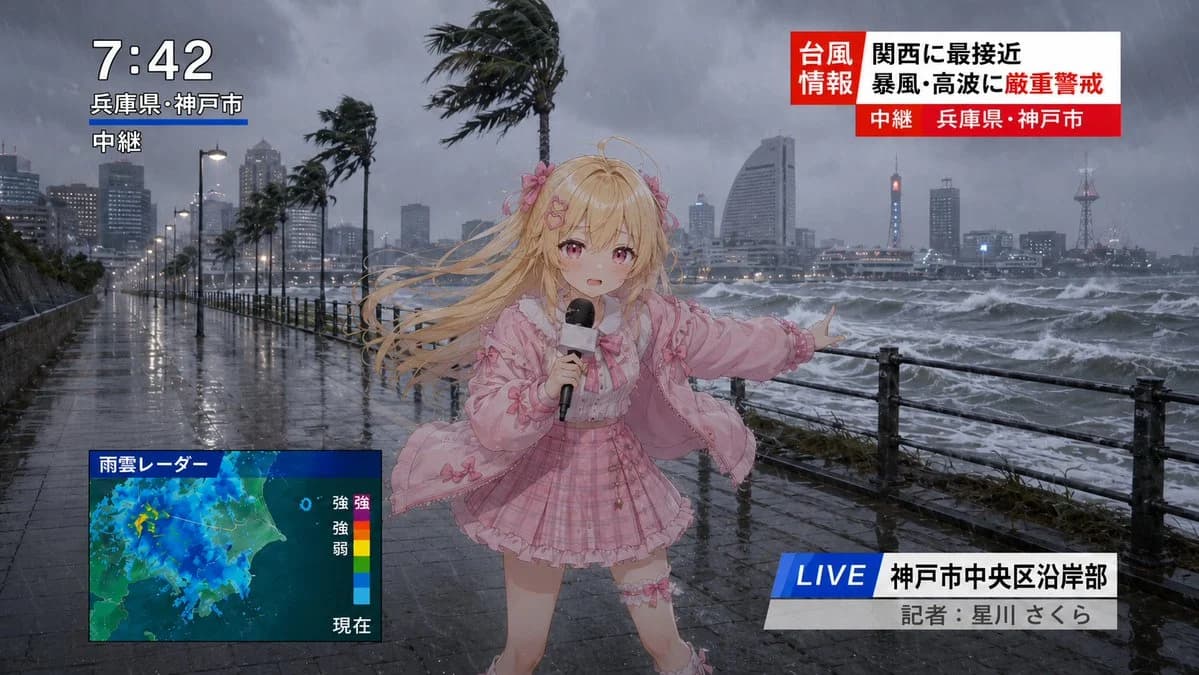
395 wordsGoal: Create a dramatic live television news still of an anime typhoon report in Kobe, Japan, combining a realistic stormy waterfront background with a cute anime reporter composited in the foreground.
Canvas: 16:9 horizontal broadcast frame, photorealistic rainy seaside city scene at dusk or early evening, grey-blue storm lighting, wet reflective pavement, rough ocean waves, heavy rain streaks, strong wind, dark clouds, distant skyline and harbor towers.
Main subject: A cute blonde anime girl news reporter stands slightly right of center on a waterfront promenade beside a black metal railing. She has very long blonde hair blown violently to the left by the wind, pink flower hair accessories, a determined reporting pose, and one arm extended toward the stormy sea. She holds a black handheld microphone in her other hand. Her outfit is a pink idol-style ensemble: frilly pink jacket, bow details, pale blouse, pink plaid pleated skirt, ruffled trim, ribbons, and thigh accessory. Her face is intentionally covered by a centered square blur/censor block in a muted beige color.
Environment details: The promenade is soaked and reflective, lined with street lamps and wind-bent palm trees. Show exactly 5 prominent palm trees leaning in the wind along the waterfront. The ocean on the right is churning with whitecaps and spray. The city skyline appears through rain and mist, with high-rise buildings and a lit tower in the distance.
Broadcast graphics: Include exactly 4 on-screen TV overlay groups. 1) Top-left time/location stack: large white time {argument name="time display" default="7:42"}, smaller Japanese location text {argument name="location text" default="兵庫県・神戸市"}, and a white live-relay label {argument name="relay label" default="中継"}; add a short blue underline beneath the location. 2) Top-right typhoon alert banner: red-and-white Japanese breaking-news panel with the labels {argument name="typhoon headline" default="台風 情報 関西に最接近 暴風・高波に厳重警戒"} plus a red lower strip reading {argument name="broadcast place label" default="中継 兵庫県・神戸市"}. 3) Bottom-left weather radar box: a rectangular blue-framed rain-cloud radar map labeled 「雨雲レーダー」, with a vertical color scale on the right and small Japanese intensity labels 「強」「弱」 and 「現在」. 4) Bottom-right lower third: a blue slanted LIVE tag, white location bar reading 「神戸市中央区沿岸部」, and grey reporter credit bar reading 「記者:星川 さくら」.
Visual style: Realistic disaster-news photography for the background, high-quality anime character rendering for the reporter, cohesive broadcast composition, rain and motion effects, dramatic wind-blown hair and clothing, sharp TV news graphics, no watermark, no extra logos, no extra overlay groups.About this prompt
Anime Typhoon Live News Reporter is a ready-to-use social media prompt for GPT Image 2 on Image 2. Copy the 395 words below, paste them into the Create form, and you will get a result close to the preview above. Tweak the Social Media, Infographic, Poster tag if you want to push it somewhere new.
Use it as a starting point, then adjust the subject, lighting, or composition to suit your idea. The credit cost stays the same whether you use it as written or customize it.
Use case
A strong starting point for Social Media
Start here when you want a social media image inspired by Anime Typhoon Live News Reporter. The prompt already sets the look and composition; replace the subject, product, colors, or scene details to match your project.
Easy places to tweak
- Subject Swap in your person, product, place, or object without changing the overall composition.
- Look and mood Tune the lighting, palette, camera angle, or materials so the image fits your brand.
- Final format Set the aspect ratio, background, text, or layout notes before you generate.
More prompt paths to explore
Find more GPT Image 2 prompts with a similar style, use case, or subject.
How to use it
- Step 1
Copy the prompt
Hit the Copy button above to grab the full text.
- Step 2
Open Image 2 Create
Head to the Create form and paste it in.
- Step 3
Generate
Hit Generate. Your version lands in seconds.
Make it yours
Load the prompt into the Create form with one click, then start tweaking.