Prompt
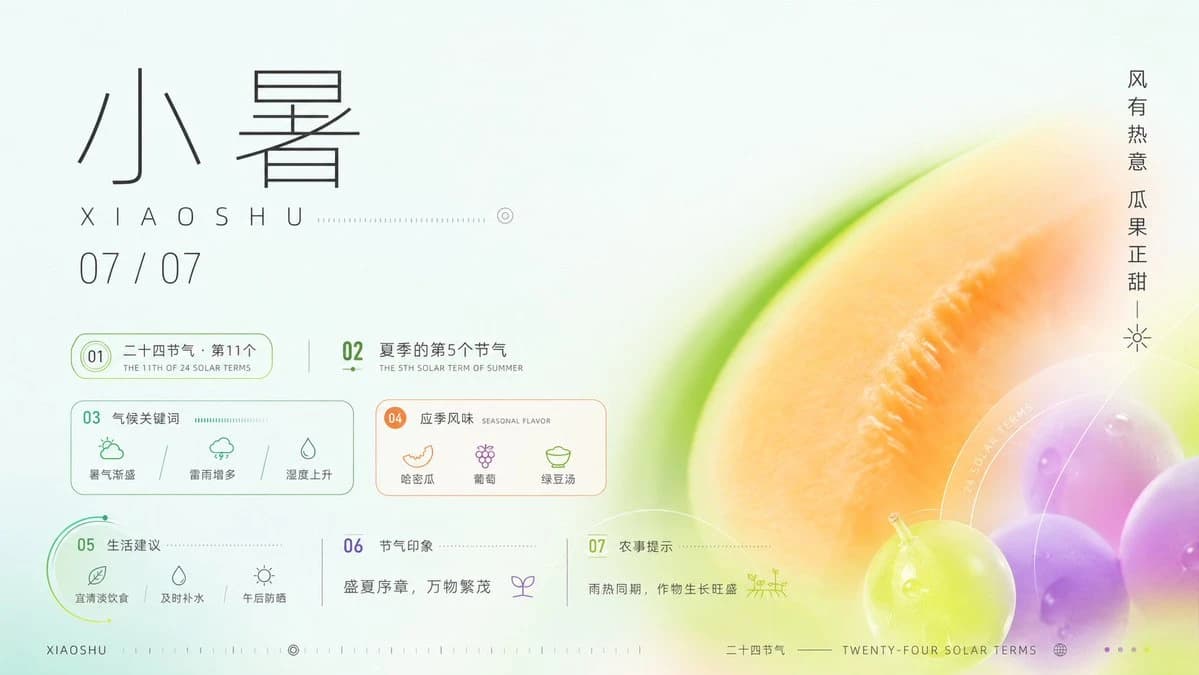
466 wordsGoal: Create a refined horizontal Chinese solar-term infographic poster for {argument name="solar term name" default="小暑"}, combining traditional calendar information with a fresh summer dessert and melon color palette.
Canvas: 16:9 landscape poster, pale mint-white background, airy negative space, high-end editorial infographic style. Use thin black, teal, lime, peach, orange, and violet accents. The right half is dominated by a soft-focus macro fruit composition: a large cropped cantaloupe or melon slice in warm orange with a bright green rind, plus glossy grapes in lime green and purple at the lower right, with translucent circular overlays and delicate white technical arcs.
Layout: Left side contains the typography and data cards; right side contains the fruit photograph-style illustration. Top-left: very large thin-line Chinese title “小暑”, below it spaced Romanization “XIAOSHU” with a dotted horizontal guide line and small circular target mark, then the date “07 / 07”. Far right edge: vertical Chinese slogan “风有热意 瓜果正甜” with a tiny sun icon beneath it.
Information modules: Include exactly 7 numbered infographic sections, arranged in a clean grid with fine outlines and dotted dividers. Section 01: pill-shaped green outline card reading “二十四节气 · 第11个” with smaller English subtitle “THE 11TH OF 24 SOLAR TERMS”. Section 02: text block reading “夏季的第5个节气” with English subtitle “THE 5TH SOLAR TERM OF SUMMER”. Section 03: rounded rectangle card titled “气候关键词” with exactly 3 mini icon items: “暑气渐盛” with a sun/cloud icon, “雷雨增多” with a rainy cloud icon, and “湿度上升” with a water-drop triangle icon. Section 04: rounded rectangle card titled “应季风味” with English subtitle “SEASONAL FLAVOR” and exactly 3 mini icon items: “哈密瓜” with melon icon, “葡萄” with grape icon, and “绿豆汤” with bowl icon. Section 05: green arc-accent card titled “生活建议” with exactly 3 mini icon items: “宜清淡饮食” with leaf icon, “及时补水” with water drop icon, and “午后防晒” with sun icon. Section 06: simple text area titled “节气印象” containing the quote “盛夏序章,万物繁茂” and a small sprout icon. Section 07: simple text area titled “农事提示” containing “雨热同期,作物生长旺盛” and a small field/crop icon.
Footer: Bottom-left small label “XIAOSHU” followed by tiny tick marks and a target icon. Bottom-center/right label “二十四节气” and “TWENTY-FOUR SOLAR TERMS” with a tiny globe icon and four small pagination dots. Keep all text crisp and minimal.
Visual style: Minimalist Swiss-grid layout mixed with Chinese seasonal aesthetics, thin monoline icons, translucent glassmorphism circles, delicate dotted measurement lines, soft gradients, shallow-depth-of-field fruit rendering, luminous summer freshness. Main color inspiration comes from {argument name="color inspiration" default="summer desserts and watermelon colors"}. Use realistic fruit texture but keep the infographic elements flat and precise.
Constraints: Use exactly the 7 numbered sections and exactly the item counts listed above. Keep the composition uncluttered, with generous blank space on the left and a dreamy macro fruit crop on the right. No extra logos, no watermark, no additional paragraphs of text.About this prompt
Xiaoshu Solar Term Infographic Poster is a ready-to-use infographic prompt for GPT Image 2 on Image 2. Copy the 466 words below, paste them into the Create form, and you will get a result close to the preview above. Tweak the Infographic, Poster, Product tag if you want to push it somewhere new.
Use it as a starting point, then adjust the subject, lighting, or composition to suit your idea. The credit cost stays the same whether you use it as written or customize it.
Use case
A strong starting point for Infographic
Start here when you want a infographic image inspired by Xiaoshu Solar Term Infographic Poster. The prompt already sets the look and composition; replace the subject, product, colors, or scene details to match your project.
Easy places to tweak
- Subject Swap in your person, product, place, or object without changing the overall composition.
- Look and mood Tune the lighting, palette, camera angle, or materials so the image fits your brand.
- Final format Set the aspect ratio, background, text, or layout notes before you generate.
More prompt paths to explore
Find more GPT Image 2 prompts with a similar style, use case, or subject.
How to use it
- Step 1
Copy the prompt
Hit the Copy button above to grab the full text.
- Step 2
Open Image 2 Create
Head to the Create form and paste it in.
- Step 3
Generate
Hit Generate. Your version lands in seconds.
Make it yours
Load the prompt into the Create form with one click, then start tweaking.