Prompt
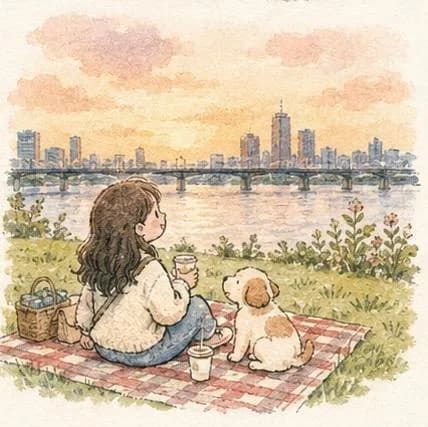
134 wordsSoft watercolor anime illustration of a cute girl exploring peaceful city landscapes with her small puppy and cat companion, cozy slice-of-life aesthetic, pastel watercolor palette, gentle hand-painted textures, dreamy sketchbook art style, warm sunlight and soft clouds, charming urban riverside picnic scene, quiet Japanese-style street with glowing café lights and murals, cherry blossom lake view with modern skyline, peaceful stone canal walkway with greenery and bridges, adorable anime-inspired girl with fluffy sweater, denim overalls or skirt, small backpack, rosy cheeks and soft wavy hair, whimsical Ghibli-inspired atmosphere, calming everyday life moments, cozy travel diary vibe, highly detailed watercolor brush strokes, delicate ink outlines, nostalgic and heartwarming mood, soft cinematic composition, storybook illustration style, minimal pastel tones, peaceful nature and city harmony, ultra aesthetic anime background art, handmade watercolor paper texture, wholesome companionship theme, 8k
About this prompt
Watercolor City Slice-of-Life is a ready-to-use portrait prompt for GPT Image 2 on Image 2. Copy the 134 words below, paste them into the Create form, and you will get a result close to the preview above. Tweak the Portrait, Travel, Architecture tag if you want to push it somewhere new.
Use it as a starting point, then adjust the subject, lighting, or composition to suit your idea. The credit cost stays the same whether you use it as written or customize it.
Use case
A strong starting point for Portrait
Start here when you want a portrait image inspired by Watercolor City Slice-of-Life. The prompt already sets the look and composition; replace the subject, product, colors, or scene details to match your project.
Easy places to tweak
- Subject Swap in your person, product, place, or object without changing the overall composition.
- Look and mood Tune the lighting, palette, camera angle, or materials so the image fits your brand.
- Final format Set the aspect ratio, background, text, or layout notes before you generate.
More prompt paths to explore
Find more GPT Image 2 prompts with a similar style, use case, or subject.
How to use it
- Step 1
Copy the prompt
Hit the Copy button above to grab the full text.
- Step 2
Open Image 2 Create
Head to the Create form and paste it in.
- Step 3
Generate
Hit Generate. Your version lands in seconds.
Make it yours
Load the prompt into the Create form with one click, then start tweaking.