Prompt
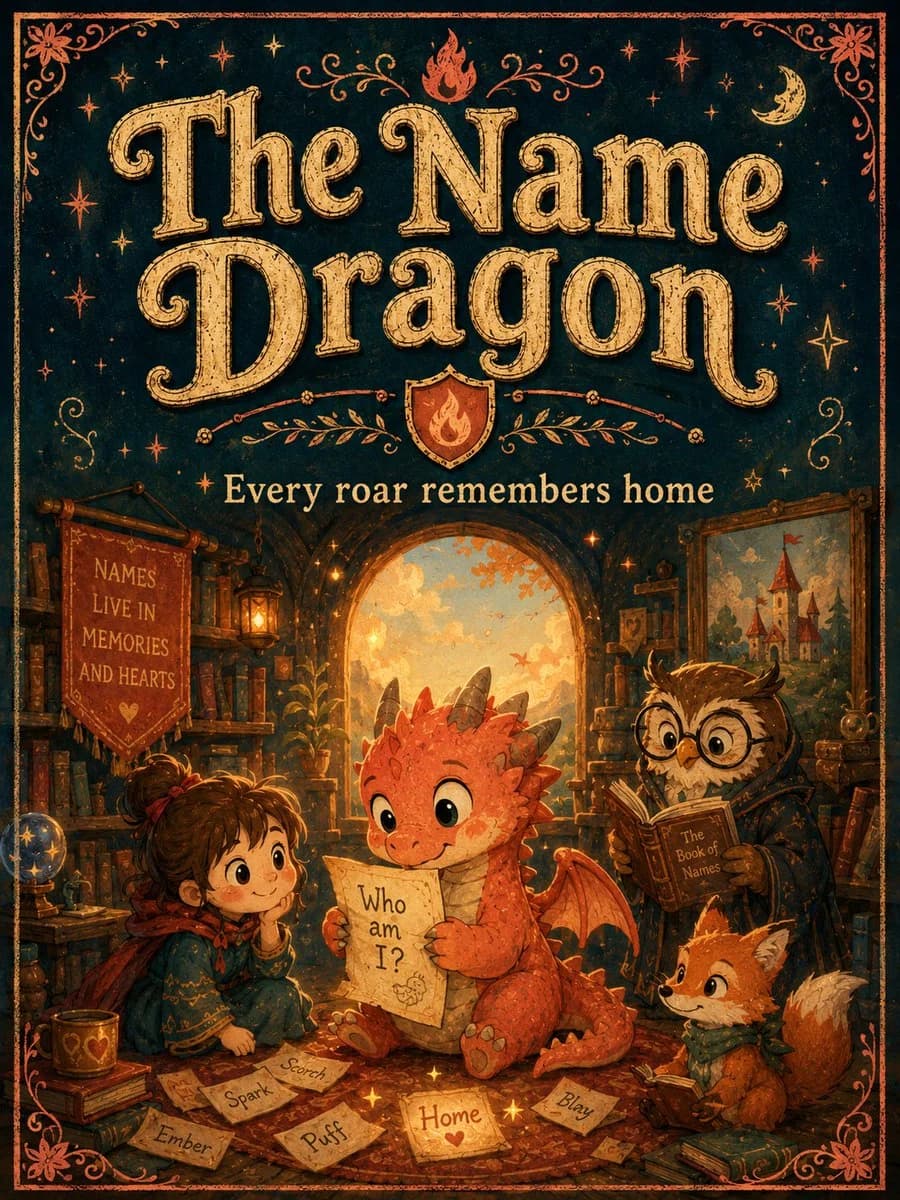
418 wordsGoal: Create a richly illustrated vintage storybook poster cover for a fantasy children's tale titled {argument name="title text" default="The Name Dragon"}, with a warm, magical library scene and ornate hand-lettered typography.
Canvas: Vertical portrait poster, 3:4 aspect ratio, like an aged illustrated book cover. Use a dark teal-black background with distressed parchment texture, copper-orange decorative border, corner flourishes, stars, moons, and tiny magical sparkles.
Top typography: The upper half is dominated by large ornate serif lettering reading {argument name="title text" default="The Name Dragon"}. The letters are warm antique gold with engraved line texture, subtle shadowing, curled swashes, and a hand-printed vintage look. Above and around the title are small stars, a crescent moon, a small flame icon at the top center, and symmetrical vine-like flourishes. Beneath the title is a small shield crest with a flame emblem, then the subtitle {argument name="subtitle text" default="Every roar remembers home"} in cream-gold serif type.
Main scene: The lower half shows a cozy magical library inside an arched alcove glowing with sunset light. Bookshelves, lanterns, scrolls, framed art, plants, and warm amber light fill the background. The floor is covered with scattered parchment name cards and golden sparkles.
Characters: Include exactly 4 main characters. 1) A small orange baby dragon seated at center, cute and expressive, with round green eyes, little gray horns, red-orange scales, tiny wings, a curled tail, and clawed feet; it holds a parchment reading {argument name="dragon parchment text" default="Who am I?"}. 2) A young girl sitting on the left, brown hair tied in a messy bun with a red ribbon, wearing a teal embroidered cloak and red scarf, smiling gently with her chin in her hand. 3) A wise owl on the right wearing round spectacles and a dark robe, reading a brown book labeled {argument name="book title" default="The Book of Names"}. 4) A small orange fox at the lower right wearing a green scarf, looking toward the dragon with curiosity.
Visible text and countable items: Include exactly 6 loose name cards on the floor labeled: “Scorch”, “Spark”, “Ember”, “Puff”, “Home”, and “Blazy”. Add one hanging red banner on the left bookshelf with the text {argument name="banner text" default="NAMES LIVE IN MEMORIES AND HEARTS"}. Keep the title, subtitle, dragon parchment, owl book label, banner, and six name cards readable.
Visual style: Whimsical hand-painted children's book illustration, vintage fantasy cover, warm orange and gold lighting, deep teal shadows, textured paper grain, slightly imperfect ink lines, ornate decorative framing, cozy emotional atmosphere. Avoid photorealism, modern UI elements, or extra characters.About this prompt
Vintage Name Dragon Storybook Poster is a ready-to-use poster prompt for GPT Image 2 on Image 2. Copy the 418 words below, paste them into the Create form, and you will get a result close to the preview above. Tweak the Infographic, Poster, Product tag if you want to push it somewhere new.
Use it as a starting point, then adjust the subject, lighting, or composition to suit your idea. The credit cost stays the same whether you use it as written or customize it.
Use case
A strong starting point for Poster
Start here when you want a poster image inspired by Vintage Name Dragon Storybook Poster. The prompt already sets the look and composition; replace the subject, product, colors, or scene details to match your project.
Easy places to tweak
- Subject Swap in your person, product, place, or object without changing the overall composition.
- Look and mood Tune the lighting, palette, camera angle, or materials so the image fits your brand.
- Final format Set the aspect ratio, background, text, or layout notes before you generate.
More prompt paths to explore
Find more GPT Image 2 prompts with a similar style, use case, or subject.
How to use it
- Step 1
Copy the prompt
Hit the Copy button above to grab the full text.
- Step 2
Open Image 2 Create
Head to the Create form and paste it in.
- Step 3
Generate
Hit Generate. Your version lands in seconds.
Make it yours
Load the prompt into the Create form with one click, then start tweaking.