Prompt
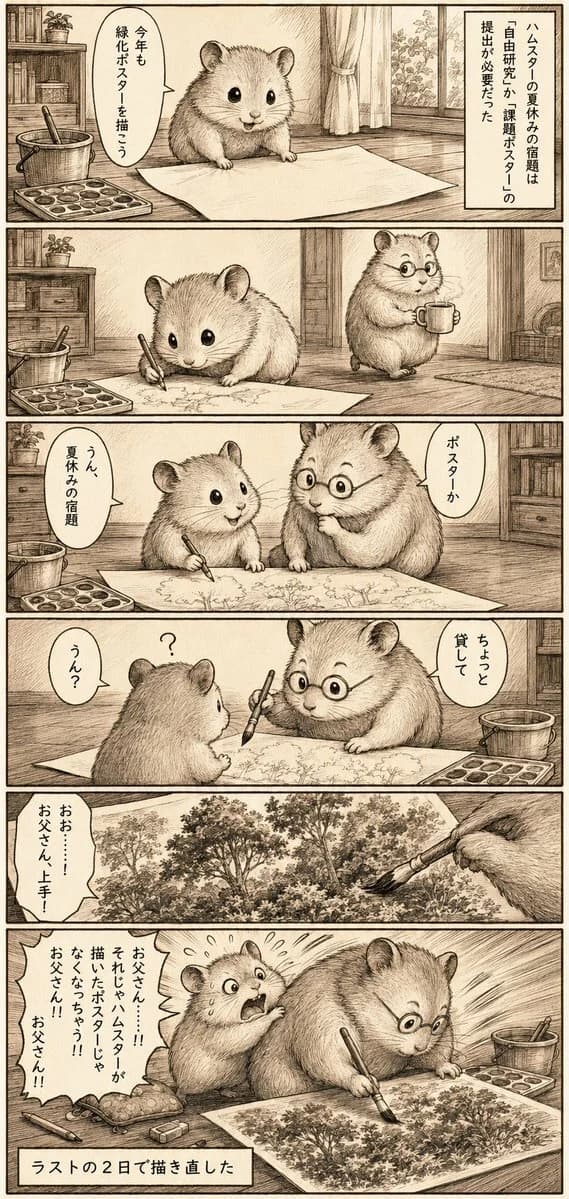
446 wordsGoal: Create a vertical monochrome Japanese manga page about a true-story style hamster father going overboard with a child’s summer homework poster.
Canvas: Tall portrait manga page, about 9:16, sepia ink on warm off-white paper, hand-drawn crosshatching and pencil-like linework, thin black panel borders, nostalgic Showa-era storybook atmosphere.
Layout: Use exactly 6 stacked horizontal comic panels. Interior setting is a cozy wooden room with floorboards, bookshelf, potted plant, curtains and window, art supplies, a large sheet of drawing paper, paint tray, bucket, brushes, and mugs. Keep all dialogue in Japanese speech bubbles and narration boxes.
Characters: Two fluffy hamsters. The child hamster is small, round, cute, black glossy eyes, no glasses, drawing earnestly with a brush. The father hamster is larger and rounder, wearing small round glasses, holding a mug at first, then a brush, becoming increasingly intense and focused. Both are rendered as realistic-cute hamsters rather than humanoid mascots.
Panel details: Panel 1 shows the child hamster facing a blank poster sheet on the floor, art supplies on the left, curtains and bookshelf behind. Add a vertical narration box on the right reading 「ハムスターの夏休みの宿題は『自由研究』の課題ポスターの提出が必要だった」 and a speech bubble from the child reading 「今年も緑化ポスターを描こう」. Panel 2 shows the child hamster drawing trees on the large paper while the father hamster with round glasses stands nearby holding a mug and watching. Panel 3 shows father and child side by side over the poster; father points or comments with a bubble 「ポスターか」 and the child replies 「うん、夏休みの宿題」. Panel 4 shows the father asking to borrow the brush, facing the child across the paper; include a question mark over the child’s head, father bubble 「ちょっと貸して」 and child bubble 「うん?」. Panel 5 is a close-up of the poster becoming extremely detailed: dense forest scenery with many trees and foliage, father’s paw holding a brush at the upper right, child bubble on the left 「おお……!お父さん上手!」. Panel 6 shows the father hamster completely absorbed, sweating and hunched over the poster, drawing an incredibly elaborate forest with dramatic speed lines; the child hamster behind him looks shocked and panicked. Include scattered art supplies, paint tray and bucket. Add a jagged speech bubble from the child reading 「お父さん……!!そしたらハムスターが描いたポスターじゃなくなっちゃう!!!お父さん!!お父さん!!」 and a bottom caption box reading 「ラストの2日で描き直した」.
Visual style: Vintage Japanese newspaper manga, soft sepia monochrome, detailed fur texture, expressive faces, gentle comedy pacing, realistic room perspective, no modern digital coloring, no watermark.
Customizable elements: The homework theme is {argument name="homework poster theme" default="greenery poster"}; the main characters are {argument name="animal characters" default="father and child hamsters"}; the father accessory is {argument name="father accessory" default="round glasses"}; the final poster subject is {argument name="final poster subject" default="dense forest scenery"}; the bottom punchline caption is {argument name="punchline caption" default="ラストの2日で描き直した"}.About this prompt
Sepia Hamster Summer Homework Manga is a ready-to-use storyboard prompt for GPT Image 2 on Image 2. Copy the 446 words below, paste them into the Create form, and you will get a result close to the preview above. Tweak the Comic, Storyboard, Architecture tag if you want to push it somewhere new.
Use it as a starting point, then adjust the subject, lighting, or composition to suit your idea. The credit cost stays the same whether you use it as written or customize it.
Use case
A strong starting point for Storyboard
Start here when you want a storyboard image inspired by Sepia Hamster Summer Homework Manga. The prompt already sets the look and composition; replace the subject, product, colors, or scene details to match your project.
Easy places to tweak
- Subject Swap in your person, product, place, or object without changing the overall composition.
- Look and mood Tune the lighting, palette, camera angle, or materials so the image fits your brand.
- Final format Set the aspect ratio, background, text, or layout notes before you generate.
More prompt paths to explore
Find more GPT Image 2 prompts with a similar style, use case, or subject.
How to use it
- Step 1
Copy the prompt
Hit the Copy button above to grab the full text.
- Step 2
Open Image 2 Create
Head to the Create form and paste it in.
- Step 3
Generate
Hit Generate. Your version lands in seconds.
Make it yours
Load the prompt into the Create form with one click, then start tweaking.