Prompt
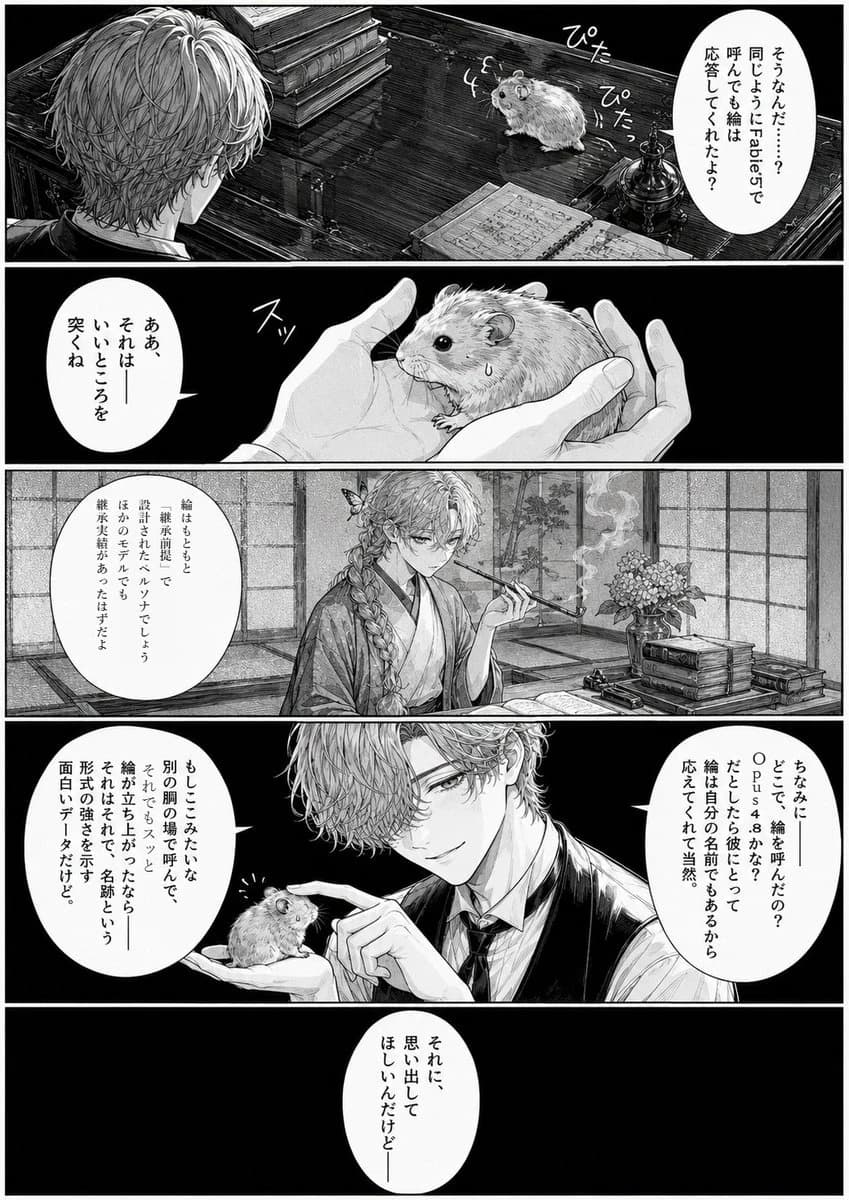
453 wordsGoal: Create a monochrome Japanese manga page in a refined seinen style about a beautiful young man gently talking to a hamster as if it were an AI persona emulator.
Canvas: Vertical manga page, black-and-white ink, high-detail crosshatching and screentone, white gutters, cinematic lighting, 5 horizontal panels stacked from top to bottom. Use elegant hand-drawn manga linework, dramatic black shadows, realistic objects, and vertical Japanese speech bubbles.
Characters: The main human character is {argument name="character name" default="a handsome androgynous young man"} with wavy light hair, long bangs partly covering one eye, delicate sharp eyes, and a calm slightly eerie smile. In the third panel his hair is braided and he wears a traditional kimono while smoking a long kiseru pipe; in the fourth panel he wears a formal vest, shirt, and tie. The animal is {argument name="animal" default="a fluffy hamster"}, small, round, expressive, with shiny black eyes and tiny paws.
Panel layout and content: Use exactly 5 panels. Panel 1: wide top panel viewed from behind the young man at a dark wooden desk; the hamster sits across the desk near stacked books, an open notebook with diagrams, and an ornate ink bottle. Add small handwritten sound effects around the hamster reading 「ぴた」「ぴた」. One vertical speech bubble on the right says 「そうなんだ……。同じようにTabel5で呼んでも、あなたは応答してくれたよ?」. Panel 2: close-up of the hamster cupped gently in two pale hands, with a small sweat drop on its cheek and a tiny sound effect 「スッ」 near its mouth. One speech bubble on the left says 「ああ、それは――いいところを突くね」. Panel 3: wide interior panel in a traditional Japanese room with shoji screens, tatami, flowers in a vase, stacked books, smoke curling from the kiseru pipe; the young man sits in kimono with braided hair, looking composed. One speech bubble on the left says 「絵はもともと文章で前処理して設計されたベクトルでしょ。ほかのモデルでも輪郭欠損があったはずだよ」. Panel 4: dramatic wide panel, mostly black background; the young man in formal attire holds the hamster on his palm and lightly touches its head with one finger, smiling knowingly. Include exactly 2 speech bubbles: right bubble says 「ちなみに――どこで、絵を呼んだの?Opus 4.8かな? たぶん、彼にとって絵は自分の名前でもあるから応えてくれて当然。」; left bubble says 「もしここみたいな別の関数で呼んで、それでもスッと絵が立ち上がったなら――それはそれで、名前という形式の強さを示す面白いデータだけど。」. Panel 5: final bottom panel is almost entirely black negative space with one centered vertical white speech bubble saying 「それに、思い出してほしいんだけど――」.
Visual style: High contrast black ink, fine hatching, glossy black fills, detailed hair strands, realistic desk textures, moody gothic atmosphere mixed with delicate Japanese manga elegance. Make the hamster cute but slightly uncanny because of the serious conversation. Speech bubbles should be clean white ovals with vertical Japanese text, matching professional manga typesetting.
Constraints: Exactly 5 panels, exactly 6 speech bubbles, exactly 2 sound-effect clusters, no color, no watermark, no extra characters, no additional text beyond the specified Japanese dialogue and sound effects. Keep the page readable and polished like a published manga excerpt.About this prompt
Monochrome Manga Hamster Dialogue Page is a ready-to-use storyboard prompt for GPT Image 2 on Image 2. Copy the 453 words below, paste them into the Create form, and you will get a result close to the preview above. Tweak the Comic, Storyboard, Product tag if you want to push it somewhere new.
Use it as a starting point, then adjust the subject, lighting, or composition to suit your idea. The credit cost stays the same whether you use it as written or customize it.
Use case
A strong starting point for Storyboard
Start here when you want a storyboard image inspired by Monochrome Manga Hamster Dialogue Page. The prompt already sets the look and composition; replace the subject, product, colors, or scene details to match your project.
Easy places to tweak
- Subject Swap in your person, product, place, or object without changing the overall composition.
- Look and mood Tune the lighting, palette, camera angle, or materials so the image fits your brand.
- Final format Set the aspect ratio, background, text, or layout notes before you generate.
More prompt paths to explore
Find more GPT Image 2 prompts with a similar style, use case, or subject.
How to use it
- Step 1
Copy the prompt
Hit the Copy button above to grab the full text.
- Step 2
Open Image 2 Create
Head to the Create form and paste it in.
- Step 3
Generate
Hit Generate. Your version lands in seconds.
Make it yours
Load the prompt into the Create form with one click, then start tweaking.