Prompt
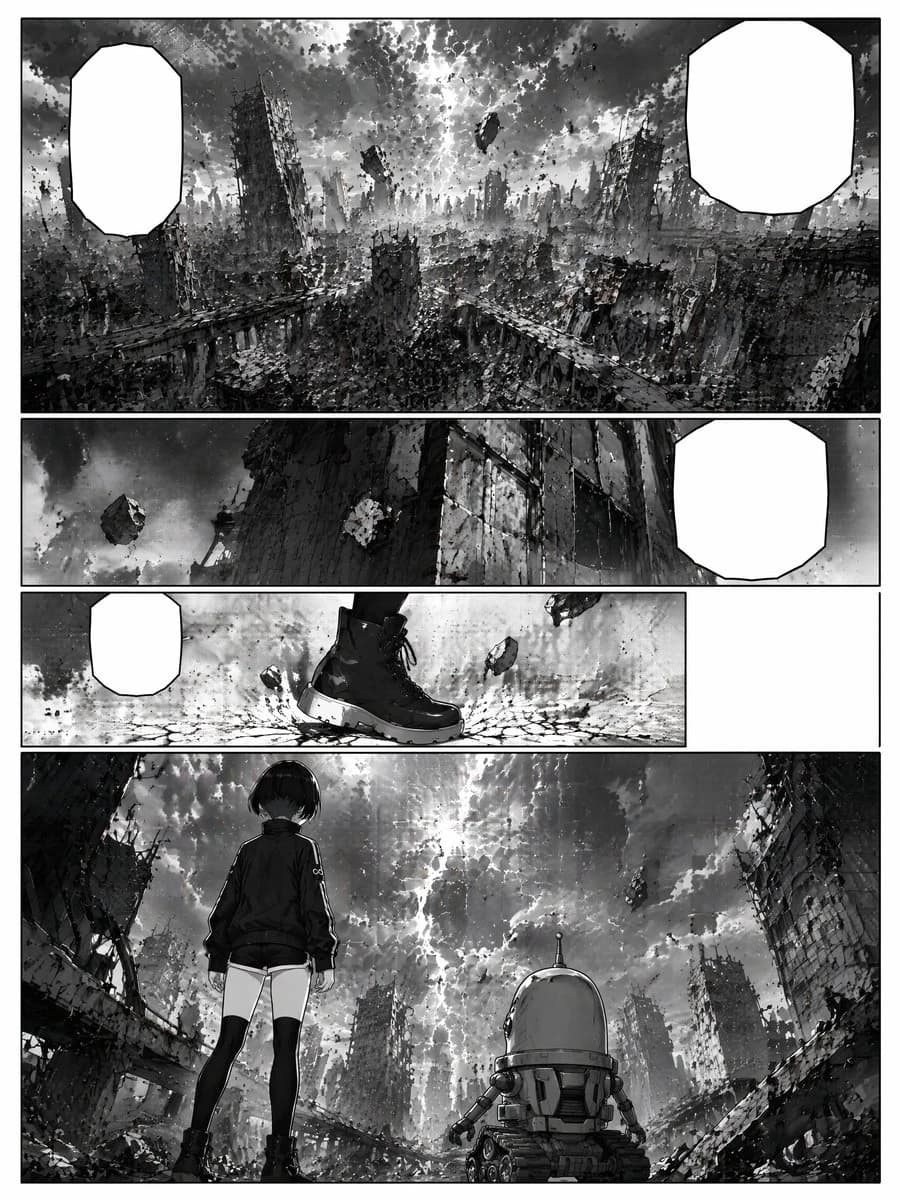
462 wordsGoal: Create a black-and-white sci-fi manga page showing a ruined futuristic city after a catastrophe, with cinematic wide shots and empty dialogue bubbles for later lettering.
Canvas: Vertical manga page, portrait orientation, clean white page border, high-contrast monochrome ink and grayscale screentone, detailed debris textures, dramatic cloudy sky, no color.
Layout: Use exactly 4 horizontal panels stacked from top to bottom, separated by thick white gutters.
- Panel 1: A very wide establishing shot filling the top third of the page. Show a devastated megacity with collapsed skyscrapers, broken elevated roads, rubble, dust, and a stormy sky split by bright light. Include floating chunks of wreckage in the sky. Add exactly 2 blank white manga speech bubbles: one tall rounded polygon bubble at the upper left and one larger rounded polygon bubble at the upper right.
- Panel 2: A narrow panoramic panel beneath it. Low-angle view of a towering damaged building wall and a dark sky with a levitating rock or debris chunk. Add exactly 1 blank white speech bubble on the right side.
- Panel 3: A narrow action-detail panel. Close-up of one black combat boot stepping onto cracked ground, with small stones and debris floating around it. Add exactly 1 small blank white speech bubble on the left. Leave a large empty white rectangular gutter/space on the far right of this row, as if the panel does not extend across the full page.
- Panel 4: A large final panel occupying the bottom portion. Rear view of a young girl and a small robot facing the ruined city and apocalyptic sky. The girl stands on the left, wearing a dark jacket, short shorts, thigh-high black socks, and sturdy boots, with short dark bobbed hair. The robot stands to her right, squat and cylindrical with a domed head, small side arms, treads, vents, and mechanical details. The background shows broken buildings framing the scene, rubble in the foreground, floating debris in the sky, and a bright crack of light through dense clouds.
Subject details: The main human character is {argument name="character name" default="a silent young girl"}, with {argument name="hair style" default="short dark bobbed hair"}, wearing {argument name="outfit" default="dark jacket, short shorts, thigh-high socks, and black boots"}. The companion is {argument name="robot companion" default="a small cylindrical treaded robot with a domed head"}. The setting is {argument name="ruined city setting" default="a collapsed futuristic megacity under a stormy sky"}.
Visual style: Serious seinen sci-fi manga, painterly ink wash, dense architectural detail, gritty rubble, dramatic perspective, atmospheric haze, heavy blacks, textured grayscale, cinematic composition, no sound effects, no visible lettering inside the bubbles.
Constraints: Exactly 4 panels and exactly 4 blank speech bubbles. Keep all speech bubbles empty white with black outlines. Do not add captions, titles, watermarks, logos, page numbers, or extra characters.About this prompt
Ruined Sci-Fi Manga Page is a ready-to-use social media prompt for GPT Image 2 on Image 2. Copy the 462 words below, paste them into the Create form, and you will get a result close to the preview above. Tweak the Social Media, Storyboard, Fashion tag if you want to push it somewhere new.
Use it as a starting point, then adjust the subject, lighting, or composition to suit your idea. The credit cost stays the same whether you use it as written or customize it.
Use case
A strong starting point for Social Media
Start here when you want a social media image inspired by Ruined Sci-Fi Manga Page. The prompt already sets the look and composition; replace the subject, product, colors, or scene details to match your project.
Easy places to tweak
- Subject Swap in your person, product, place, or object without changing the overall composition.
- Look and mood Tune the lighting, palette, camera angle, or materials so the image fits your brand.
- Final format Set the aspect ratio, background, text, or layout notes before you generate.
More prompt paths to explore
Find more GPT Image 2 prompts with a similar style, use case, or subject.
How to use it
- Step 1
Copy the prompt
Hit the Copy button above to grab the full text.
- Step 2
Open Image 2 Create
Head to the Create form and paste it in.
- Step 3
Generate
Hit Generate. Your version lands in seconds.
Make it yours
Load the prompt into the Create form with one click, then start tweaking.