Prompt
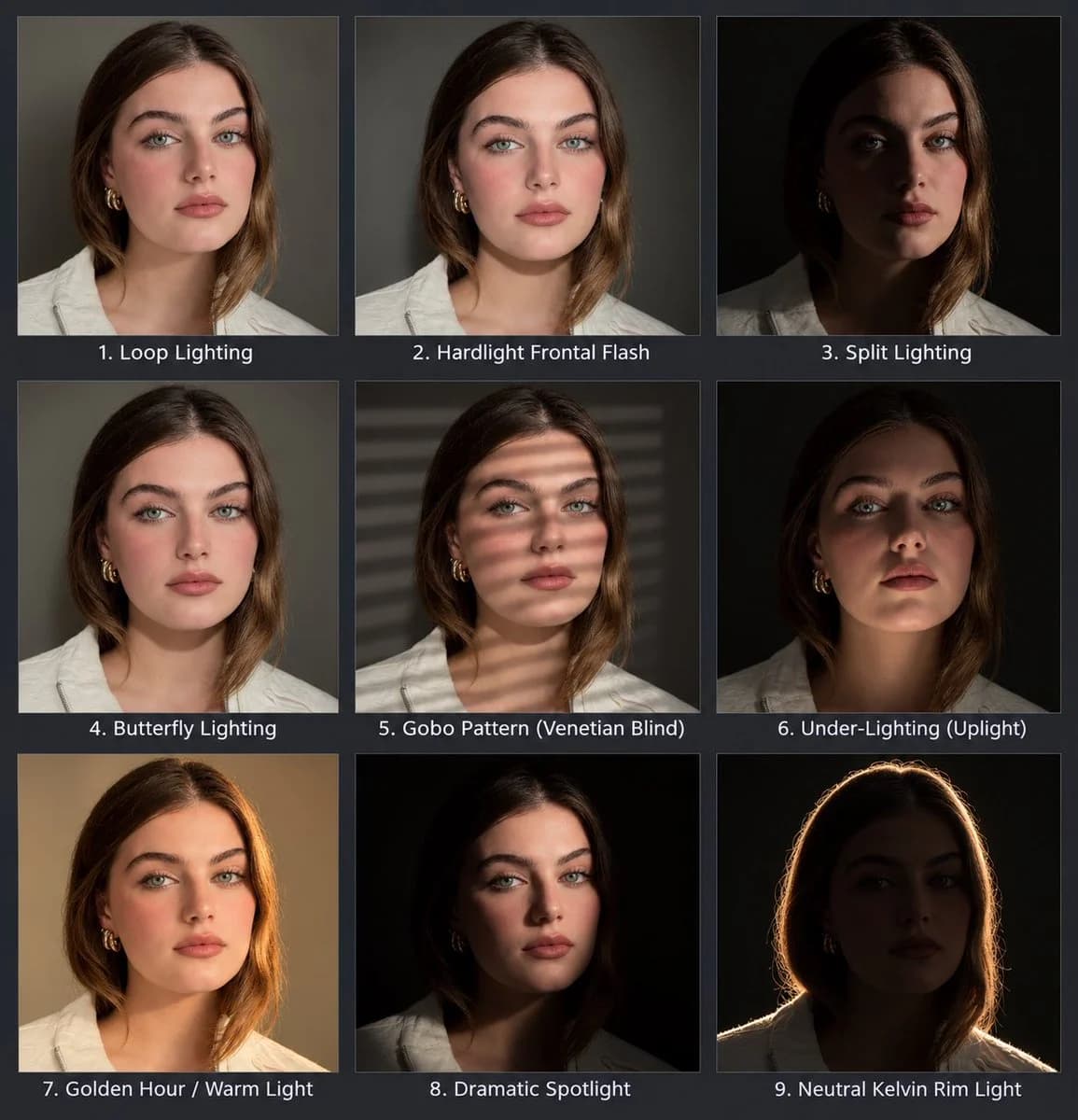
269 wordsA 3x3 photo grid presented as a single image on a {argument name="background color" default="dark grey"} background. Each of the nine grid cells contains a different portrait of the same subject from the uploaded image, maintaining the perfect character consistency, outfit and pose across all panels. Below each individual portrait, a clean sans-serif text label with a number and name is clearly displayed.
The grid layout and lighting setups are:
- Top row, left to right:
Loop Lighting (Flattering 3/4 light with a small loop of shadow from the nose onto the cheek)
Hardlight Frontal Flash (direct front facing, harsh flashlight with deep frontal shadows)
Split Lighting (dramatic light on only one side of the face, leaving the other side completely dark)
- Middle row, left to right:
Butterfly Lighting (classic symmetrical light from the front, slightly high, with a small shadow under the nose)
Gobo Pattern (Venetian Blind)' (light projected through Venetian blinds, creating linear shadows across the face and clothes, the shadow can also be scene on the background)
Under-Lighting (Uplight)' (light coming from below, creating reverse shadows and a moody look)
- Bottom row, left to right:
Golden Hour / Warm Light' (bathed in soft, golden, warm light from a side angle)
Dramatic Spotlight (hard, narrow circular beam of light, with a deep chiascuro effect and crushed blacks)
Neutral Kelvin Rim Light' (intense backlighting with no front fill, creating a distinct glowing outline around the hair and shoulders, leaving the face in darkness, against a black background).
The perspective and features remain identical in all panels, with only the specified lighting changing to match the label.About this prompt
Portrait Lighting Study Grid is a ready-to-use infographic prompt for GPT Image 2 on Image 2. Copy the 269 words below, paste them into the Create form, and you will get a result close to the preview above. Tweak the Infographic, Storyboard, Product tag if you want to push it somewhere new.
Use it as a starting point, then adjust the subject, lighting, or composition to suit your idea. The credit cost stays the same whether you use it as written or customize it.
Use case
A strong starting point for Infographic
Start here when you want a infographic image inspired by Portrait Lighting Study Grid. The prompt already sets the look and composition; replace the subject, product, colors, or scene details to match your project.
Easy places to tweak
- Subject Swap in your person, product, place, or object without changing the overall composition.
- Look and mood Tune the lighting, palette, camera angle, or materials so the image fits your brand.
- Final format Set the aspect ratio, background, text, or layout notes before you generate.
More prompt paths to explore
Find more GPT Image 2 prompts with a similar style, use case, or subject.
How to use it
- Step 1
Copy the prompt
Hit the Copy button above to grab the full text.
- Step 2
Open Image 2 Create
Head to the Create form and paste it in.
- Step 3
Generate
Hit Generate. Your version lands in seconds.
Make it yours
Load the prompt into the Create form with one click, then start tweaking.