Prompt
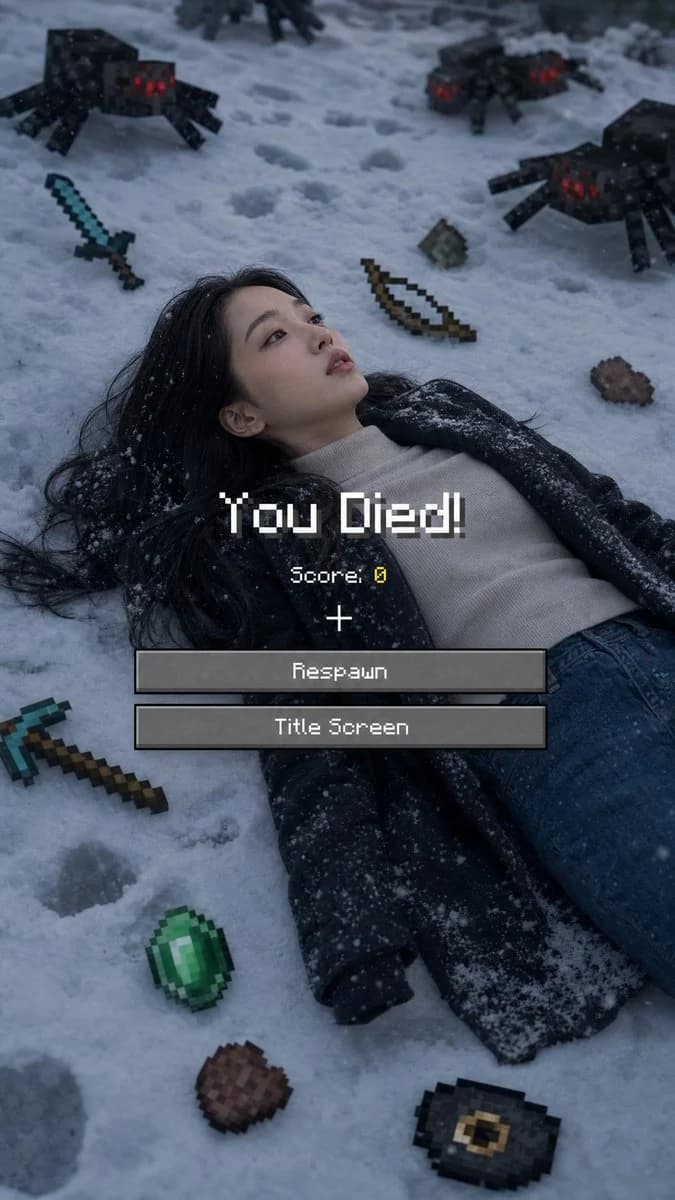
165 wordsUse 100% of the face and body from my reference image. Create a cinematic winter scene with a side face close-up view, inspired by a Minecraft death screen. The person is lying face up in the snow, wearing {argument name="clothing" default="casual winter clothing"}, in a realistic pose, with cool atmospheric lighting, slightly desaturated tones, and visible footprints in the snow. Surround the person with floating or placed pixelated objects in the Minecraft style, including a {argument name="weapon" default="diamond sword"}, bow, pickaxe, emerald, steak, Eye of Ender, music disc, and a mob of spiders. Add a realistic Minecraft "You Died!" overlay on top with pixel font, including "Score: 0," the reticle symbol, and two retro UI buttons labeled "Respawn" and "Title Screen." Naturally blend the realistic photography with pixel-art game elements. Soft shadows, melancholic winter aesthetic, ultra-detailed, vertical composition, DSLR realism, subtle depth of field, high contrast, 9:16 aspect ratio.
Negative Prompt:
"Low quality, blurry face, distorted body, extra limbs, incorrect facial features, cartoonish body, unrealistic"About this prompt
Minecraft Death Screen Portrait is a ready-to-use social media prompt for GPT Image 2 on Image 2. Copy the 165 words below, paste them into the Create form, and you will get a result close to the preview above. Tweak the Social Media, Infographic, Poster tag if you want to push it somewhere new.
Use it as a starting point, then adjust the subject, lighting, or composition to suit your idea. The credit cost stays the same whether you use it as written or customize it.
Use case
A strong starting point for Social Media
Start here when you want a social media image inspired by Minecraft Death Screen Portrait. The prompt already sets the look and composition; replace the subject, product, colors, or scene details to match your project.
Easy places to tweak
- Subject Swap in your person, product, place, or object without changing the overall composition.
- Look and mood Tune the lighting, palette, camera angle, or materials so the image fits your brand.
- Final format Set the aspect ratio, background, text, or layout notes before you generate.
More prompt paths to explore
Find more GPT Image 2 prompts with a similar style, use case, or subject.
How to use it
- Step 1
Copy the prompt
Hit the Copy button above to grab the full text.
- Step 2
Open Image 2 Create
Head to the Create form and paste it in.
- Step 3
Generate
Hit Generate. Your version lands in seconds.
Make it yours
Load the prompt into the Create form with one click, then start tweaking.