Prompt
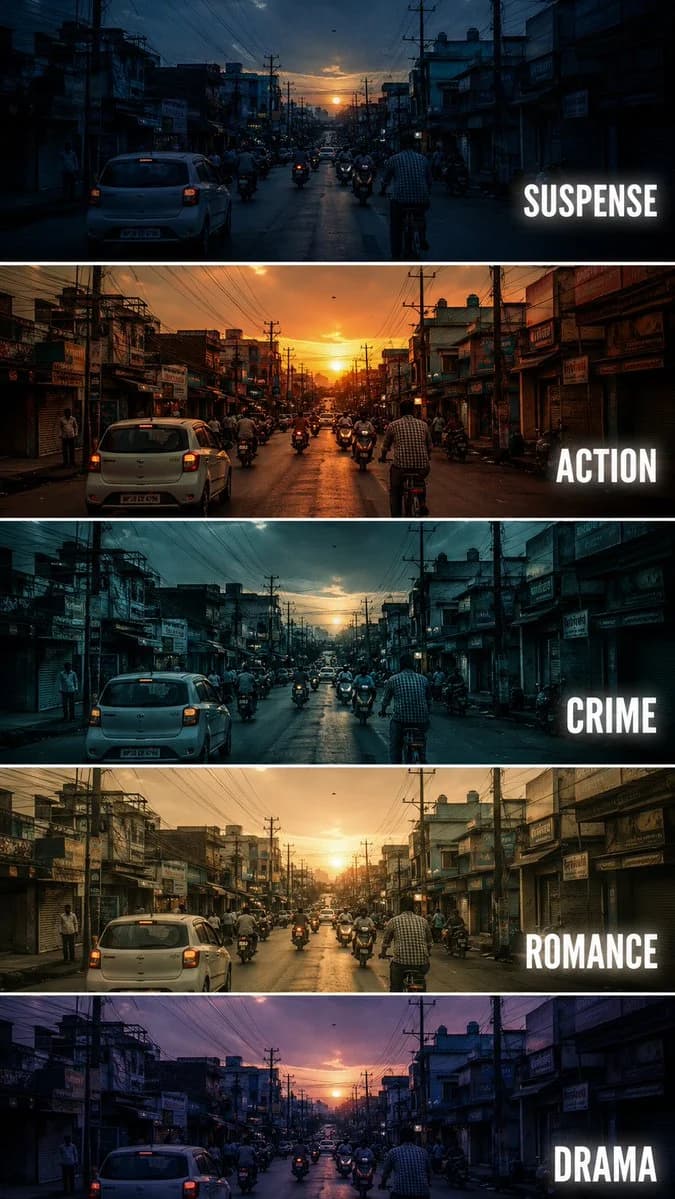
251 wordsCreate a {argument name="aspect" default="vertical"} cinematic tutorial comparison poster showing the same {argument name="subject" default="urban street scene"} repeated in five horizontal panels, each panel demonstrating a different film genre color grading style. The scene is a busy small city street at sunset, with cars, motorcycles, cyclists, shop buildings, electric poles, tangled overhead wires, and warm evening sky. Keep the camera angle exactly the same in every panel, like a fixed street photography shot.
Each horizontal strip should have a different cinematic mood and color tone:
Panel 1: SUSPENSE - cool blue shadows, dark contrast, slightly mysterious atmosphere, tense and moody lighting.
Panel 2: ACTION - warm orange sunset tone, high contrast, energetic cinematic look, dramatic highlights.
Panel 3: CRIME - cold teal blue grading, darker exposure, gritty urban feeling, realistic shadows.
Panel 4: ROMANCE - soft golden warm tone, gentle contrast, nostalgic sunset mood, dreamy atmosphere.
Panel 5: DRAMA - muted purple blue evening tone, emotional cinematic lighting, soft shadows and serious mood.
Add bold white uppercase text on the right side of each panel: SUSPENSE, ACTION, CRIME, ROMANCE, DRAMA. Use clean modern sans serif typography with slight glow or subtle shadow. Separate each panel with thin white horizontal borders. Make it look like a professional filmmaking color grading tutorial thumbnail, cinematic, realistic, high detail, urban street photography, 9:16 vertical composition.
Negative Prompt: cartoon, anime, painting, low quality, blurry, distorted buildings, extra text, wrong spelling, messy typography, overexposed, unrealistic colors, duplicated cars, warped street, bad perspective, random objects, low resolution, watermarkAbout this prompt
Cinematic Film Genre Color Grading Comparison is a ready-to-use social media prompt for GPT Image 2 on Image 2. Copy the 251 words below, paste them into the Create form, and you will get a result close to the preview above. Tweak the Social Media, Poster, Comparison tag if you want to push it somewhere new.
Use it as a starting point, then adjust the subject, lighting, or composition to suit your idea. The credit cost stays the same whether you use it as written or customize it.
Use case
A strong starting point for Social Media
Start here when you want a social media image inspired by Cinematic Film Genre Color Grading Comparison. The prompt already sets the look and composition; replace the subject, product, colors, or scene details to match your project.
Easy places to tweak
- Subject Swap in your person, product, place, or object without changing the overall composition.
- Look and mood Tune the lighting, palette, camera angle, or materials so the image fits your brand.
- Final format Set the aspect ratio, background, text, or layout notes before you generate.
More prompt paths to explore
Find more GPT Image 2 prompts with a similar style, use case, or subject.
How to use it
- Step 1
Copy the prompt
Hit the Copy button above to grab the full text.
- Step 2
Open Image 2 Create
Head to the Create form and paste it in.
- Step 3
Generate
Hit Generate. Your version lands in seconds.
Make it yours
Load the prompt into the Create form with one click, then start tweaking.