Prompt
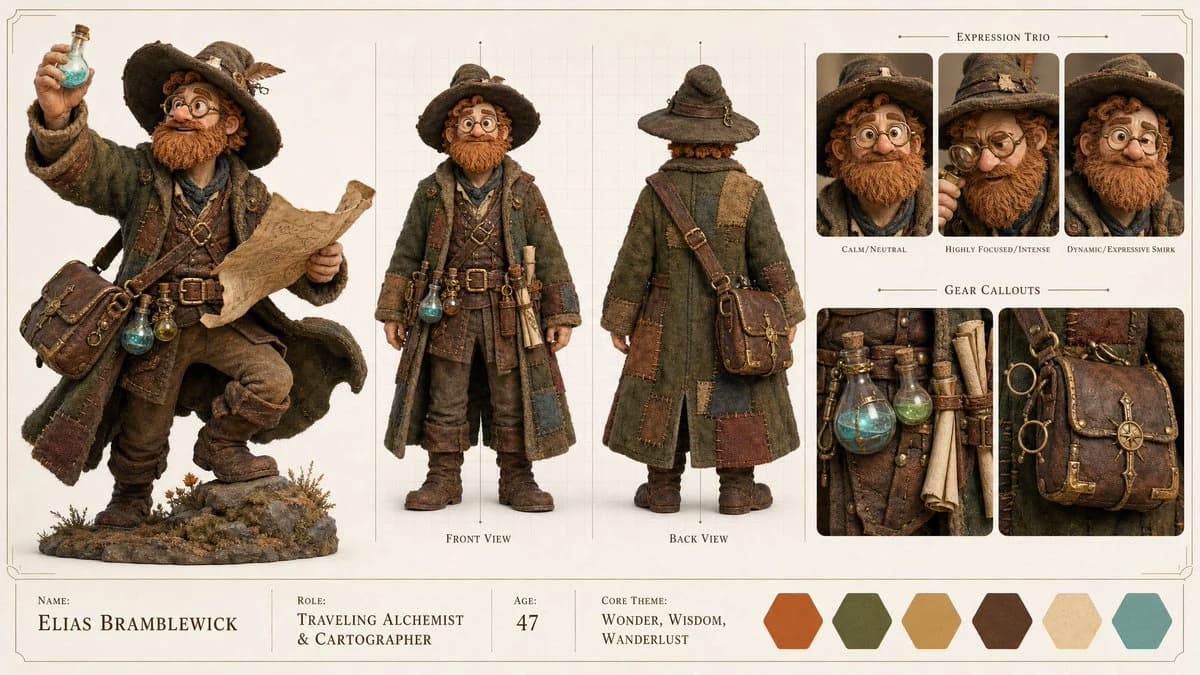
399 wordsCreate a high-end, asymmetric editorial CHARACTER CONCEPT SHOWCASE from these inputs: [STYLE]: stylized 3D stop-motion claymation style with rich tactile textures of clay, felt, and leather, and warm cinematic studio lighting [SUBJECT_DESCRIPTION]: A charming and slightly eccentric traveling medieval alchemist and cartographer. He wears a heavy, oversized patched wool coat over a worn leather tunic, multiple small glowing potion vials and rolled-up parchment scrolls strapped to his utility belt, a wide-brimmed traveler's hat, and thick round brass spectacles. He has a messy, hand-sculpted ginger beard, warm curious eyes, and a friendly smile. He carries an ancient, brass-trimmed leather satchel. His design features exaggerated, whimsical proportions and a cozy, rustic medieval aesthetic. Create the layout in a clean 16:9 widescreen format on a neutral studio gray or warm off-white background with a minimal technical border. The design must look like a premium production visual bible, using clean typography, no clutter, no watermarks, and no logos. Apply [STYLE] only to the character and visual elements, keeping the presentation layout clean, structured, and minimal. Infer all missing details from the subject description, including name, role, brief background specs, and a cohesive color palette. Use this tri-fold layout: 1. HERO SPOTLIGHT (Left 40% of the board) - Show one large, highly detailed full-body dynamic action pose of the subject. - This pose should showcase the character's primary personality, attitude, and silhouette. 2. TECHNICAL TURNAROUND (Center 35% of the board) - Show exactly two clean full-body views: Front View and Back View. - The subject should be in a relaxed, neutral stance. - Place these views over very subtle vertical and horizontal grid lines resembling a technical schematic blueprint. 3. KEY DETAILS (Right 25% of the board) - EXPRESSION TRIO: Exactly 3 large, highly expressive close-up headshots showing core emotional states: Calm/Neutral, Highly Focused/Intense, and a Dynamic/Expressive emotion (like a smirk or fierce grin). - GEAR CALLOUTS: Exactly 2 clean, isolated close-up panels showing primary wardrobe textures, signature accessories, or weapons/gear. 4. SPECS & COLOR BANNER (Bottom Edge) - A minimalist, horizontal typography block listing Name, Role, Age, and Core Theme. - Adjacent to the text, display 5 to 6 clean geometric color swatches showing the character's primary color palette with no labels. Ensure complete character and costume consistency across all sections. The Hero Spotlight must visually anchor the sheet, offering a clean, open, and professional layout that avoids dense, repetitive, or cluttered grids.
About this prompt
Medieval Alchemist Character Sheet is a ready-to-use character design prompt for GPT Image 2 on Image 2. Copy the 399 words below, paste them into the Create form, and you will get a result close to the preview above. Tweak the Storyboard, Character, Fashion tag if you want to push it somewhere new.
Use it as a starting point, then adjust the subject, lighting, or composition to suit your idea. The credit cost stays the same whether you use it as written or customize it.
Use case
A strong starting point for Character Design
Start here when you want a character design image inspired by Medieval Alchemist Character Sheet. The prompt already sets the look and composition; replace the subject, product, colors, or scene details to match your project.
Easy places to tweak
- Subject Swap in your person, product, place, or object without changing the overall composition.
- Look and mood Tune the lighting, palette, camera angle, or materials so the image fits your brand.
- Final format Set the aspect ratio, background, text, or layout notes before you generate.
More prompt paths to explore
Find more GPT Image 2 prompts with a similar style, use case, or subject.
How to use it
- Step 1
Copy the prompt
Hit the Copy button above to grab the full text.
- Step 2
Open Image 2 Create
Head to the Create form and paste it in.
- Step 3
Generate
Hit Generate. Your version lands in seconds.
Make it yours
Load the prompt into the Create form with one click, then start tweaking.