Prompt
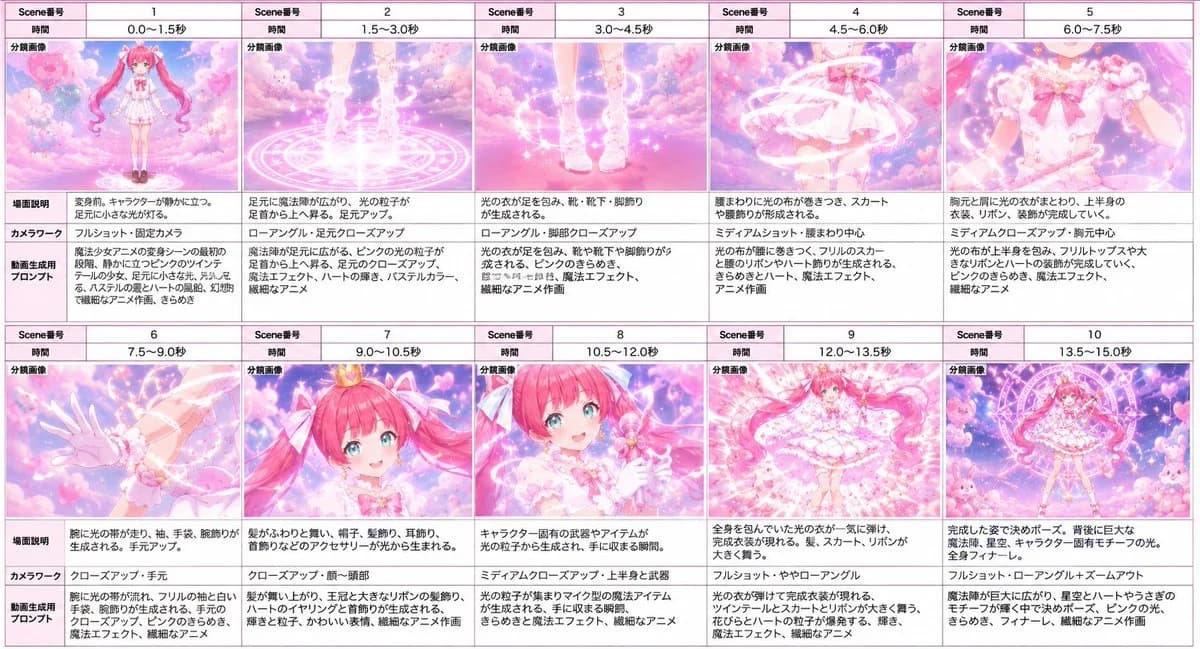
335 wordsUsing the provided reference image as the character base, create a horizontal magical-girl transformation storyboard for a {argument name="video length" default="15 seconds"} sequence. Analyze and preserve the character’s face, hairstyle, hair color, eyes, body type, outfit details, accessories, motifs, and overall pink magical world aesthetic from the reference while showing the transformation as a cinematic sequence.
Format: Wide storyboard sheet with exactly 10 panels arranged in a 2-row by 5-column grid. Each panel must have a small storyboard table layout with Japanese labels, including Scene number, time range, split image, scene description, camera work, and video generation prompt. Use a clean pink-bordered production storyboard style.
Panel sequence and timing: 1: 0.0–1.5s, the character stands before transforming on a glowing magic circle in a dreamy pink sky. 2: 1.5–3.0s, close-up of feet as magic circles and light particles rise. 3: 3.0–4.5s, shoes, socks, and leg decorations appear in sparkling light. 4: 4.5–6.0s, skirt forms as ribbons and luminous fabric wrap around the waist. 5: 6.0–7.5s, upper-body outfit forms with blouse, bow, and shoulder details. 6: 7.5–9.0s, arm accessories, sleeves, gloves, and wrist decorations appear. 7: 9.0–10.5s, close-up of the face and upper body as hair ornaments, ribbons, ears/head accessories, and a small crown-like ornament sparkle into place. 8: 10.5–12.0s, the character receives or summons a signature magical item/weapon, with face partially obscured by bright transformation light if needed. 9: 12.0–13.5s, full-body reveal with hair, skirt, and ribbons swirling dramatically in radiant pink light. 10: 13.5–15.0s, final heroic pose with a large magic circle behind her and cute mascot-like elements around the scene.
Style: pastel pink anime magical-girl aesthetic, soft clouds, hearts, sparkles, glowing runes, ribbons, luminous particles, dreamy fantasy lighting, delicate line art, high saturation pinks and whites. Keep the storyboard readable and production-oriented, with Japanese text blocks in each panel. Add a title-free grid only; no watermark.
Customization: The transformation theme should be {argument name="transformation theme" default="pink heart-and-ribbon magical girl"}, and the final magical item should be {argument name="magical item" default="a cute pink wand-like weapon"}.About this prompt
Magical Girl Transformation Storyboard is a ready-to-use poster prompt for GPT Image 2 on Image 2. Copy the 335 words below, paste them into the Create form, and you will get a result close to the preview above. Tweak the Poster, Comic, Storyboard tag if you want to push it somewhere new.
Use it as a starting point, then adjust the subject, lighting, or composition to suit your idea. The credit cost stays the same whether you use it as written or customize it.
Use case
A strong starting point for Poster
Start here when you want a poster image inspired by Magical Girl Transformation Storyboard. The prompt already sets the look and composition; replace the subject, product, colors, or scene details to match your project.
Easy places to tweak
- Subject Swap in your person, product, place, or object without changing the overall composition.
- Look and mood Tune the lighting, palette, camera angle, or materials so the image fits your brand.
- Final format Set the aspect ratio, background, text, or layout notes before you generate.
More prompt paths to explore
Find more GPT Image 2 prompts with a similar style, use case, or subject.
How to use it
- Step 1
Copy the prompt
Hit the Copy button above to grab the full text.
- Step 2
Open Image 2 Create
Head to the Create form and paste it in.
- Step 3
Generate
Hit Generate. Your version lands in seconds.
Make it yours
Load the prompt into the Create form with one click, then start tweaking.