Prompt
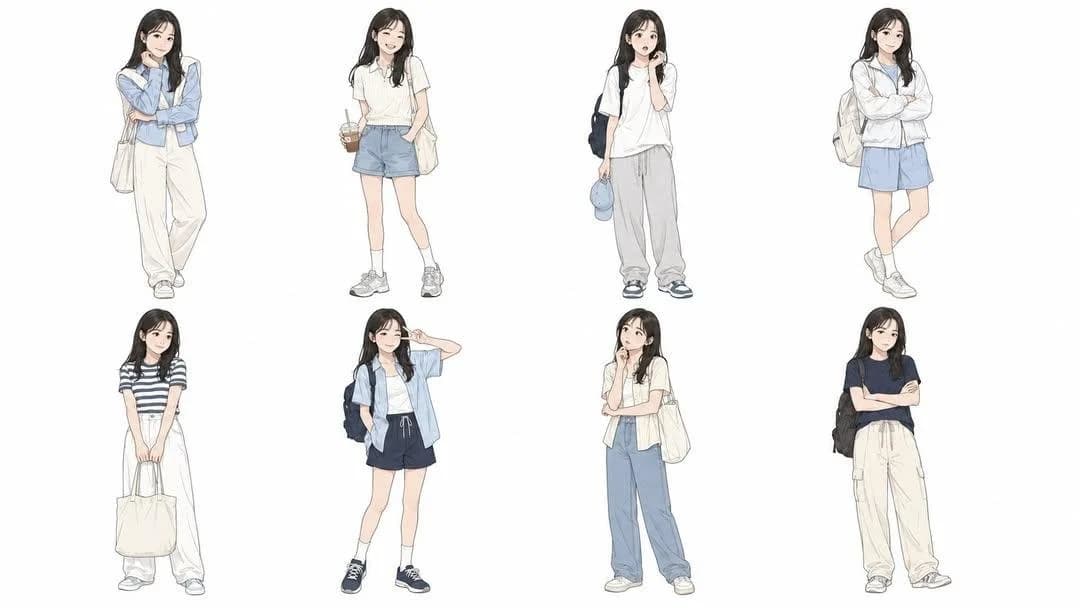
250 wordsUse the uploaded photo as the only character reference and create a professional 2x4 character design sheet. The image must show the same person from the uploaded photo repeated in 8 variations. Do not create different people. Preserve the character’s identity, facial impression, hairstyle, face shape, age impression, body type, skin tone, natural posture, and overall personality across all panels. Arrange the character in a clean {argument name="layout" default="2x4 grid layout"} on a {argument name="background" default="pure white background"}. Each panel should show a full-body standing pose with consistent proportions and the same recognizable character design. Create 8 different variations of the same character, changing only the outfit, expression, pose, and small accessories. Use {argument name="fashion style" default="casual modern Korean street fashion"} with summer styling: lightweight jacket, short-sleeve shirt, oversized T-shirt, shorts, loose pants, sneakers, backpack, tote bag, cap, or minimal accessories. Keep all outfits realistic, stylish, and suitable for everyday urban life. Each variation should have a different natural expression and pose, such as calm, smiling, surprised, confident, shy, playful, thoughtful, or slightly annoyed. Poses should feel relaxed and natural, not exaggerated. Style: 2020s animation character design sheet, Japanese manga-influenced illustration, hand-drawn sketch, thin clean linework, crisp outlines, subtle imperfect contours, high-detail fashion illustration, muted retro flat color palette, subtle paper texture, editorial fashion mood. Use flat colors only. No heavy shading, no soft gradients, no realistic lighting, no dramatic shadows, no photorealism. Keep the composition clean, balanced, and professional, like an animation pre-production character sheet. Aspect ratio: 16:9 horizontal.About this prompt
Professional Character Design Sheet is a ready-to-use poster prompt for GPT Image 2 on Image 2. Copy the 250 words below, paste them into the Create form, and you will get a result close to the preview above. Tweak the Poster, Comic, Storyboard tag if you want to push it somewhere new.
Use it as a starting point, then adjust the subject, lighting, or composition to suit your idea. The credit cost stays the same whether you use it as written or customize it.
Use case
A strong starting point for Poster
Start here when you want a poster image inspired by Professional Character Design Sheet. The prompt already sets the look and composition; replace the subject, product, colors, or scene details to match your project.
Easy places to tweak
- Subject Swap in your person, product, place, or object without changing the overall composition.
- Look and mood Tune the lighting, palette, camera angle, or materials so the image fits your brand.
- Final format Set the aspect ratio, background, text, or layout notes before you generate.
More prompt paths to explore
Find more GPT Image 2 prompts with a similar style, use case, or subject.
How to use it
- Step 1
Copy the prompt
Hit the Copy button above to grab the full text.
- Step 2
Open Image 2 Create
Head to the Create form and paste it in.
- Step 3
Generate
Hit Generate. Your version lands in seconds.
Make it yours
Load the prompt into the Create form with one click, then start tweaking.