Prompt
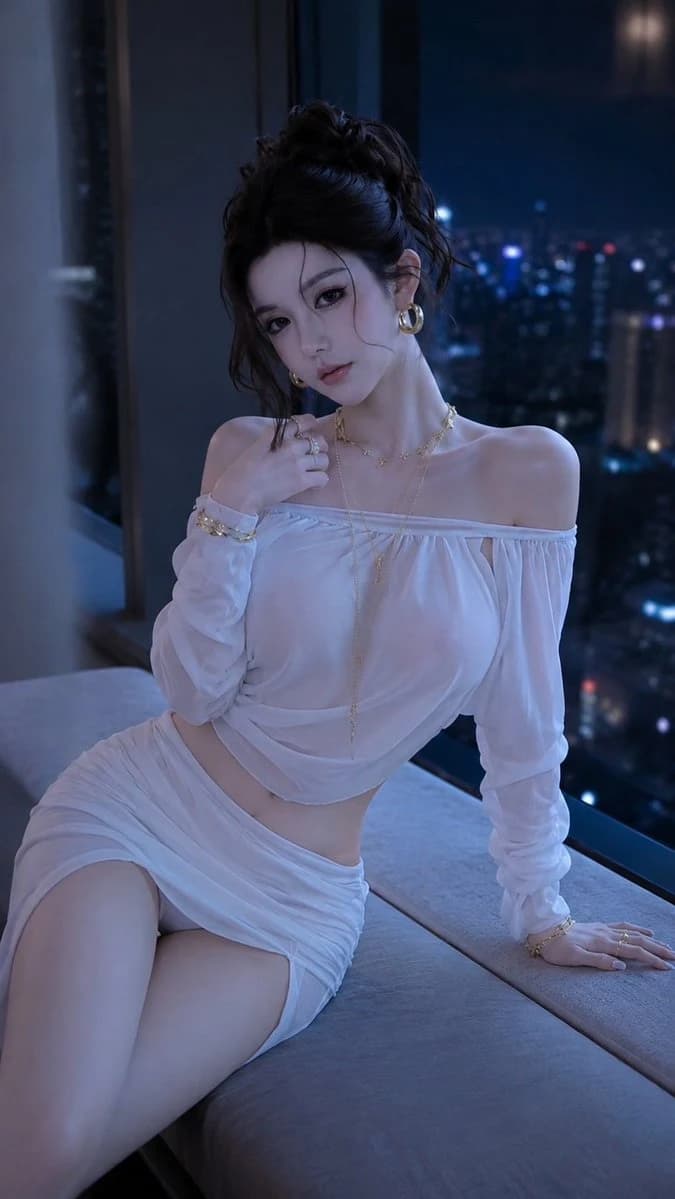
418 wordsA luxurious night fashion portrait of a {argument name="subject" default="East Asian woman over 25 years old"}, sitting on a light gray padded window bench in a modern high-rise apartment, overlooking a glowing city skyline. Positioned slightly to the left, leaving ample space on the right for the floor-to-ceiling windows, deep blue night sky, and soft-focus city lights. The composition is a three-quarter seated shot from mid-thigh to slightly above the head, at eye level with a subtle cinematic angle.
Pose: Sitting diagonally on the bench with the torso upright but leaning back slightly. Her right hand rests behind her on a cushion with fingers naturally extended. Her left hand is raised toward her collarbone as if touching a necklace. Hips are angled toward the lower-left, with one thigh extending into the foreground and the other tucked along the seat. Shoulders are relaxed and bare due to the off-the-shoulder neckline. Her head tilts gently toward the left shoulder, looking directly into the lens with a dignified, confident expression, slightly parted lips, and a calm, intimate gaze.
Hairstyle: A voluminous, intentionally messy high bun with loose curls and flyaway strands framing the face, forehead, and neck. Individual hair strands show realistic highlights and deep shadows with subtle movement.
Makeup: Sophisticated evening makeup with luminous fair skin showing real pore texture. Soft brow shape, smoky brown eyeliner, long dense lashes, subtle contouring, and glossy nude-pink lips.
Clothing: An {argument name="outfit" default="elegant white off-the-shoulder two-piece evening set"} featuring light translucent chiffon layered over opaque lining. A cropped top with an elasticized neckline and long translucent sleeves, paired with a fitted wrap-style mini skirt showing asymmetric draping and sculptural folds.
Jewelry: {argument name="accessories" default="Large polished gold hoop earrings"} and multiple layered gold necklaces of varying lengths. Delicate gold bracelets and rings complete the look with subtle highlights contrasting against the cool ambient night light.
Scene: A sophisticated contemporary apartment or luxury hotel suite at night. Large floor-to-ceiling windows showing high-rise buildings below with bokeh city lights in blue, cyan, and purple. Minimalist interior with dark paneling and soft architectural shadows.
Lighting: Low-key and cinematic, dominated by cool tones. Soft blue moonlight or city glow from the back and right creates a delicate rim light on hair and shoulders. Soft diffuse beauty fill light from the front-left illuminates eyes and skin without breaking the nighttime mood.
Camera: 85mm, f/1.8, sharp focus on eyes and face, smooth background bokeh, realistic low-light dynamic range, subtle film grain, high contrast with controlled highlights, and accurate body proportions.About this prompt
Luxury Night Apartment Portrait is a ready-to-use ad creative prompt for GPT Image 2 on Image 2. Copy the 418 words below, paste them into the Create form, and you will get a result close to the preview above. Tweak the Product Ad, Ad Creative, Fashion tag if you want to push it somewhere new.
Use it as a starting point, then adjust the subject, lighting, or composition to suit your idea. The credit cost stays the same whether you use it as written or customize it.
Use case
A strong starting point for Ad Creative
Start here when you want a ad creative image inspired by Luxury Night Apartment Portrait. The prompt already sets the look and composition; replace the subject, product, colors, or scene details to match your project.
Easy places to tweak
- Subject Swap in your person, product, place, or object without changing the overall composition.
- Look and mood Tune the lighting, palette, camera angle, or materials so the image fits your brand.
- Final format Set the aspect ratio, background, text, or layout notes before you generate.
More prompt paths to explore
Find more GPT Image 2 prompts with a similar style, use case, or subject.
How to use it
- Step 1
Copy the prompt
Hit the Copy button above to grab the full text.
- Step 2
Open Image 2 Create
Head to the Create form and paste it in.
- Step 3
Generate
Hit Generate. Your version lands in seconds.
Make it yours
Load the prompt into the Create form with one click, then start tweaking.