Prompt
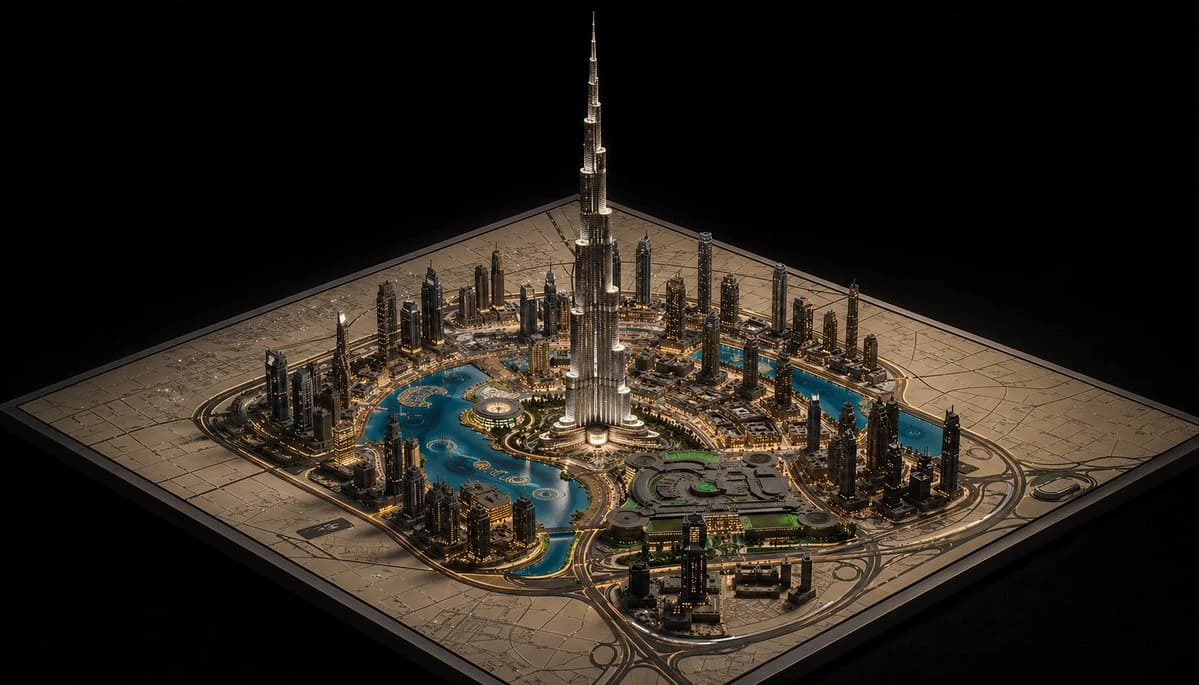
226 wordsA hyper-detailed cinematic isometric miniature city model of {argument name="landmark tower" default="Burj Khalifa"} rising dramatically from the center of a square architectural master-plan board, presented like a luxury urban planning maquette on a black background. The composition shows one dominant ultra-tall silver skyscraper in the exact center, surrounded by a dense ring of modern high-rise towers, illuminated roads, bridges, and glowing warm city lights. Curving turquoise-blue water features and artificial lakes wrap around the central district in multiple connected pools and canals, with one large circular fountain-like feature near the tower base and several small island shapes visible in the water. In the lower right quadrant, include a large low-rise complex with rounded geometric roofs and subtle green-lit sections, connected by multilane roads and looping interchanges. The entire city sits on one square beige map board engraved with faint street grids and planning lines, with the board edges clearly visible and slightly raised. Viewpoint is a high three-quarter isometric angle, centered and symmetrical, with the tower extending far upward into negative space. Lighting is dramatic and luxurious: warm golden edge lights on buildings and roads, cool reflections in the water, crisp metallic highlights on the central tower, and a deep black void surrounding the model. Style should feel like a photorealistic architectural visualization mixed with a premium collectible scale model, extremely intricate, sharp, polished, and elegant.About this prompt
Luxury Miniature Dubai City Model is a ready-to-use ad creative prompt for GPT Image 2 on Image 2. Copy the 226 words below, paste them into the Create form, and you will get a result close to the preview above. Tweak the Product Ad, Ad Creative, Travel tag if you want to push it somewhere new.
Use it as a starting point, then adjust the subject, lighting, or composition to suit your idea. The credit cost stays the same whether you use it as written or customize it.
Use case
A strong starting point for Ad Creative
Start here when you want a ad creative image inspired by Luxury Miniature Dubai City Model. The prompt already sets the look and composition; replace the subject, product, colors, or scene details to match your project.
Easy places to tweak
- Subject Swap in your person, product, place, or object without changing the overall composition.
- Look and mood Tune the lighting, palette, camera angle, or materials so the image fits your brand.
- Final format Set the aspect ratio, background, text, or layout notes before you generate.
More prompt paths to explore
Find more GPT Image 2 prompts with a similar style, use case, or subject.
How to use it
- Step 1
Copy the prompt
Hit the Copy button above to grab the full text.
- Step 2
Open Image 2 Create
Head to the Create form and paste it in.
- Step 3
Generate
Hit Generate. Your version lands in seconds.
Make it yours
Load the prompt into the Create form with one click, then start tweaking.