Prompt
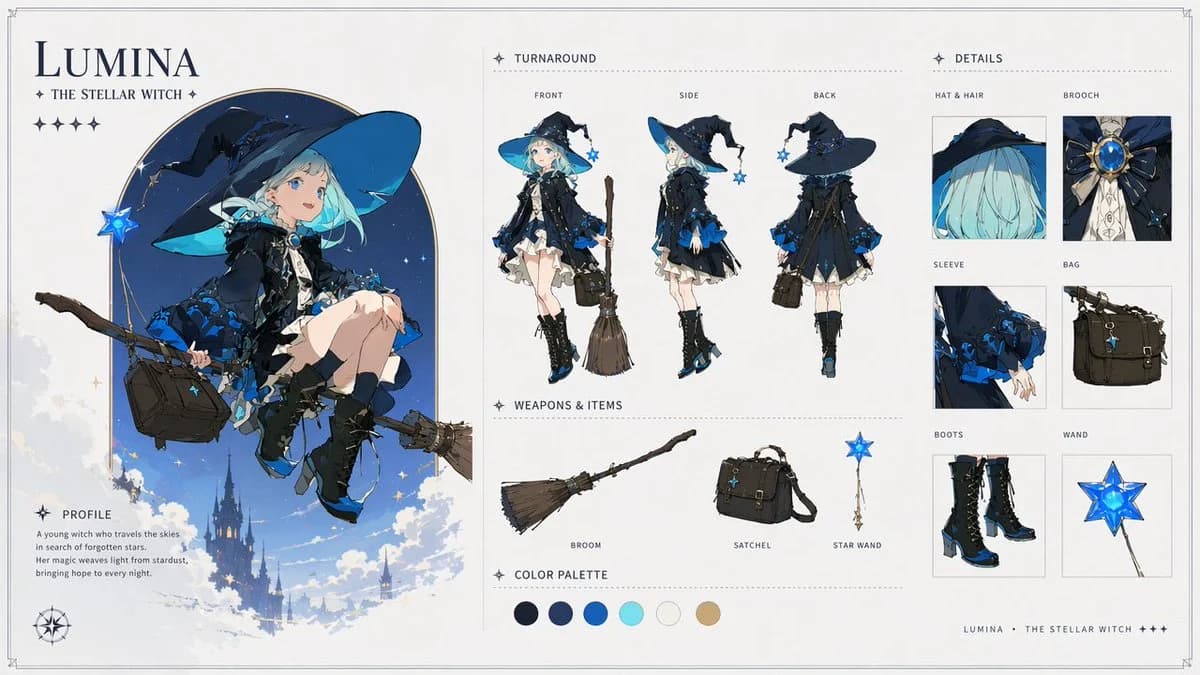
588 wordsGoal: Create an ultra-detailed 16:9 fantasy character design sheet for {argument name="character name" default="Lumina"}, a premium anime magical girl witch, presented like AAA game concept art and a professional character bible page.
Canvas: Wide horizontal editorial layout on an off-white parchment background with thin double-line border, subtle corner crop marks, delicate dotted dividers, navy typography, and small star glyph decorations. Clean, elegant, airy composition with soft fantasy illustration and polished UI-like spacing.
Main left panel: Large title at top left reading {argument name="character name" default="LUMINA"}, with subtitle “THE STELLAR WITCH” beneath it and a row of 5 small star icons. Below, show one large full-color hero illustration of the character seated side-saddle on a flying broom, framed by a tall rounded arch of deep starry blue sky. She is a young witch with pale skin, bright blue eyes, short mint-aqua bobbed hair, a huge floppy navy witch hat with cyan underside and black ribbons, a black-and-midnight-blue layered dress with frilled white underskirt, blue rose-like trim, lace details, black gloves, black knee socks, and black lace-up heeled boots with blue accents. She carries a dark brown satchel and a glowing blue star wand charm; the broom extends diagonally across the panel. Background includes clouds, small stars, and a distant gothic castle silhouette floating in the sky. Add a small compass rose near the bottom left.
Profile block: Under the hero illustration, include a labeled section “PROFILE” with this short text: “A young witch who travels the skies in search of forgotten stars. Her magic weaves light from stardust, bringing hope to every night.”
Center panel: Add a “TURNAROUND” section with exactly 3 full-body model views, each labeled above: 1) FRONT, 2) SIDE, 3) BACK. The views should show the same character standing in the outfit, with consistent proportions and costume details. In the front view she holds the broom upright beside her; in the side view her satchel is visible; in the back view emphasize the hat silhouette, layered cape/dress back, and blue floral trim.
Weapons and items section: Below the turnaround, create a “WEAPONS & ITEMS” row with exactly 3 isolated objects, each with a label: 1) BROOM, a rustic wooden broom with twig bristles; 2) SATCHEL, a structured dark brown leather shoulder bag with buckles and straps; 3) STAR WAND, a slim gold wand topped with a luminous blue five-point star.
Color palette: Add a “COLOR PALETTE” strip with exactly 6 circular swatches: 1) near-black navy, 2) deep royal navy, 3) saturated cobalt blue, 4) bright aqua cyan, 5) warm off-white, 6) muted tan gold.
Right panel: Add a “DETAILS” section containing exactly 6 boxed close-up callouts in a two-column grid, each labeled: 1) HAT & HAIR, close-up of the wide navy hat and aqua hair; 2) BROOCH, ornate blue gemstone brooch with gold setting and black bow; 3) SLEEVE, black sleeve with blue rose trim and delicate hand; 4) BAG, dark satchel close-up; 5) BOOTS, black lace-up heeled boots with blue highlights; 6) WAND, glowing blue star wand head.
Footer: At the bottom right, add small spaced text: “LUMINA • THE STELLAR WITCH +++”.
Visual style: Soft fantasy anime rendering, crisp inked character design, luminous blues, detailed fabric folds, elegant gothic magical motifs, subtle paper texture, high-end concept art sheet, balanced whitespace, refined serif and small caps typography.
Constraints: Use exactly 1 main hero illustration, 3 turnaround views, 3 weapons/items, 6 color swatches, and 6 detail callouts. Keep all text legible and in English. Do not add extra panels, extra characters, watermarks, logos, or unrelated props.About this prompt
Lumina Stellar Witch Character Sheet is a ready-to-use character design prompt for GPT Image 2 on Image 2. Copy the 588 words below, paste them into the Create form, and you will get a result close to the preview above. Tweak the Infographic, Storyboard, Character Design tag if you want to push it somewhere new.
Use it as a starting point, then adjust the subject, lighting, or composition to suit your idea. The credit cost stays the same whether you use it as written or customize it.
Use case
A strong starting point for Character Design
Start here when you want a character design image inspired by Lumina Stellar Witch Character Sheet. The prompt already sets the look and composition; replace the subject, product, colors, or scene details to match your project.
Easy places to tweak
- Subject Swap in your person, product, place, or object without changing the overall composition.
- Look and mood Tune the lighting, palette, camera angle, or materials so the image fits your brand.
- Final format Set the aspect ratio, background, text, or layout notes before you generate.
More prompt paths to explore
Find more GPT Image 2 prompts with a similar style, use case, or subject.
How to use it
- Step 1
Copy the prompt
Hit the Copy button above to grab the full text.
- Step 2
Open Image 2 Create
Head to the Create form and paste it in.
- Step 3
Generate
Hit Generate. Your version lands in seconds.
Make it yours
Load the prompt into the Create form with one click, then start tweaking.