Prompt
262 words{
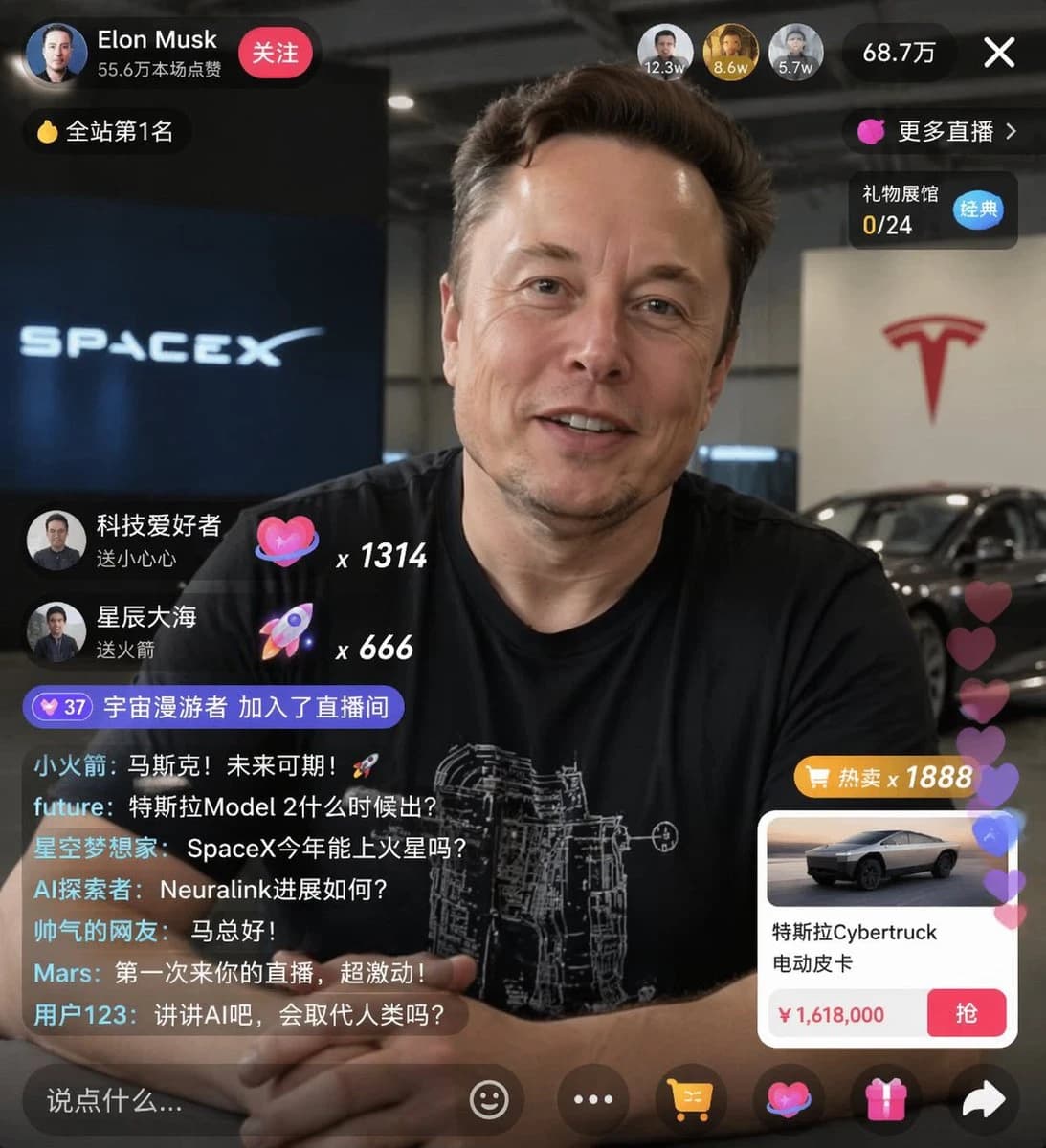
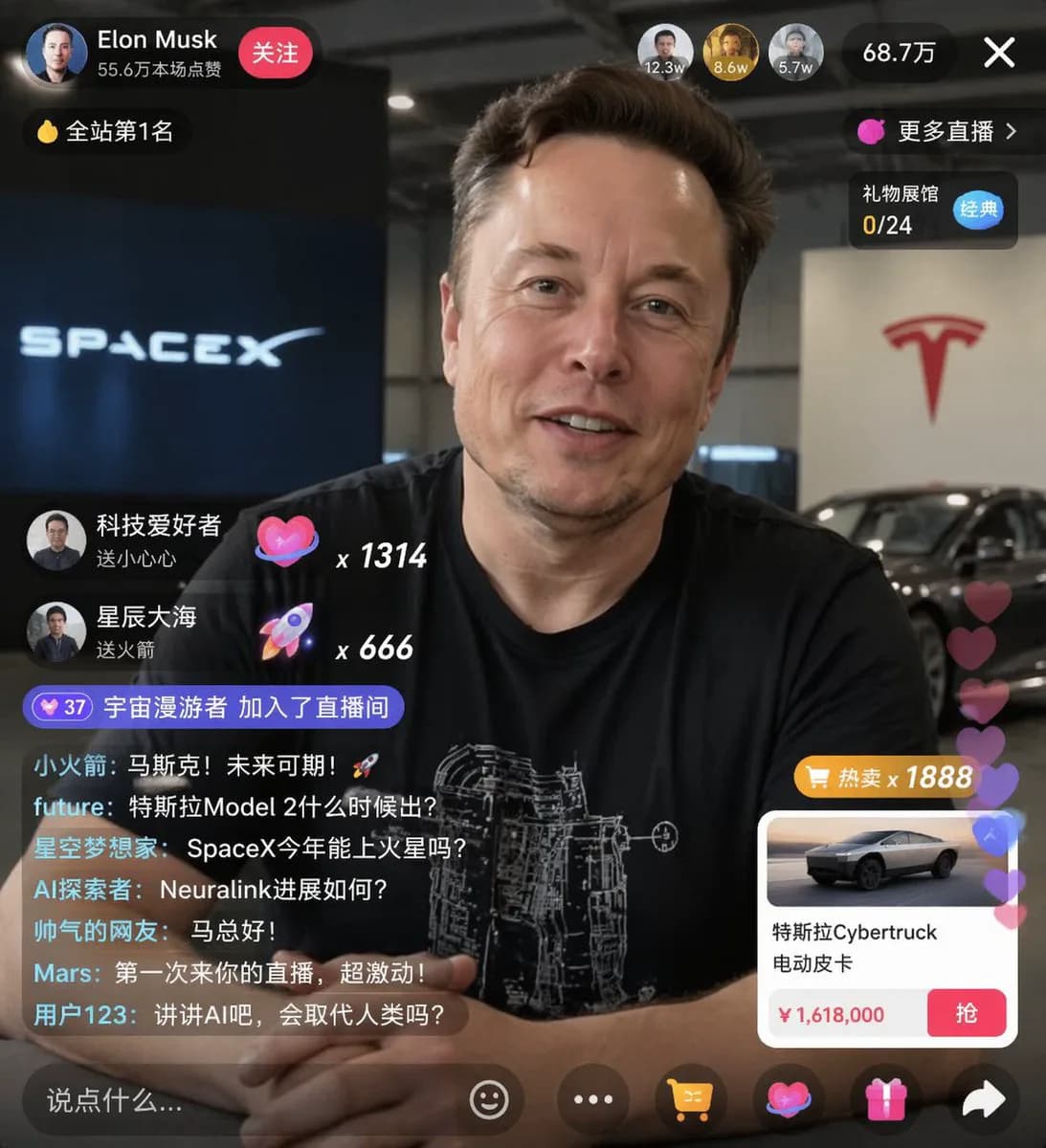
"type": "live stream UI mockup",
"subject": {
"description": "portrait of {argument name=\"host name\" default=\"Elon Musk\"}, smiling, dressed in a black t-shirt featuring a white technical schematic print",
"background": "left side displays a screen showing '{argument name=\"left background logo\" default=\"SPACEX\"}' text, right side shows a red '{argument name=\"right background logo\" default=\"Tesla T logo\"}' and a dark-colored car"
},
"ui_overlay": {
"top_header": {
"host_info": "avatar, host name '{argument name=\"host name\" default=\"Elon Musk\"}', subtext '556k likes this stream', red 'Follow' button",
"rank_badge": "gold coin icon labeled 'No.1 Site-wide'",
"viewer_stats": "3 top viewer avatars with counts '123k', '86k', '57k', total viewers '687k', 'X' close button",
"right_links": "'More streams >', 'Gift Hall 0/24' with blue 'Classic' tag"
},
"mid_left_gifts": {
"count": 2,
"items": [
"avatar 'TechFan', 'sent a Little Heart', heart icon x 1314",
"avatar 'SeaOfStars', 'sent a Rocket', rocket icon x 666"
]
},
"bottom_left_chat": {
"system_message": "level 37 badge 'CosmicWanderer joined the stream'",
"message_count": 7,
"messages": [
"LittleRocket: Musk! The future is bright! 🚀",
"future: When is Tesla Model 2 coming out?",
"StarryDreamer: Will SpaceX reach Mars this year?",
"AIExplorer: What's the latest on Neuralink?",
"HandsomeNetizen: Hello Boss Ma!",
"Mars: First time watching your stream, super excited!",
"User123: Talk about AI — will it replace humans?"
]
},
"bottom_right_product_card": {
"hot_tag": "orange 'Hot Sale x 1888'",
"image": "Tesla Cybertruck",
"title": "{argument name=\"product name\" default=\"Tesla Cybertruck Electric Pickup\"}",
"price": "{argument name=\"product price\" default=\"¥1,618,000\"}",
"button": "red 'Buy' button",
"floating_animation": "translucent hearts drifting up along the right edge"
},
"bottom_bar": {
"input_field": "'Say something...'",
"icons": ["smiley face", "three dots", "shopping cart", "gift box", "share"]
}
}
}About this prompt
Livestream Commerce UI Mockup is a ready-to-use ui mockup prompt for GPT Image 2 on Image 2. Copy the 262 words below, paste them into the Create form, and you will get a result close to the preview above. Tweak the Product Ad, E-commerce, Social Media tag if you want to push it somewhere new.
Use it as a starting point, then adjust the subject, lighting, or composition to suit your idea. The credit cost stays the same whether you use it as written or customize it.
Use case
A strong starting point for UI Mockup
Start here when you want a ui mockup image inspired by Livestream Commerce UI Mockup. The prompt already sets the look and composition; replace the subject, product, colors, or scene details to match your project.
Easy places to tweak
- Subject Swap in your person, product, place, or object without changing the overall composition.
- Look and mood Tune the lighting, palette, camera angle, or materials so the image fits your brand.
- Final format Set the aspect ratio, background, text, or layout notes before you generate.
More prompt paths to explore
Find more GPT Image 2 prompts with a similar style, use case, or subject.
How to use it
- Step 1
Copy the prompt
Hit the Copy button above to grab the full text.
- Step 2
Open Image 2 Create
Head to the Create form and paste it in.
- Step 3
Generate
Hit Generate. Your version lands in seconds.
Make it yours
Load the prompt into the Create form with one click, then start tweaking.