Prompt
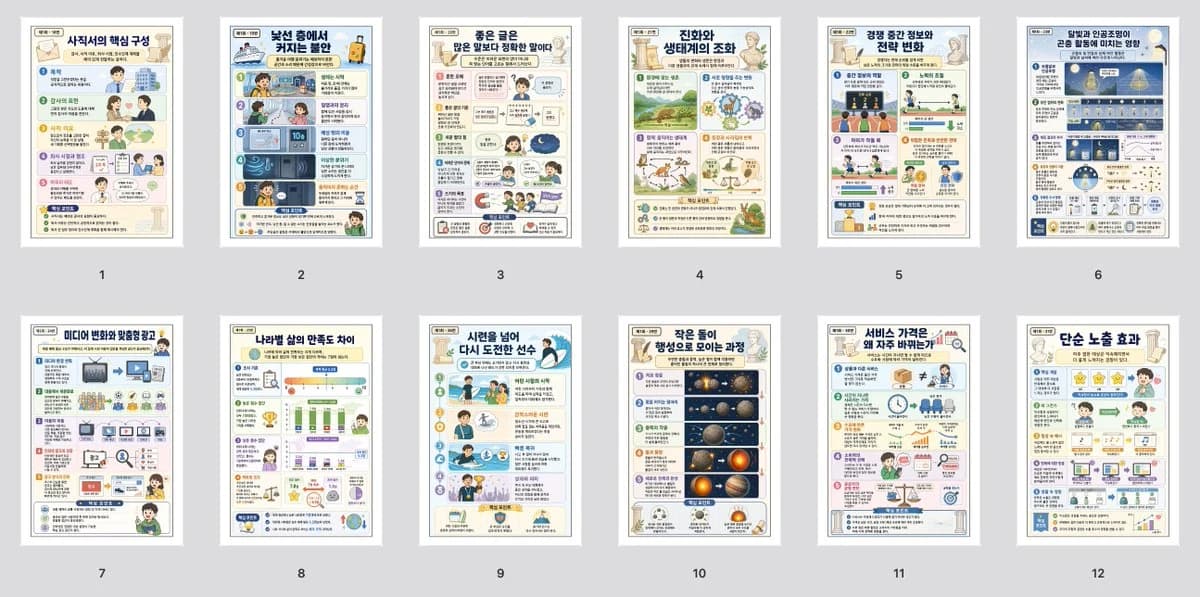
468 wordsGoal: Create a wide contact-sheet preview showing exactly 12 Korean classroom infographic worksheets generated from English exam passages, arranged as miniature pages for comparison and batch review.
Canvas: Wide horizontal 16:9 image on a light gray background, with generous margins. Place 12 portrait-oriented A4-style page thumbnails in a clean grid: 6 pages across the top row and 6 pages across the bottom row. Each page has a white paper border, subtle drop shadow, and a small black number centered underneath from 1 to 12.
Layout: Each thumbnail is a dense, colorful educational infographic page in Korean, designed for high school English reading comprehension. Use a consistent worksheet style: top title banner, small source label at the upper left, section blocks with numbered steps, cartoon students/teachers, simple icons, mini charts, diagrams, arrows, callout boxes, and a short summary box near the bottom. The pages should look readable as Korean educational posters when zoomed in but remain thumbnail-sized in the contact sheet.
Pages: Include exactly 12 distinct infographic pages, numbered and titled as follows: 1. “사회사의 핵심 구성” about the core components of society; 2. “낯선 숲에서 커지는 불안” about anxiety growing in an unfamiliar forest; 3. “좋은 글은 많은 해석을 낳는다” about good writing producing many interpretations; 4. “진화와 생태계의 조화” about evolution and ecological balance; 5. “공정 중간 정보와 전략 변화” about mid-process information and changing strategies; 6. “빛의 만남: 그림 물자의 에너지 영향” about light interactions and energy effects; 7. “미디어 변화와 맞춤형 광고” about media change and personalized advertising; 8. “나라별 삶의 만족도 차이” about differences in life satisfaction by country; 9. “시련을 넘어 다시 도전한 선수” about an athlete overcoming trials and trying again; 10. “작은 돌이 행성으로 모이는 과정” about small rocks forming planets; 11. “서비스 가격은 왜 자주 바뀌는가” about why service prices change often; 12. “단순 노출 효과” about the mere exposure effect.
Visual style: Bright Korean textbook infographic design, soft pastel backgrounds, navy and teal title headers, rounded content cards, friendly cartoon characters, small decorative academic icons, clean vector illustrations, and thin colored dividers. Use a polished classroom handout aesthetic, not photorealistic. Make the pages varied in color and diagram type while keeping them visually consistent as one batch.
Text content: Use Korean text throughout the worksheet thumbnails. The main titles should be legible; smaller body text may be dense but should resemble authentic Korean educational material. Use the customizable overall topic set as {argument name="topic set" default="Korean English exam passage infographic worksheets"}, and keep the page title style based on {argument name="language" default="Korean"}.
Constraints: Do not show people holding the pages. Do not create a single enlarged worksheet; the image must be a batch contact sheet with exactly 12 portrait thumbnails and exactly 12 numbers beneath them. Avoid watermarks, app UI, browser chrome, or extra captions outside the page numbers.About this prompt
Korean Infographic Worksheet Batch is a ready-to-use infographic prompt for GPT Image 2 on Image 2. Copy the 468 words below, paste them into the Create form, and you will get a result close to the preview above. Tweak the Social Media, Infographic, Product tag if you want to push it somewhere new.
Use it as a starting point, then adjust the subject, lighting, or composition to suit your idea. The credit cost stays the same whether you use it as written or customize it.
Use case
A strong starting point for Infographic
Start here when you want a infographic image inspired by Korean Infographic Worksheet Batch. The prompt already sets the look and composition; replace the subject, product, colors, or scene details to match your project.
Easy places to tweak
- Subject Swap in your person, product, place, or object without changing the overall composition.
- Look and mood Tune the lighting, palette, camera angle, or materials so the image fits your brand.
- Final format Set the aspect ratio, background, text, or layout notes before you generate.
More prompt paths to explore
Find more GPT Image 2 prompts with a similar style, use case, or subject.
How to use it
- Step 1
Copy the prompt
Hit the Copy button above to grab the full text.
- Step 2
Open Image 2 Create
Head to the Create form and paste it in.
- Step 3
Generate
Hit Generate. Your version lands in seconds.
Make it yours
Load the prompt into the Create form with one click, then start tweaking.