Prompt
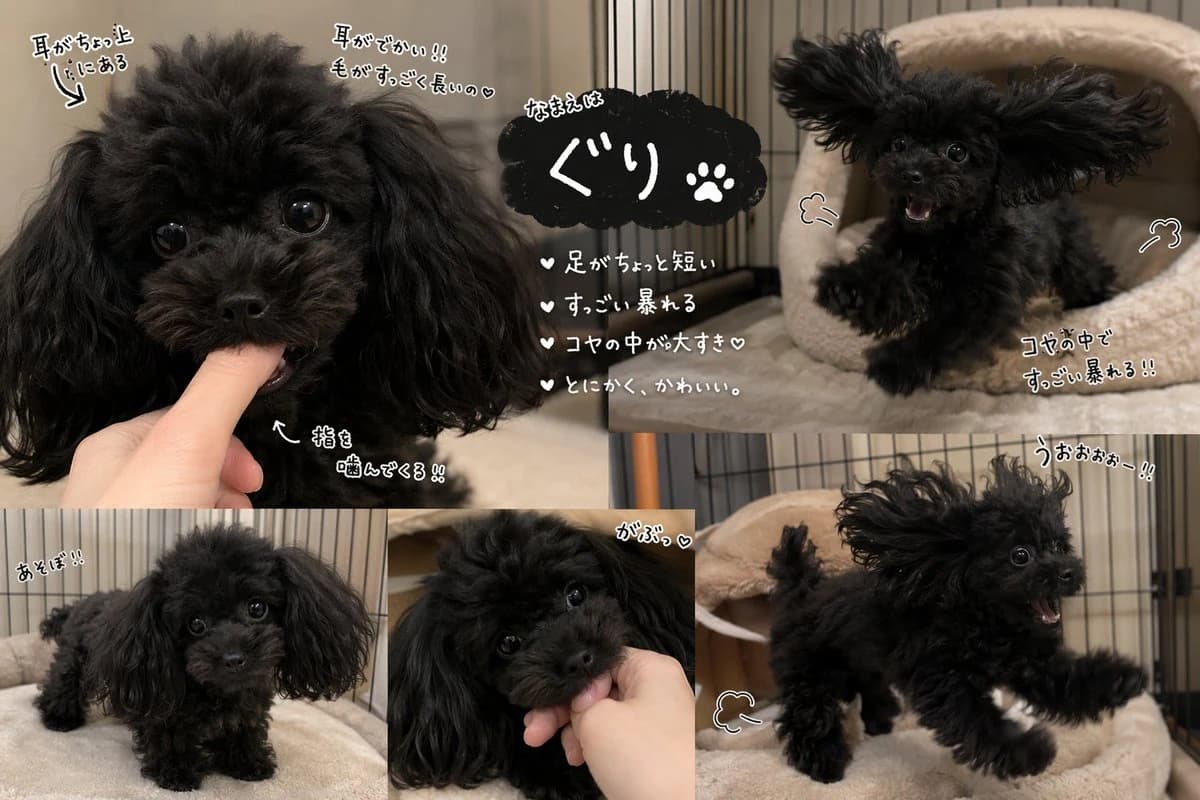
470 wordsGoal: Create a cute scrapbook-style photo collage introducing a tiny black toy poodle puppy named {argument name="dog name" default="ぐり"}, with playful handwritten Japanese annotations and heart/paw doodles.
Canvas: Landscape 3:2 image, warm indoor lighting, cozy pet-room setting with beige fleece bedding and black metal crate bars in the background. Use realistic smartphone-style puppy photos combined into a clean collage, with thin white dividers between panels.
Layout: Use exactly 5 photo panels. Panel 1 is a large top-left close-up of the black puppy biting a human finger, showing huge glossy eyes, fluffy curly black fur, long floppy ears, and a tiny muzzle. Panel 2 is a top-right action shot of the puppy jumping or bouncing on a beige pet bed with ears flying outward and mouth open. Panel 3 is a bottom-left full-body shot of the puppy standing on a soft beige blanket, facing forward. Panel 4 is a bottom-center close-up of the puppy gently mouthing a hand, tilted head, fluffy ears framing the face. Panel 5 is a large bottom-right action shot of the puppy running or leaping across the bed with one front paw stretched forward, ears flying, mouth open excitedly.
Central text block: Place a black cloud-shaped label near the upper center overlap area. In small handwritten white text above it write 「なまえは」, then large white text 「ぐり」 with a white paw-print icon beside the name. Below the name area, add exactly 4 white handwritten bullet points with heart bullets: 「足がちょっと短い」, 「すっごい暴れる」, 「コヤの中が大すき♡」, 「とにかく、かわいい。」
Handwritten annotations: Add exactly 10 playful white handwritten Japanese callouts with black shadow/outline and small arrows or doodles: 1) near the top-left puppy ear, 「耳がちょっと上にある」 with an arrow pointing to the ear; 2) near the top center over the fluffy head/ear area, 「耳がでかい!! 毛がすっごく長いの♡」; 3) near the biting finger in the top-left panel, 「指を噛んでくる!!」 with an arrow; 4) near the bottom-left standing puppy, 「あそぼ!!」; 5) near the bottom-center hand-biting puppy, 「がぶっ♡」; 6) near the top-right jumping puppy, a small puff doodle; 7) near the top-right/bottom-right area, a simple motion doodle; 8) near the right side of the collage, 「コヤの中ですっごい暴れる!!」; 9) near the top of the bottom-right action panel, 「うぉぉぉー!!」; 10) near the bottom-right running puppy, a small motion-swoosh doodle.
Subject details: The puppy is a very small black toy poodle with extremely fluffy curly fur, oversized floppy ears, shiny round black eyes, a short muzzle, tiny legs, and an energetic mischievous personality. Keep the dog adorable, lively, and slightly chaotic.
Visual style: Realistic pet photography collage with cute social-media annotation style, white hand-drawn lettering, black drop shadows, little hearts, arrows, paw print, and motion doodles. The overall mood is affectionate, funny, and cozy.
Constraints: Use exactly 5 photo panels and exactly the listed text elements. Do not add extra dogs, extra panels, logos, watermarks, or unrelated text. Keep the Japanese text legible and handwritten.About this prompt
Cute Black Toy Poodle Collage is a ready-to-use infographic prompt for GPT Image 2 on Image 2. Copy the 470 words below, paste them into the Create form, and you will get a result close to the preview above. Tweak the Infographic, Storyboard, Product tag if you want to push it somewhere new.
Use it as a starting point, then adjust the subject, lighting, or composition to suit your idea. The credit cost stays the same whether you use it as written or customize it.
Use case
A strong starting point for Infographic
Start here when you want a infographic image inspired by Cute Black Toy Poodle Collage. The prompt already sets the look and composition; replace the subject, product, colors, or scene details to match your project.
Easy places to tweak
- Subject Swap in your person, product, place, or object without changing the overall composition.
- Look and mood Tune the lighting, palette, camera angle, or materials so the image fits your brand.
- Final format Set the aspect ratio, background, text, or layout notes before you generate.
More prompt paths to explore
Find more GPT Image 2 prompts with a similar style, use case, or subject.
How to use it
- Step 1
Copy the prompt
Hit the Copy button above to grab the full text.
- Step 2
Open Image 2 Create
Head to the Create form and paste it in.
- Step 3
Generate
Hit Generate. Your version lands in seconds.
Make it yours
Load the prompt into the Create form with one click, then start tweaking.