Prompt
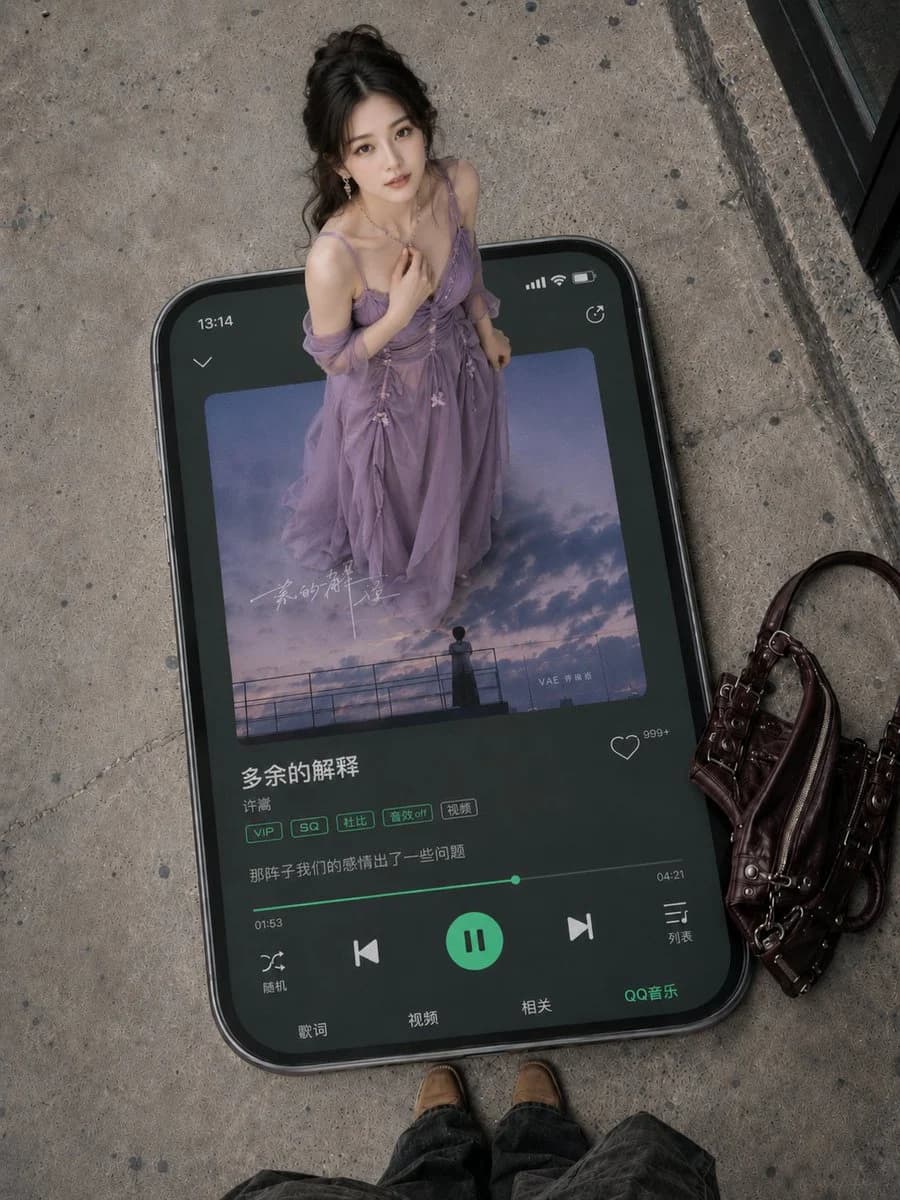
406 wordsHigh-angle overhead perspective, authentic street photography style. A giant black rounded-corner smartphone lies flat on a rough grey concrete floor, appearing as a physical object with thickness, bezels, and shadows, in a vertical 3:4 composition. The phone screen displays the QQ Music interface with a deep dark green UI, highlighted green buttons, and a progress bar, appearing clear and realistic with Chinese music player elements.
A gentle and beautiful young Chinese woman stands on the giant phone screen like a dreamlike figure within a music panel. She has an elegant Oriental beauty with soft, refined features, fair clean skin, subtle natural makeup, and a gentle, quiet gaze looking slightly up at the camera. Her black long hair is styled in a loose, elegant half-tie or low bun with minor natural wisps, accessorized with delicate earrings and a thin necklace. She wears a {argument name="dress color" default="purple"} long dress made of light gauze, flowing in layers with natural folds, a sheer shawl, thin straps, and small floral decorations. The overall style is romantic, gentle, Oriental, and ethereal while maintaining a realistic photographic texture.
Phone screen details: The top displays the time 13:14, with signal, battery, and loop icons on the top right. In the center is a square album cover featuring a purple-blue twilight sky, clouds, railings, and distant character silhouettes, creating a melancholic and romantic atmosphere with faint handwritten Chinese artistic calligraphy. The song info area clearly shows the Chinese title "{argument name="song title" default="Extra Explanation"}" and the singer "{argument name="singer name" default="Vae"}". Below are QQ Music style tag buttons: VIP, SQ, Dolby, Sound Effect Off, and Video. A lyric line reads "Our relationship had some issues back then." At the bottom is a green progress bar showing 01:53 and 04:21, with a green circular pause button in the middle flanked by previous, next, shuffle, and list icons, with "QQ Music" on the bottom right.
To the right on the ground sits a dark burgundy leather handbag with metal buckles, zippers, straps, and vintage hardware details. The bottom edge of the frame reveals the photographer's brown shoes and dark trousers, enhancing the first-person overhead perspective. A black glass door frame or building edge is visible in the top right. The overall lighting is soft and natural, with realistic photographic quality, clear details, high-end fashion magazine style, accurate scale between the giant phone and the person, precise perspective, and natural shadows, making the image clean and sophisticated.About this prompt
Giant Smartphone Music Player Scene is a ready-to-use e-commerce prompt for GPT Image 2 on Image 2. Copy the 406 words below, paste them into the Create form, and you will get a result close to the preview above. Tweak the Product Ad, E-commerce, Social Media tag if you want to push it somewhere new.
Use it as a starting point, then adjust the subject, lighting, or composition to suit your idea. The credit cost stays the same whether you use it as written or customize it.
Use case
A strong starting point for E-commerce
Start here when you want a e-commerce image inspired by Giant Smartphone Music Player Scene. The prompt already sets the look and composition; replace the subject, product, colors, or scene details to match your project.
Easy places to tweak
- Subject Swap in your person, product, place, or object without changing the overall composition.
- Look and mood Tune the lighting, palette, camera angle, or materials so the image fits your brand.
- Final format Set the aspect ratio, background, text, or layout notes before you generate.
More prompt paths to explore
Find more GPT Image 2 prompts with a similar style, use case, or subject.
How to use it
- Step 1
Copy the prompt
Hit the Copy button above to grab the full text.
- Step 2
Open Image 2 Create
Head to the Create form and paste it in.
- Step 3
Generate
Hit Generate. Your version lands in seconds.
Make it yours
Load the prompt into the Create form with one click, then start tweaking.