Prompt
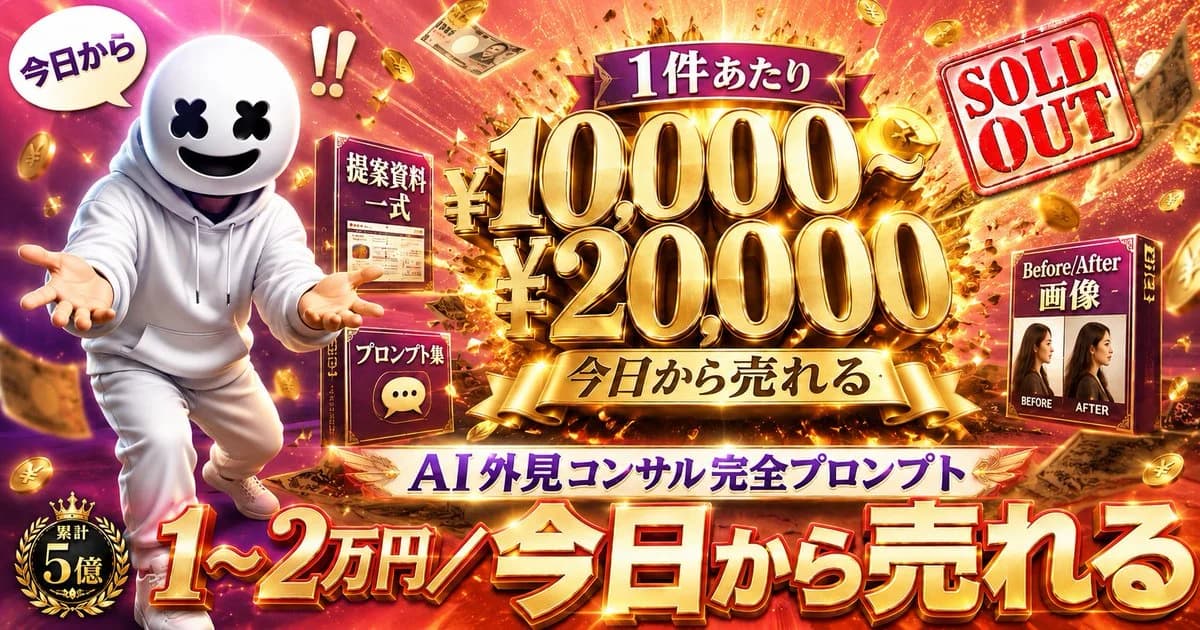
415 wordsGoal: Create a flashy Japanese social-media sales banner advertising an AI appearance-consulting prompt package, designed like a high-converting X/Twitter promo thumbnail.
Canvas: Wide horizontal 16:9 banner, ultra-saturated, glossy, cinematic ad design. Background is an explosive gold-and-magenta money burst with flying yen coins, banknotes, spark trails, confetti, and intense lens flares.
Layout: Left third features a cute mascot character in a white hoodie and white pants, running or leaning forward with both hands extended toward the viewer. The character has a round white helmet-like head, black X-shaped eyes, and a big smiling black mouth, similar to a friendly faceless mascot. Above the mascot is one white speech bubble reading 「今日から」 and a large red exclamation mark pair nearby. Bottom-left has a black-and-gold laurel badge reading 「累計 5億」.
Center: The main focal point is huge 3D metallic-gold typography with dramatic bevels, shadows, and glowing highlights. At the top center, place a purple ribbon label reading 「1件あたり」. Below it, show the main price stack: 「¥10,000〜」 on the first line and 「¥20,000」 on the second line, extremely large and gold. Under the price, add a gold ribbon reading 「今日から売れる」.
Product elements: Include exactly 3 boxed product/package mockups around the center: 1) a dark red box near the left-center labeled 「提案資料 一式」 with a small document preview, 2) a smaller dark red box lower-left of center labeled 「プロンプト集」 with a chat bubble icon, and 3) a dark red box on the right labeled 「Before/After 画像」 showing two female profile photos side by side with small English labels “BEFORE” and “AFTER”.
Right side: Add a tilted red rubber-stamp graphic in the upper-right that says “SOLD OUT” in English, with a transparent white stamp background and distressed texture.
Bottom typography: Across the bottom, use enormous red-to-gold 3D Japanese lettering with white highlights and dark drop shadows reading 「1〜2万円/今日から売れる」. Just above that, on a white-and-gold banner, place purple text reading 「AI 外見コンサル完全プロンプト」.
Visual style: Maximum-impact Japanese internet marketing thumbnail, luxury gold, red, purple, and magenta palette, high contrast, exaggerated 3D text, glowing outlines, sparkle effects, dynamic motion, dense composition, celebratory “money explosion” atmosphere.
Text customization: Use the exact visible Japanese copy unless changed: {argument name="main price text" default="¥10,000〜 ¥20,000"}, {argument name="bottom headline" default="1〜2万円/今日から売れる"}, {argument name="product name" default="AI 外見コンサル完全プロンプト"}, {argument name="top ribbon text" default="1件あたり"}, {argument name="stamp text" default="SOLD OUT"}.
Constraints: Keep all text crisp and readable, preserve the exact count of 3 product boxes, 1 mascot, 1 speech bubble, 1 badge, and 1 sold-out stamp. Do not add extra logos, watermarks, or unrelated characters.About this prompt
Flashy AI Appearance Consulting Sales Banner is a ready-to-use ad creative prompt for GPT Image 2 on Image 2. Copy the 415 words below, paste them into the Create form, and you will get a result close to the preview above. Tweak the Product Ad, Ad Creative, Social Media tag if you want to push it somewhere new.
Use it as a starting point, then adjust the subject, lighting, or composition to suit your idea. The credit cost stays the same whether you use it as written or customize it.
Use case
A strong starting point for Ad Creative
Start here when you want a ad creative image inspired by Flashy AI Appearance Consulting Sales Banner. The prompt already sets the look and composition; replace the subject, product, colors, or scene details to match your project.
Easy places to tweak
- Subject Swap in your person, product, place, or object without changing the overall composition.
- Look and mood Tune the lighting, palette, camera angle, or materials so the image fits your brand.
- Final format Set the aspect ratio, background, text, or layout notes before you generate.
More prompt paths to explore
Find more GPT Image 2 prompts with a similar style, use case, or subject.
How to use it
- Step 1
Copy the prompt
Hit the Copy button above to grab the full text.
- Step 2
Open Image 2 Create
Head to the Create form and paste it in.
- Step 3
Generate
Hit Generate. Your version lands in seconds.
Make it yours
Load the prompt into the Create form with one click, then start tweaking.