Prompt
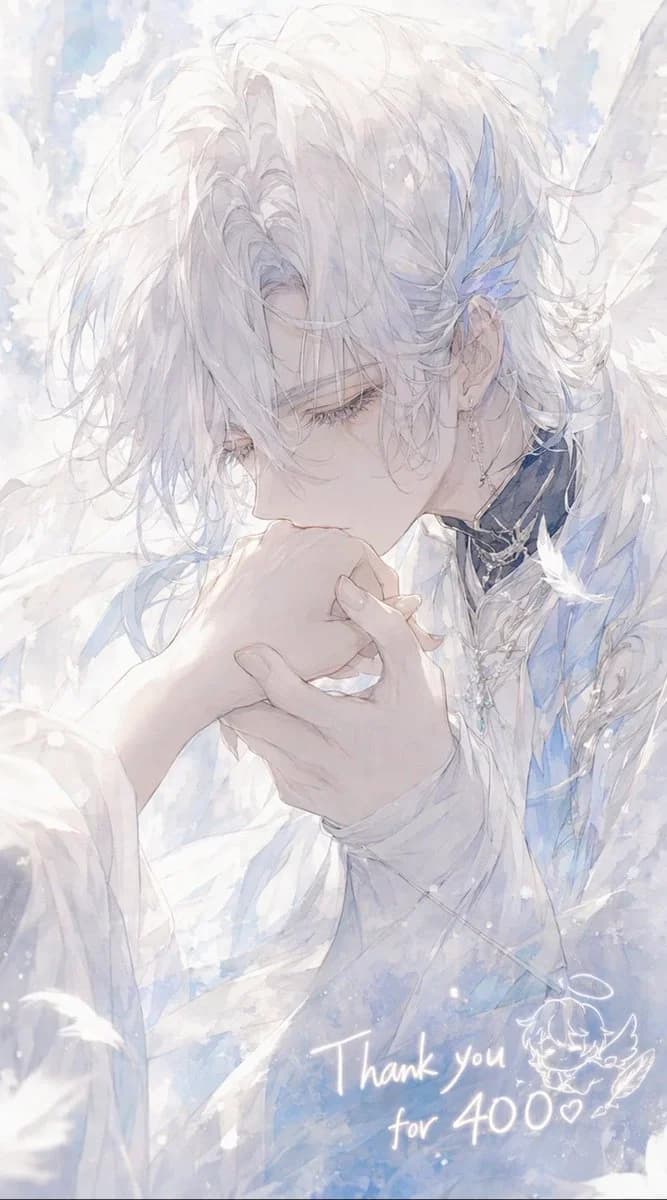
206 wordsCreate a delicate vertical anime-style illustration of {argument name="character name" default="Celestin"}, an ethereal angelic young man with very pale skin and soft, messy {argument name="hair color" default="snow-white"} hair falling over his eyes, shown in close-up three-quarter profile as he gently kisses the back of someone’s hand. His expression is calm, reverent, and slightly melancholic, with long eyelashes and downcast eyes. He wears layered white ceremonial clothing with translucent fabric, pale blue accents, ornate silver jewelry, a dark high collar with metallic trim, dangling earrings, and blue crystal-feather ornaments near one ear. Large soft white wings and drifting feathers surround him, filling the background with a dreamy heavenly atmosphere. Use a luminous watercolor and pencil-sketch aesthetic, very soft pastel whites, icy blues, pearly grays, high-key lighting, airy brush textures, sparkling snow-like particles, and a romantic shoujo manga composition. The foreground hand should be gracefully held in both of his hands as he kisses it, with elegant slender fingers. Add handwritten glowing white text near the lower right reading {argument name="thank you message" default="Thank you for 400♡"}, plus a small cute doodle of a winged chibi face or angel mascot beside it. Canvas should be vertical 9:16, intimate cropped portrait, no hard outlines, no modern objects, no watermark.About this prompt
Ethereal Angel Thank You Illustration is a ready-to-use character design prompt for GPT Image 2 on Image 2. Copy the 206 words below, paste them into the Create form, and you will get a result close to the preview above. Tweak the Portrait, Character, Character Design tag if you want to push it somewhere new.
Use it as a starting point, then adjust the subject, lighting, or composition to suit your idea. The credit cost stays the same whether you use it as written or customize it.
Use case
A strong starting point for Character Design
Start here when you want a character design image inspired by Ethereal Angel Thank You Illustration. The prompt already sets the look and composition; replace the subject, product, colors, or scene details to match your project.
Easy places to tweak
- Subject Swap in your person, product, place, or object without changing the overall composition.
- Look and mood Tune the lighting, palette, camera angle, or materials so the image fits your brand.
- Final format Set the aspect ratio, background, text, or layout notes before you generate.
More prompt paths to explore
Find more GPT Image 2 prompts with a similar style, use case, or subject.
How to use it
- Step 1
Copy the prompt
Hit the Copy button above to grab the full text.
- Step 2
Open Image 2 Create
Head to the Create form and paste it in.
- Step 3
Generate
Hit Generate. Your version lands in seconds.
Make it yours
Load the prompt into the Create form with one click, then start tweaking.