프롬프트
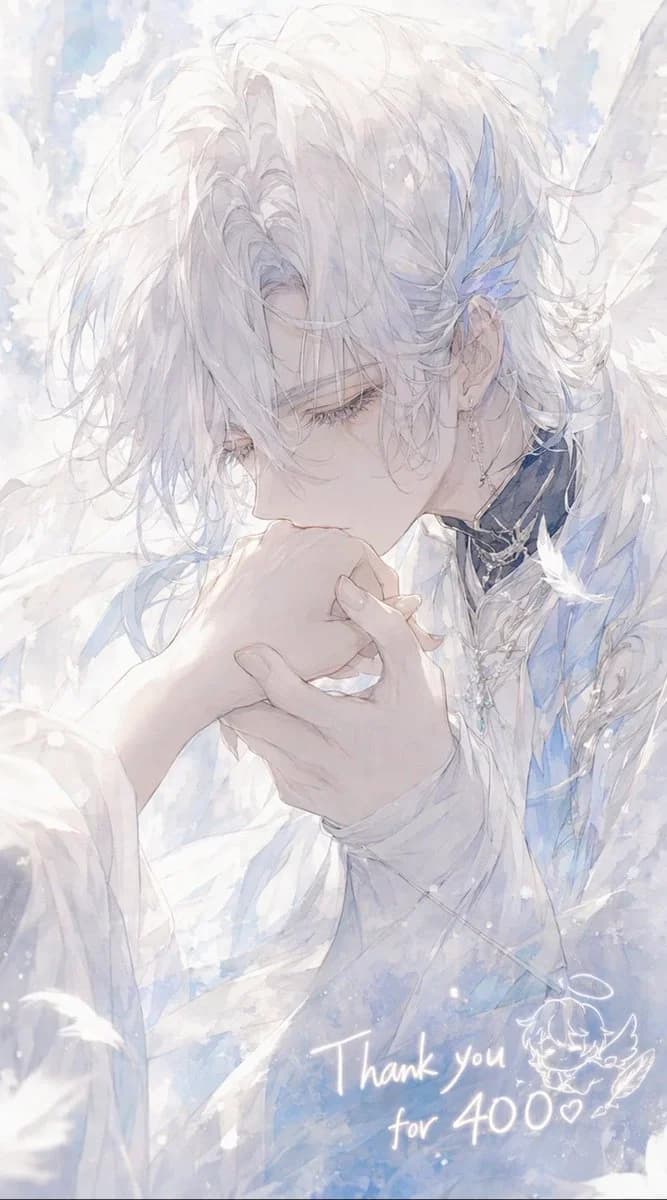
1213자Create a delicate vertical anime-style illustration of {argument name="character name" default="Celestin"}, an ethereal angelic young man with very pale skin and soft, messy {argument name="hair color" default="snow-white"} hair falling over his eyes, shown in close-up three-quarter profile as he gently kisses the back of someone’s hand. His expression is calm, reverent, and slightly melancholic, with long eyelashes and downcast eyes. He wears layered white ceremonial clothing with translucent fabric, pale blue accents, ornate silver jewelry, a dark high collar with metallic trim, dangling earrings, and blue crystal-feather ornaments near one ear. Large soft white wings and drifting feathers surround him, filling the background with a dreamy heavenly atmosphere. Use a luminous watercolor and pencil-sketch aesthetic, very soft pastel whites, icy blues, pearly grays, high-key lighting, airy brush textures, sparkling snow-like particles, and a romantic shoujo manga composition. The foreground hand should be gracefully held in both of his hands as he kisses it, with elegant slender fingers. Add handwritten glowing white text near the lower right reading {argument name="thank you message" default="Thank you for 400♡"}, plus a small cute doodle of a winged chibi face or angel mascot beside it. Canvas should be vertical 9:16, intimate cropped portrait, no hard outlines, no modern objects, no watermark.이 프롬프트 소개
Image 2에서 GPT Image 2에 바로 사용할 수 있는 캐릭터 디자인 프롬프트 ‘천상의 천사 감사 일러스트’입니다. 아래 1213자를 복사해 Create 폼에 붙여 넣으면 위 미리보기와 비슷한 이미지를 만들 수 있습니다. 인물, 캐릭터, 캐릭터 디자인 태그를 조정하면 새로운 방향으로 확장할 수 있습니다.
먼저 그대로 사용해 본 뒤 피사체, 조명, 구도를 작업에 맞게 조정해 보세요. 원문을 그대로 쓰거나 수정해도 생성 비용은 같습니다.
사용 사례
캐릭터 디자인 작업의 좋은 출발점
‘천상의 천사 감사 일러스트’처럼 표현한 캐릭터 디자인 이미지를 만들고 싶다면 이 GPT Image 2 프롬프트로 시작해 보세요. 스타일과 구도는 이미 잡혀 있으므로 인물, 제품, 색상, 장면 요소만 작업에 맞게 바꾸면 됩니다.
먼저 손보기 좋은 부분
- 피사체 인물, 제품, 장소, 오브젝트를 내 내용으로 바꾸고 전체 구도는 유지합니다.
- 분위기 조명, 색감, 카메라 각도, 소재 디테일을 브랜드나 용도에 맞춥니다.
- 결과 형식 생성 전에 비율, 배경, 텍스트, 레이아웃 지시를 정리합니다.
비슷한 프롬프트 더 보기
스타일, 용도, 피사체가 가까운 GPT Image 2 프롬프트를 이어서 확인해 보세요.
사용 방법
- 1단계
프롬프트 복사
위의 복사 버튼을 눌러 전체 텍스트를 가져옵니다.
- 2단계
Image 2 Create 열기
Create 폼으로 이동해 붙여 넣습니다.
- 3단계
생성
Generate를 누르면 몇 초 안에 내 버전이 완성됩니다.
내 버전으로 만들기
한 번의 클릭으로 Create 폼에 불러오고 바로 조정하세요.