Prompt
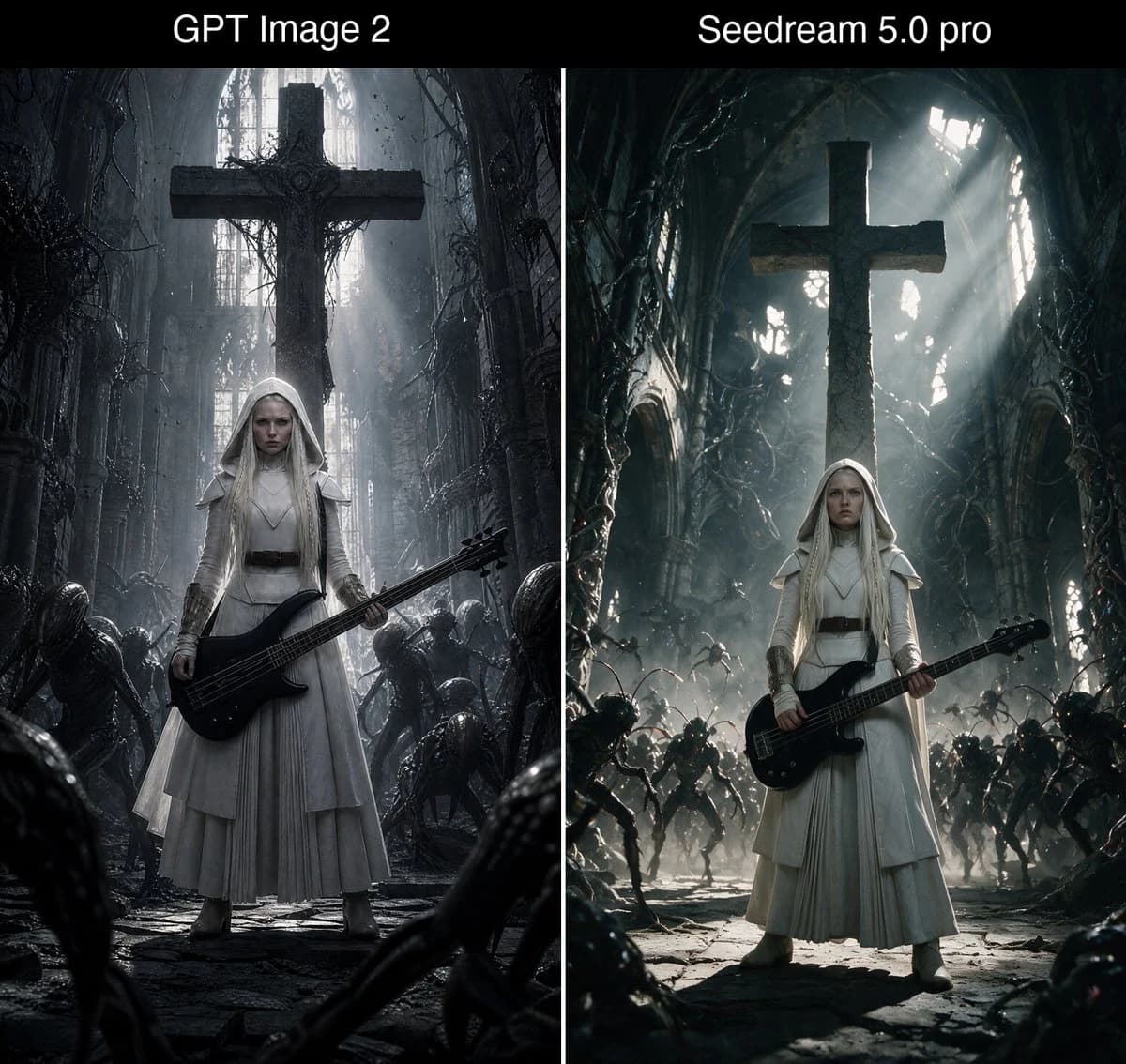
478 wordsGoal: Create a square side-by-side comparison image showing two dark fantasy generations of the same concept: a white-clad gothic nun holding a black bass guitar inside a ruined cathedral, with a black title bar across the top.
Canvas: Square 1:1 image, split into exactly 2 equal vertical panels separated by a thin white divider line. Add a black header band across the full width at the top.
Top text: Place exactly 2 white sans-serif labels in the header band: left label “{argument name="left model label" default="GPT Image 2"}” centered over the left panel, right label “{argument name="right model label" default="Seedream 5.0 pro"}” centered over the right panel. Use large clean white text, no other typography.
Left panel: A clean cinematic hero shot. Center exactly 1 young pale gothic nun with long platinum-blonde hair under a white hooded veil, stern expression, wearing layered white robes with a dark belt and subtle armor-like shoulder pieces. She stands full body, facing forward, holding exactly 1 glossy black electric bass guitar diagonally across her waist. Behind her is exactly 1 enormous dark stone cross suspended or mounted high in the ruined cathedral. The cathedral is narrow, gray, decayed, filled with vines, broken arches, dust, mist, and cold shafts of light from tall windows. Around her are exactly 6 visible crouching alien/demon silhouettes: 2 near the left foreground/midground, 2 near the right midground, and 2 partially visible in the lower foreground edges. Mood is restrained, flat, scanned-film, monochrome gray, clean composition, strong centered symmetry.
Right panel: A more dramatic action-horror version of the same scene. Center exactly 1 young pale gothic nun with long platinum-blonde hair under a white hooded veil, wearing white robes and a dark belt, holding exactly 1 black electric bass guitar across her waist. Behind her is exactly 1 enormous dark stone cross, backlit by intense god rays pouring through broken cathedral windows. The ruined cathedral is wider, deeper, more chaotic, with twisted organic vines, arched walls, rubble, smoky haze, and high-contrast teal-gray lighting. Include exactly 14 visible demon/alien figures: 5 on the left side, 5 on the right side, 2 in the center background, and 2 partial foreground creatures at the bottom corners. They should appear as a menacing swarm approaching the nun. Mood is dread-filled, dynamic, cinematic, with stronger rim light and volumetric beams.
Visual style: Dark fantasy gothic realism, ultra-detailed but not glossy, cold desaturated palette of black, charcoal, bone white, silver gray, and faint blue-green. The nun’s white outfit must remain the brightest subject in both panels. Use dramatic cathedral scale, wet stone floor texture, dust particles, and horror atmosphere.
Constraints: Keep the image as a comparison diptych, not two separate files. Include exactly 2 panels, exactly 2 top labels, exactly 2 nuns total, exactly 2 bass guitars total, and exactly 2 large crosses total. No watermark, no extra captions, no logos, no additional text.About this prompt
Bass Nun Model Comparison is a ready-to-use comparison prompt for GPT Image 2 on Image 2. Copy the 478 words below, paste them into the Create form, and you will get a result close to the preview above. Tweak the Comparison, Storyboard, Product tag if you want to push it somewhere new.
Use it as a starting point, then adjust the subject, lighting, or composition to suit your idea. The credit cost stays the same whether you use it as written or customize it.
Use case
A strong starting point for Comparison
Start here when you want a comparison image inspired by Bass Nun Model Comparison. The prompt already sets the look and composition; replace the subject, product, colors, or scene details to match your project.
Easy places to tweak
- Subject Swap in your person, product, place, or object without changing the overall composition.
- Look and mood Tune the lighting, palette, camera angle, or materials so the image fits your brand.
- Final format Set the aspect ratio, background, text, or layout notes before you generate.
More prompt paths to explore
Find more GPT Image 2 prompts with a similar style, use case, or subject.
How to use it
- Step 1
Copy the prompt
Hit the Copy button above to grab the full text.
- Step 2
Open Image 2 Create
Head to the Create form and paste it in.
- Step 3
Generate
Hit Generate. Your version lands in seconds.
Make it yours
Load the prompt into the Create form with one click, then start tweaking.