Prompt
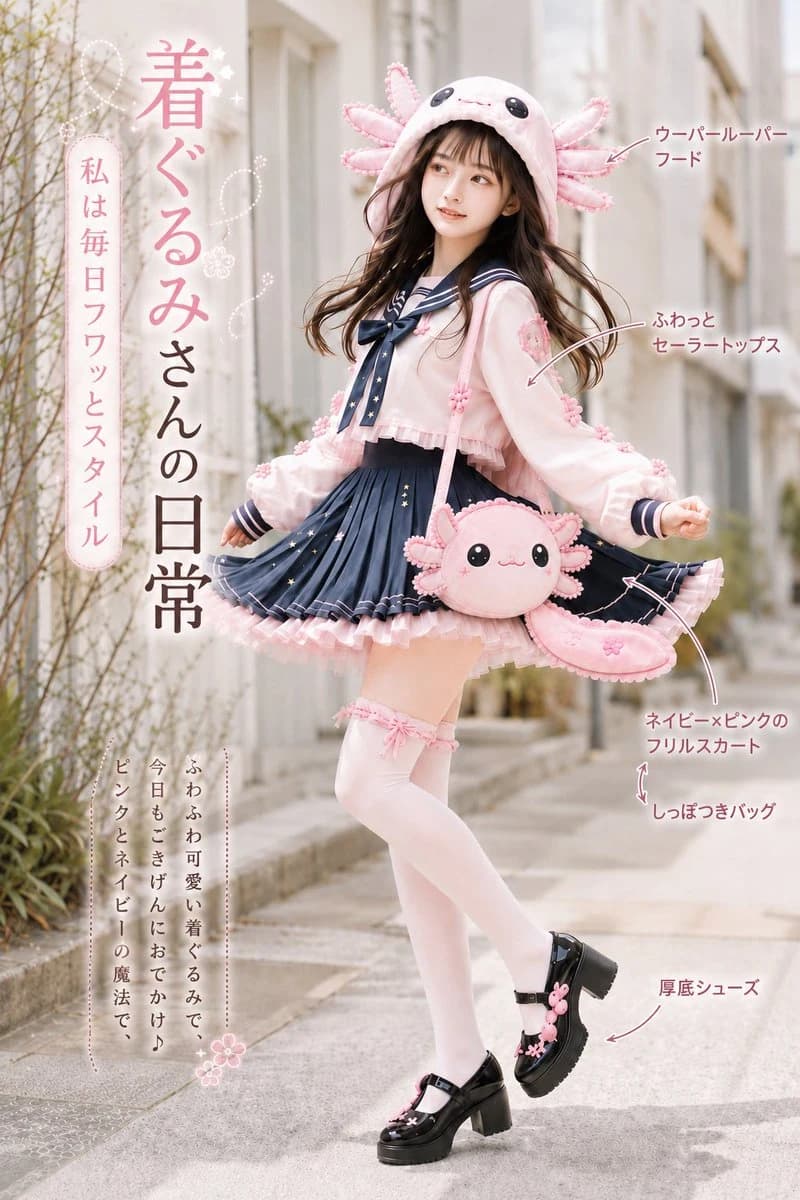
359 wordsGoal: Create a vertical Japanese kawaii fashion magazine poster featuring a full-body young woman modeling an axolotl-inspired "kigurumi daily outfit" on a softly blurred residential sidewalk.
Canvas: Portrait 2:3 composition, airy pastel editorial style, bright natural daylight, shallow depth of field, soft beige city street background with plants and apartment walls. Keep the subject centered slightly right, full body visible from hood to shoes.
Subject details: A cute young woman with long flowing dark brown hair and bangs, fair skin, soft makeup, gentle expression, looking slightly up and to the side while twirling. She wears a pink axolotl hood with black button-like eyes and six fluffy gill fronds, a pale pink cropped sailor-style top with navy sailor collar and bow, oversized puffy sleeves, a navy pleated mini skirt with pink frills and tiny star details, white thigh-high socks with pink garter bows, and chunky black platform Mary Jane shoes decorated with small pink flower charms. Add a round pink axolotl shoulder bag with a smiling face and a long curved tail-shaped pouch hanging at her hip.
Counted fashion callouts: Include exactly 5 arrow callouts on the right side pointing to these items: 1) axolotl hood, 2) fluffy sailor top, 3) navy-and-pink frill skirt, 4) tail-shaped bag, 5) thick-soled shoes. Use thin hand-drawn pink arrows and small rounded Japanese annotation text.
Text content: Large vertical Japanese title on the left reading {argument name="main vertical title" default="着ぐるみさんの日常"}. A small rounded vertical sidebar label on the far left reading {argument name="sidebar slogan" default="私は毎日フワッとスタイル"}. Bottom-left vertical caption in a delicate dotted frame reading {argument name="bottom caption" default="ふわふわ可愛い着ぐるみで、今日もごきげんにおでかけ♪ ピンクとネイビーの魔法で、"}. Right-side callout text should read {argument name="callout labels" default="ウーパールーパーフード|ふわっとセーラートップス|ネイビー×ピンクのフリルスカート|しっぽつきバッグ|厚底シューズ"}. Add small white sparkle doodles, dotted loops, and tiny flower icons around the title area.
Visual style: Photorealistic fashion editorial mixed with cute Japanese magazine graphic design, pastel pink and navy color palette, soft glow, clean typography, delicate decorative strokes, high detail fabric texture, whimsical but stylish rather than overly costume-like.
Constraints: Exactly one model, exactly one axolotl hood, exactly one round axolotl purse, exactly one tail-shaped pouch, exactly 5 labeled arrow callouts. No extra people, no watermark, no logo, no English text in the poster.About this prompt
Axolotl Kigurumi Fashion Poster is a ready-to-use social media prompt for GPT Image 2 on Image 2. Copy the 359 words below, paste them into the Create form, and you will get a result close to the preview above. Tweak the Social Media, Infographic, Product tag if you want to push it somewhere new.
Use it as a starting point, then adjust the subject, lighting, or composition to suit your idea. The credit cost stays the same whether you use it as written or customize it.
Use case
A strong starting point for Social Media
Start here when you want a social media image inspired by Axolotl Kigurumi Fashion Poster. The prompt already sets the look and composition; replace the subject, product, colors, or scene details to match your project.
Easy places to tweak
- Subject Swap in your person, product, place, or object without changing the overall composition.
- Look and mood Tune the lighting, palette, camera angle, or materials so the image fits your brand.
- Final format Set the aspect ratio, background, text, or layout notes before you generate.
More prompt paths to explore
Find more GPT Image 2 prompts with a similar style, use case, or subject.
How to use it
- Step 1
Copy the prompt
Hit the Copy button above to grab the full text.
- Step 2
Open Image 2 Create
Head to the Create form and paste it in.
- Step 3
Generate
Hit Generate. Your version lands in seconds.
Make it yours
Load the prompt into the Create form with one click, then start tweaking.