Prompt
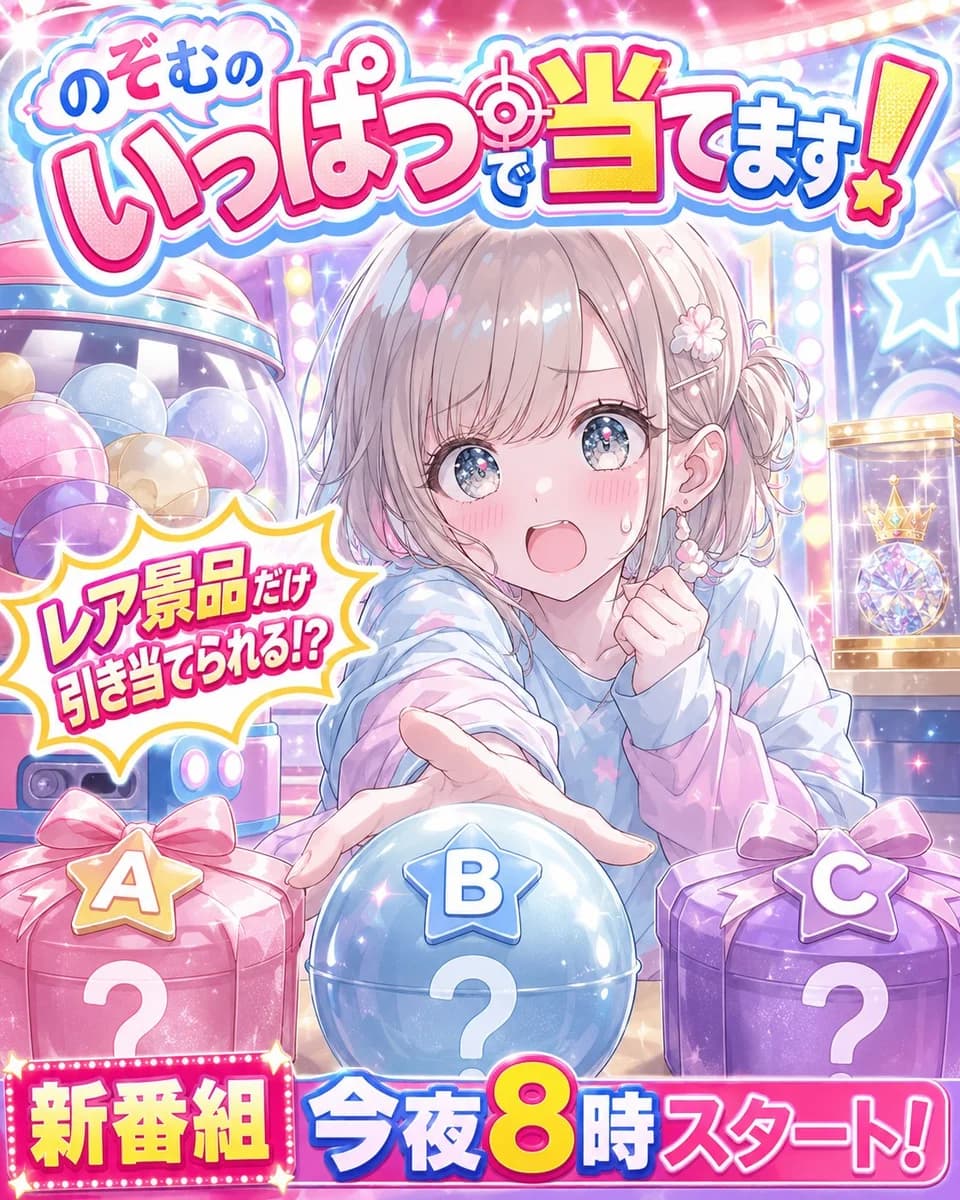
392 wordsGoal: Create a bright Japanese anime TV variety-show poster for a fictional character-led prize guessing program, packed with colorful game-show energy and readable Japanese title typography.
Canvas: Vertical 4:5 poster, glossy high-saturation idol-variety-show design, no borders, full-bleed background. Use sparkling lights, lens flares, confetti-like glints, pastel pink, cyan, purple, and yellow.
Main subject: Center a cute anime girl, {argument name="character name" default="Nozomu"}, shown from the waist up behind a table of prizes. She has soft ash-blonde/light brown bobbed hair with side bun braids, flower hair clips, pale skin, large sparkling blue eyes, rosy cheeks, and a surprised excited open-mouth expression with one sweat drop. She wears a loose pastel hoodie in blue, lavender, and pink with subtle star patterns. Pose her leaning forward, one hand reaching toward the viewer over the center prize ball, the other hand held near her chest.
Layout: Place a huge bubbly Japanese logo across the top reading 「のぞむの いっぱいで当てます!」 with thick white outline, cyan drop shadow, hot-pink main lettering, yellow accent on 「当」, and a target icon inside the title. Behind the character, show a colorful arcade/game-show set with illuminated marquee bulbs, star signs, a capsule-toy machine filled with pastel balls on the left, and a glass display case on the right containing a jeweled crown and crystal prize.
Foreground objects: Include exactly 3 mystery prize containers lined up along the bottom: left is a pink wrapped gift box labeled “A” with a large white question mark, center is a glossy blue spherical capsule labeled “B” with a large white question mark, right is a purple wrapped gift box labeled “C” with a large white question mark. Each label should be a star-shaped badge above the container.
Text elements: Add a comic burst speech bubble on the left side reading 「レア景品だけ 引き当てられる!?」 in bold hot-pink Japanese text with yellow outline. Add a bottom broadcast banner: left marquee block reading 「新番組」 in yellow on pink lights, and large text across the bottom reading 「今夜8時スタート!」 with the number 8 oversized in yellow/orange, blue and pink supporting text, white outlines, and strong drop shadows.
Visual style: Polished modern anime illustration, glossy promotional key visual, cute idol TV-show aesthetic, extremely sparkly, soft gradients, rim lighting, clean line art, detailed eyes, high contrast and high readability. Keep all visible text in Japanese exactly as specified. Avoid extra logos, watermarks, or unrelated characters.About this prompt
Anime Prize Variety Show Poster is a ready-to-use social media prompt for GPT Image 2 on Image 2. Copy the 392 words below, paste them into the Create form, and you will get a result close to the preview above. Tweak the Social Media, Infographic, Product tag if you want to push it somewhere new.
Use it as a starting point, then adjust the subject, lighting, or composition to suit your idea. The credit cost stays the same whether you use it as written or customize it.
Use case
A strong starting point for Social Media
Start here when you want a social media image inspired by Anime Prize Variety Show Poster. The prompt already sets the look and composition; replace the subject, product, colors, or scene details to match your project.
Easy places to tweak
- Subject Swap in your person, product, place, or object without changing the overall composition.
- Look and mood Tune the lighting, palette, camera angle, or materials so the image fits your brand.
- Final format Set the aspect ratio, background, text, or layout notes before you generate.
More prompt paths to explore
Find more GPT Image 2 prompts with a similar style, use case, or subject.
How to use it
- Step 1
Copy the prompt
Hit the Copy button above to grab the full text.
- Step 2
Open Image 2 Create
Head to the Create form and paste it in.
- Step 3
Generate
Hit Generate. Your version lands in seconds.
Make it yours
Load the prompt into the Create form with one click, then start tweaking.