Prompt
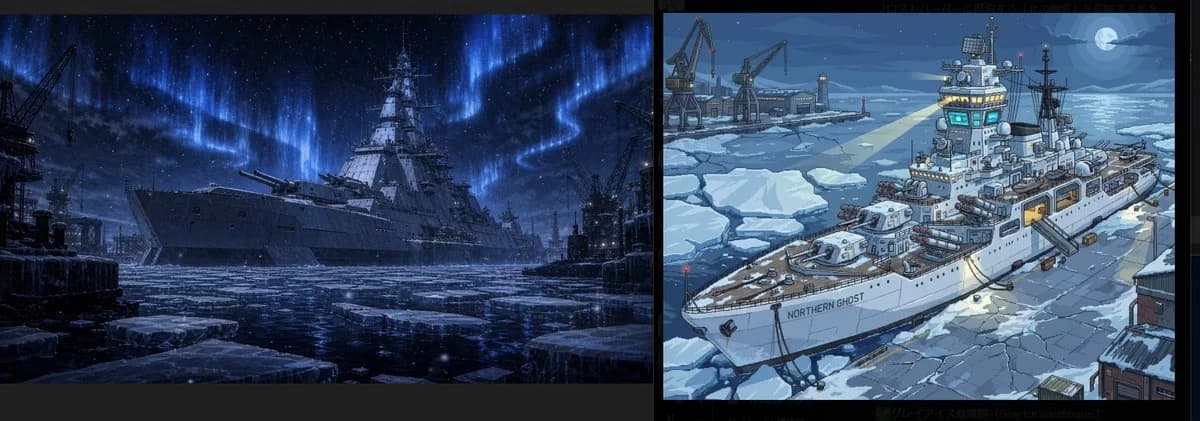
462 wordsGoal: Create a wide two-panel comparison image of an arctic warship harbor at night, separated by a thick vertical black divider, with subtle black margins around the whole composition.
Canvas: Ultra-wide horizontal canvas, about 3:1 aspect ratio. Split the image into exactly 2 equal rectangular panels: the left panel is dark, cinematic, realistic concept art; the right panel is brighter, stylized, clean anime/cartoon concept art.
Left panel: Show exactly 1 massive futuristic battleship moored in an icy industrial harbor, viewed from a low front-left angle. The ship is dark gray, imposing, with a tall central superstructure, radar masts, antennas, and large forward naval guns. The water is almost frozen, with broken ice floes in the foreground and reflections on the black-blue surface. Include exactly 3 visible harbor cranes as dark silhouettes: 1 large crane on the far left, 1 crane near the right edge, and 1 smaller industrial crane behind the ship. Add distant dock structures, piers, and faint city/port lights. The sky is deep midnight blue with stars and a dramatic blue aurora borealis sweeping vertically and horizontally behind the ship. Mood: cold, ominous, militaristic, high-detail sci-fi realism.
Right panel: Show exactly 1 white icebreaking patrol warship in a frozen harbor, viewed from a high three-quarter front-left angle. Paint it in a crisp illustrated style with clean outlines, cel-shaded colors, and detailed ship equipment. The ship name on the hull must read {argument name="ship name" default="NORTHERN GHOST"}. The ship has a tall bridge with glowing cyan windows, radar domes, antennas, mast equipment, side lifeboats, deck guns, missile pods, railings, hatches, and warm yellow-lit interior openings. It is surrounded by cracked ice sheets and snow-covered docks. Include exactly 3 visible harbor cranes in the background on the left side, plus small warehouses and pier lights. Add a full moon in the upper-right sky with moonlight reflected on the icy sea. Mood: adventurous, cute but technical, blue winter palette, clean worldbuilding illustration.
Style contrast: The left panel should feel like {argument name="left panel style" default="dark realistic cinematic naval sci-fi concept art"}; the right panel should feel like {argument name="right panel style" default="bright anime-style arctic ship illustration"}. Keep both panels depicting the same basic subject, {argument name="subject" default="an advanced arctic warship in a frozen naval port"}, but with clearly different rendering styles.
Color and lighting: Use a cold palette of navy, steel gray, icy blue, and white. Left panel lighting is low-key and dramatic, dominated by blue aurora glow. Right panel lighting is clearer and more readable, with moonlight, cyan bridge lights, and warm yellow accents.
Constraints: Include no people, no captions other than the hull text, no logos, no watermark. Maintain exactly 2 panels and exactly 1 primary ship per panel. Emphasize frozen water, broken ice floes, industrial harbor machinery, and night atmosphere.About this prompt
Arctic Warship Style Comparison is a ready-to-use comparison prompt for GPT Image 2 on Image 2. Copy the 462 words below, paste them into the Create form, and you will get a result close to the preview above. Tweak the Comparison, Storyboard, Architecture tag if you want to push it somewhere new.
Use it as a starting point, then adjust the subject, lighting, or composition to suit your idea. The credit cost stays the same whether you use it as written or customize it.
Use case
A strong starting point for Comparison
Start here when you want a comparison image inspired by Arctic Warship Style Comparison. The prompt already sets the look and composition; replace the subject, product, colors, or scene details to match your project.
Easy places to tweak
- Subject Swap in your person, product, place, or object without changing the overall composition.
- Look and mood Tune the lighting, palette, camera angle, or materials so the image fits your brand.
- Final format Set the aspect ratio, background, text, or layout notes before you generate.
More prompt paths to explore
Find more GPT Image 2 prompts with a similar style, use case, or subject.
How to use it
- Step 1
Copy the prompt
Hit the Copy button above to grab the full text.
- Step 2
Open Image 2 Create
Head to the Create form and paste it in.
- Step 3
Generate
Hit Generate. Your version lands in seconds.
Make it yours
Load the prompt into the Create form with one click, then start tweaking.