Prompt
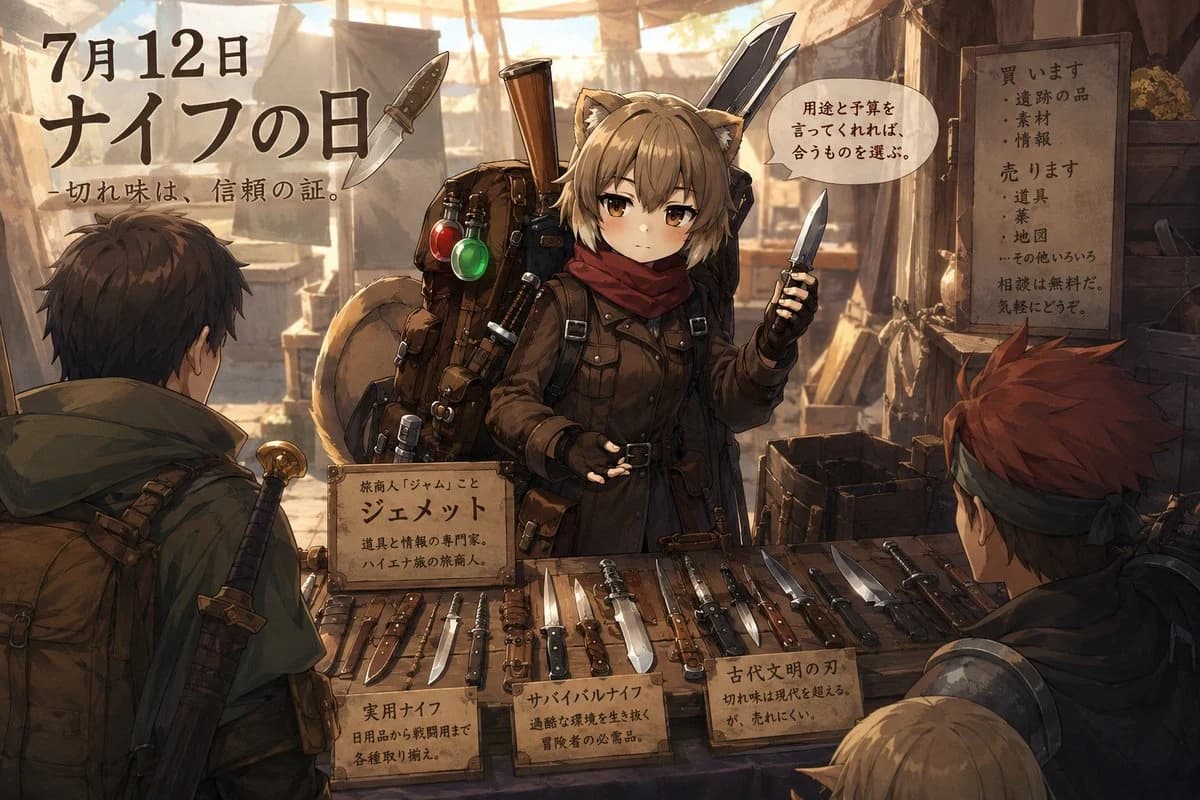
458 wordsGoal: Create a richly detailed anime fantasy marketplace scene celebrating {argument name="headline text" default="Knife Day"} with Japanese poster-style typography and a knife merchant stall.
Canvas: Wide 16:9 illustration, warm cinematic lighting, high-detail painterly anime style, dusty outdoor bazaar under beige cloth awnings, sunbeams and haze in the background, earthy browns, ochres, leather, wood, and muted metal highlights.
Layout: The central focus is a young cat-eared female merchant standing behind a wooden counter full of knives. Place large Japanese event text in the upper left, a speech bubble near the merchant’s head, a wooden shop sign on the right wall, a nameplate sign on the front of the stall, and three small product-description placards along the counter. Two customers are seen from behind in the foreground left and right, with a partial third blond head at the bottom right edge.
Subject details: The merchant is {argument name="character name" default="Jeannette"}, a small serious-looking beastkin/anime girl with fluffy tan cat ears, short messy ash-blond hair, amber eyes, and a calm businesslike expression. She wears a dark brown adventurer coat with belts and straps, black gloves, and a deep red scarf. She holds a small knife upright in her right hand and gestures with her left palm open. Behind her is an oversized traveler’s backpack packed with tools, sheathed blades, rolled gear, red and green glass flasks, and a large sword or blade rising over her shoulder.
Foreground customers: Include exactly 3 visible customers: 1 dark-haired male adventurer on the left with a green cloak, backpack, and sword hilt over his shoulder; 1 red-haired male adventurer on the right with a dark headband and armor visible from behind; 1 partial blond-haired person at the lower right edge, only the head and shoulder visible.
Knife display: Show exactly 18 distinct knives/blades laid out across the front counter, varying in size and type: practical utility knives, hunting knives, survival knives, daggers, folding knives, a cleaver-like blade, and several ancient-style blades. They should rest on leather rolls and wooden boards, with realistic metal reflections and worn handles.
Text content: Use visible Japanese calligraphy/handwritten signage. Upper left main text should read “7月12日” and “ナイフの日”, with the subtitle “切れ味は、信頼の証。” A speech bubble near the merchant should read “用途と予算を言ってくれれば、合うものを選ぶ。” The central nameplate should introduce the merchant, reading “旅商人「ジャム」こと ジェメット 道具と情報の専門家。ハイエナ族の旅商人。” On the right wooden shop board, include two sections: “買います” with “遺跡の品・素材・情報”, and “売ります” with “道具・薬・地図・その他いろいろ”, ending with “相談は無料だ。気軽にどうぞ。” Product placards on the counter must be exactly 3: left “実用ナイフ 日用品から戦闘用まで 各種取り揃え。” center “サバイバルナイフ 過酷な環境を生き抜く 冒険者の必需品。” right “古代文明の刃 切れ味は現代を超える。が、売れにくい。”
Visual style: Detailed Japanese light-novel/anime illustration, semi-realistic props, sharp linework with painterly shading, warm backlight, soft atmospheric depth, believable clutter, parchment signage, no modern objects. Keep the composition readable like an event poster while preserving the lively market-stall narrative.About this prompt
Anime Knife Day Merchant Stall is a ready-to-use storyboard prompt for GPT Image 2 on Image 2. Copy the 458 words below, paste them into the Create form, and you will get a result close to the preview above. Tweak the Comic, Storyboard, Product tag if you want to push it somewhere new.
Use it as a starting point, then adjust the subject, lighting, or composition to suit your idea. The credit cost stays the same whether you use it as written or customize it.
Use case
A strong starting point for Storyboard
Start here when you want a storyboard image inspired by Anime Knife Day Merchant Stall. The prompt already sets the look and composition; replace the subject, product, colors, or scene details to match your project.
Easy places to tweak
- Subject Swap in your person, product, place, or object without changing the overall composition.
- Look and mood Tune the lighting, palette, camera angle, or materials so the image fits your brand.
- Final format Set the aspect ratio, background, text, or layout notes before you generate.
More prompt paths to explore
Find more GPT Image 2 prompts with a similar style, use case, or subject.
How to use it
- Step 1
Copy the prompt
Hit the Copy button above to grab the full text.
- Step 2
Open Image 2 Create
Head to the Create form and paste it in.
- Step 3
Generate
Hit Generate. Your version lands in seconds.
Make it yours
Load the prompt into the Create form with one click, then start tweaking.